

Blog
Agentforce MuleSoft Connector: Enabling AI-Driven Enterprise Integrations
- April 30, 2026
- Valluru Chenna Aswini
Introduction: From AI Insight to Real-World Action
Enterprises are rapidly adopting AI—not just for insights, but for decision-making and execution.
However, a gap still exists:
AI can decide, but systems still need to act.
Salesforce Agentforce AI agents bring intelligent reasoning into enterprise workflows and modern enterprise AI automation systems.
But without integration, their impact remains limited.
This is where the Agentforce MuleSoft Connector becomes critical API-led connectivity and AI-powered workflow automation.
It bridges:
- AI-driven decision-making
- Enterprise systems and APIs
Enabling organisations to move from AI insights → real-time actions.
What is Agentforce MuleSoft Connector?
The Agentforce Mulesoft Connector allows MuleSoft applications to integrate directly with AI agents running in Salesforce Agentforce enabling real-time enterprise data exchange and AI agent orchestration. It enables developers to:
- Connect MuleSoft flows with AI agents
- Exchange messages with agents in real-time
- Trigger workflows based on AI responses
- Extend AI capabilities beyond Salesforce and integrate with external systems using Mulesoft APIs.
In simple terms, it acts as a communication layer between MuleSoft APIs and AI agents, supporting bidirectional communication and intelligent automation.
Why This Matters
Traditional integrations are rule-based.
AI-driven integrations are:
- Context-aware
- Dynamic
- Decision-driven
The connector allows enterprises to:
- Combine AI reasoning with API execution
- Build intelligent workflows
- Automate decisions across systems using AI-driven integration patterns
According to MuleSoft, this connector helps organizations “connect external systems with Agentforce agents”, enabling automation and intelligent workflows across platforms
Key Features
1. Simplified Authentication
Secure connection with Salesforce using connected app credentials and OAuth-based authentication.
2. Agent Discovery
Identify and connect with available AI agents within Agentforce and manage agent-ready APIs.
3. Session-Based Communication
Maintain conversational context across interactions using session ID tracking for AI agents.
4. Enterprise Integration Ready
Seamlessly connects with backend systems via MuleSoft APIs and supports API governance and secure integration.
Installing the Agentforce Connector
Since the connector is not available in Anypoint Exchange, it must be added manually.
Step 1: Add Maven Dependency
Add the following dependency to your pom.xml:
<dependency>
<groupId>com.mulesoft.connectors</groupId>
<artifactId>mule4-agentforce-connector</artifactId>
<version>1.2.0</version>
<classifier>mule-plugin</classifier>
</dependency>
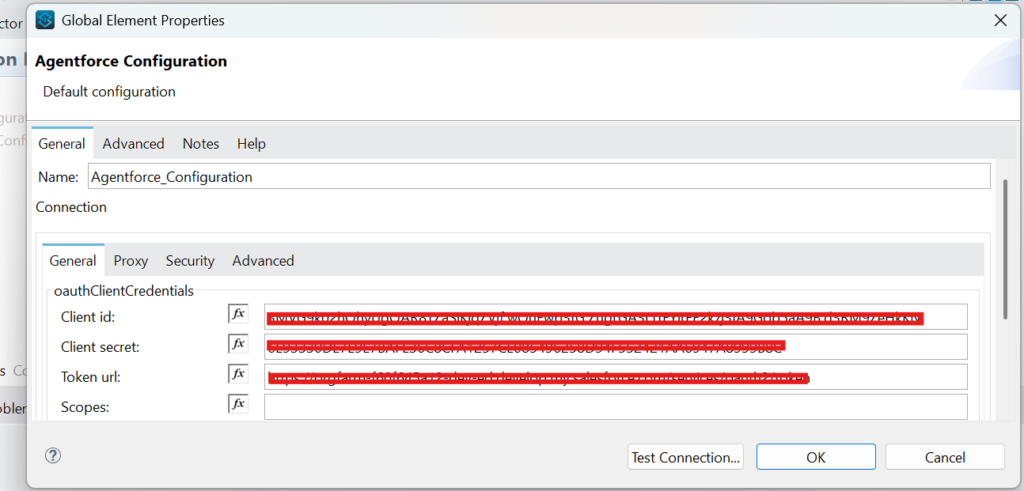
Step2: Connector configuration
Adding Credentials to Connector Configuration
Enter the data in the dedicated fields:
- Salesforce Org: Enter the name of your Salesforce org. For example, from the URL https://agentforce-111-231-222-demo.my.salesforce.com/, the org name is agentforce-111-231-222-demo.my.salesforce.com.
- Client ID: Enter the consumer key from your connected app.
- Client Secret: Enter the consumer secret from your connected app
(This setup enables secure Salesforce integration using connected apps and client credentials flow)
Supported Operations (Core Capabilities)
The Agentforce Mulesoft connector provides a set of core operations to manage AI agent interactions and AI-powered API orchestration.
1. Start Agent Conversation
- Initiates communication between MuleSoft and the AI agent
- Creates a session for interaction
This is the entry point for any AI-driven workflow automation system.
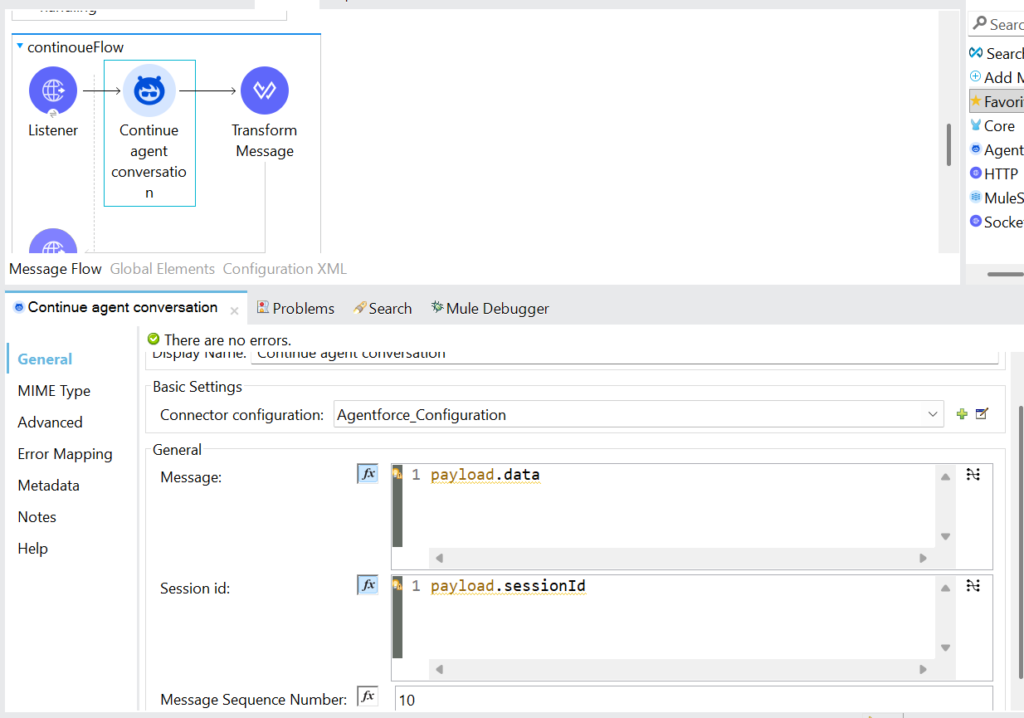
2. Continue Agent Conversation
- Sends messages to the agent within an active session
- Maintains conversation context
- Supports multi-step AI interactions and contextual automation
- Example:
- User query → MuleSoft → Agentforce → AI response → MuleSoft → User
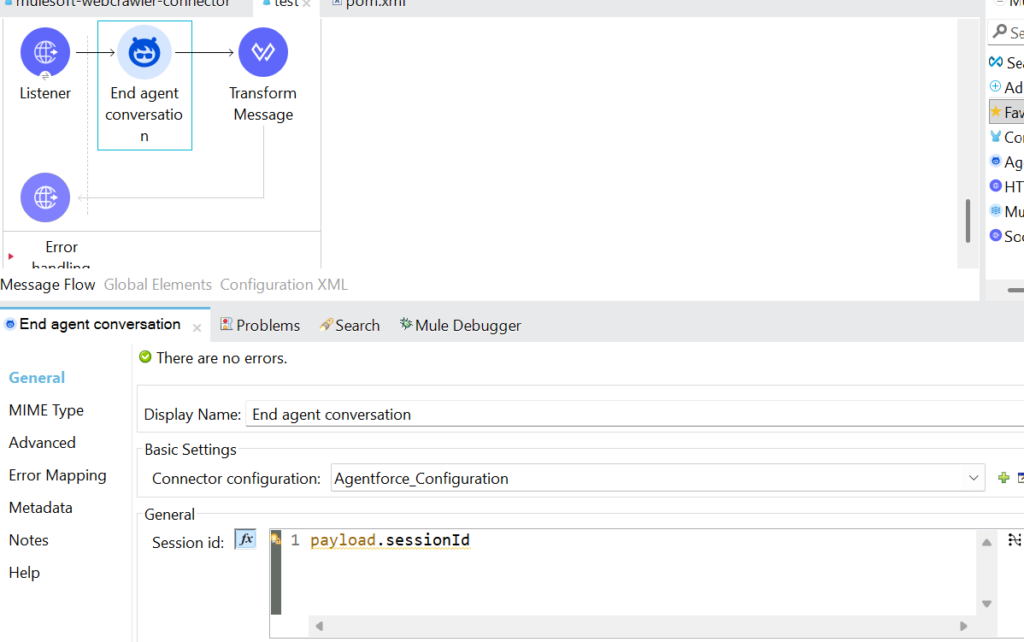
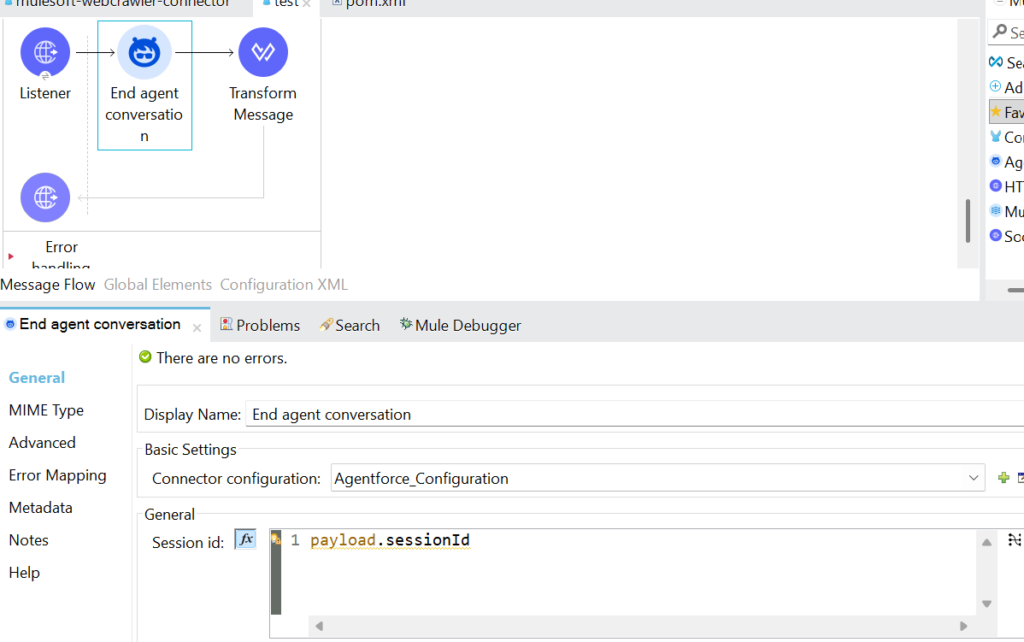
3. End Agent Conversation
- Terminates the session once interaction is complete
- Frees resources and closes context
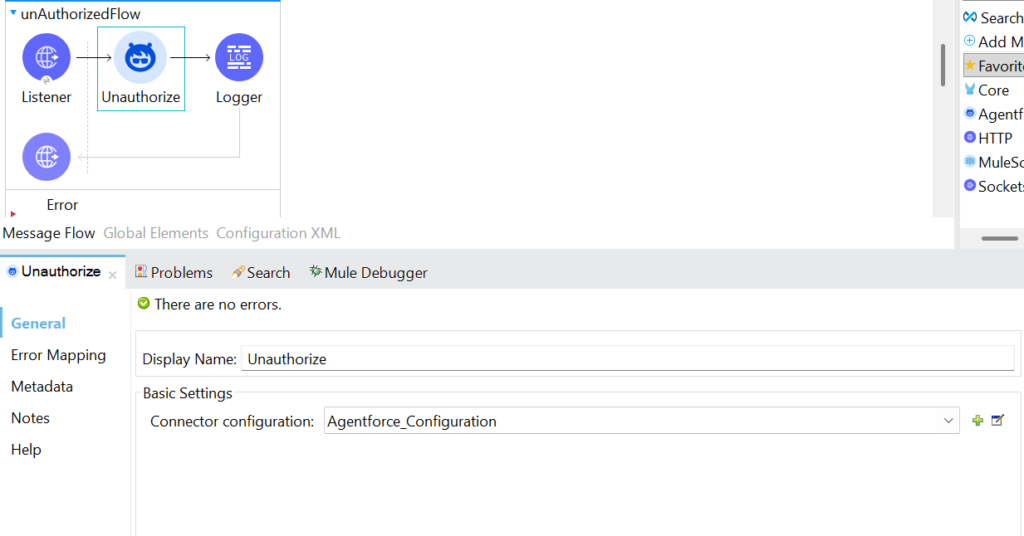
4. Unauthorize
- Disconnects authentication from Salesforce
- Ensures secure session handling
Real-Time Use Cases
1. Intelligent Customer Support
- AI agent handles queries
- MuleSoft fetches data from backend systems
- Response delivered in real time using AI-powered customer support automation
2. Order Processing Automation
- AI agent interprets request
- MuleSoft triggers APIs (ERP, OMS)
- Updates order status automatically using enterprise system integration
3. Data-Driven Decision Making
- AI agent analyzes input
- MuleSoft retrieves enterprise data
- Provides actionable insights using real-time data orchestration
4. Workflow Automation
- AI agent decides next action
- MuleSoft executes integration flows using intelligent workflow automation systems
Why Use Agentforce with MuleSoft?
Unified AI + Integration Platform
- Combine AI intelligence + API connectivity
Real-Time Actions Across Systems
- Not just insights — AI can act across external enterprise systems
Low-Code Development
- Build intelligent workflows with minimal coding using Anypoint Platform tools
Secure & Governed
- Enterprise-grade security and compliance and API governance frameworks
MuleSoft enables Agentforce to “take action across systems and workflows”, unlocking full AI potential.
Future Scope
AI-driven integration is evolving rapidly:
- Multi-agent orchestration
- Deeper LLM integrations
- Autonomous workflow execution
The Agentforce Connector is a foundational building block in this ecosystem of AI agent-based enterprise automation.
Conclusion: From Integration to AI-Orchestrated Systems
The Agentforce MuleSoft Connector represents a shift:
From:
- Static, rule-based integrations
To:
- Dynamic, AI-driven orchestration
It enables organizations to build:
- Intelligent workflows
- Automated decision systems
- Real-time AI-powered applications
This is no longer just integration—it is AI-powered execution across the enterprise using MuleSoft APIs.
How Prowess Software Services Helps
At Prowess Software Services, we help enterprises:
- Integrate AI with enterprise systems
- Build Agentforce + MuleSoft architectures
- Enable real-time, intelligent workflows
We focus on delivering context-driven integration platforms where:
- APIs connect systems
- Data powers context
- AI drives decisions

Author: Valluru Chenna Aswini
Frequently Asked Questions
Agentforce MuleSoft Connector is an integration component that connects MuleSoft applications with Salesforce Agentforce AI agents for real-time communication and automation.
It integrates through the Agentforce connector, allowing MuleSoft flows to start, continue, and manage conversations with AI agents.
Key features include authentication, agent discovery, session-based communication, and enterprise system integration.
It supports starting conversations, continuing sessions, ending conversations, and unauthorizing connections.
Session-based communication maintains conversation context between MuleSoft and AI agents, enabling intelligent multi-step interactions.
- Intelligent customer support
- Order processing automation
- Workflow automation
- Data-driven decision-making
Because MuleSoft enables AI agents to take real-time actions across enterprise systems, not just provide insights.
No, it must be added manually using a Maven dependency.
It uses Salesforce connected app credentials, including Client ID and Client Secret.
Agentforce adds AI-driven decision-making to integrations, enabling automated, context-aware workflows across systems.