

Blog
Intelligent Document Processing (IDP): From OCR to AI Driven Document Understanding
- April 01, 2026
- Ankit Kumar
Transforming Unstructured Documents into Actionable Data at Scale
Introduction: The Hidden Challenge of Unstructured Documents
Organizations today handle a large volume of unstructured documents such as invoices, resumes, application forms, scanned PDFs, and image-based records. These documents often come from multiple sources, follow different layouts, and are written in different languages. Extracting useful information from them manually is time-consuming, error-prone, and difficult to scale.
Intelligent Document Processing (IDP) addresses this challenge by combining Optical Character Recognition (OCR) with AI-based understanding. Instead of stopping at text extraction, IDP focuses on interpreting the extracted content and transforming it into structured, usable information. This blog explains how an IDP system works end to end, the key components involved, and the design considerations behind building such a system in a practical and scalable way.
What Is Intelligent Document Processing?
Intelligent Document Processing is an approach to automating document workflows by enabling systems to read, understand, and process documents in a way that resembles human interpretation.
At a high level, IDP systems aim to:
- Accept documents in different formats such as images and PDFs
- Extract text accurately across languages
- Understand the meaning and context of the extracted content
- Return structured outputs based on user needs
Unlike traditional automation systems that rely heavily on fixed templates or rules, IDP systems are designed to adapt to document variability and real-world inconsistencies.
IDP vs OCR: Understanding the Difference
OCR and IDP are often mentioned together, but they solve very different problems.
OCR focuses on text extraction. Its primary responsibility is to detect text in images or scanned documents and convert it into machine-readable characters. The output of OCR is typically raw text, presented exactly as it appears in the document, without any understanding of structure or meaning. OCR does not know whether a value represents a date, an amount, a name, or a reference number. It simply reads what is visible.
IDP goes a step further by adding context and understanding to the extracted text. An IDP system takes the OCR output and analyzes it to determine what the text represents and which parts of it are relevant. Instead of returning a block of text, IDP produces structured information aligned with a specific purpose, such as extracting key fields, summarizing content, or identifying important entities within the document.
The distinction between OCR and IDP becomes clear when looking at real-world scenarios:
- OCR can extract all text from an invoice, but it cannot identify which value is the invoice total.
- OCR can read a multi-page document, but it cannot decide which sections are important.
- OCR treats all text equally, while IDP prioritizes information based on intent.
IDP becomes especially important when documents have varying layouts, contain multiple languages, or require high accuracy and consistency. By combining OCR with AI-driven interpretation, IDP transforms unstructured text into actionable information.
In simple terms, OCR enables machines to read documents, while IDP enables systems to understand and use the information within them.
Core Components
The IDP system is composed of the following core components:
- Frontend (Web Interface)
- Backend (Processing and Orchestration)
- OCR Engine
- AI / LLM Layer
- Storage and Temporary File Handling
The role of each component is explained in detail in the sections below.
Overall System Design
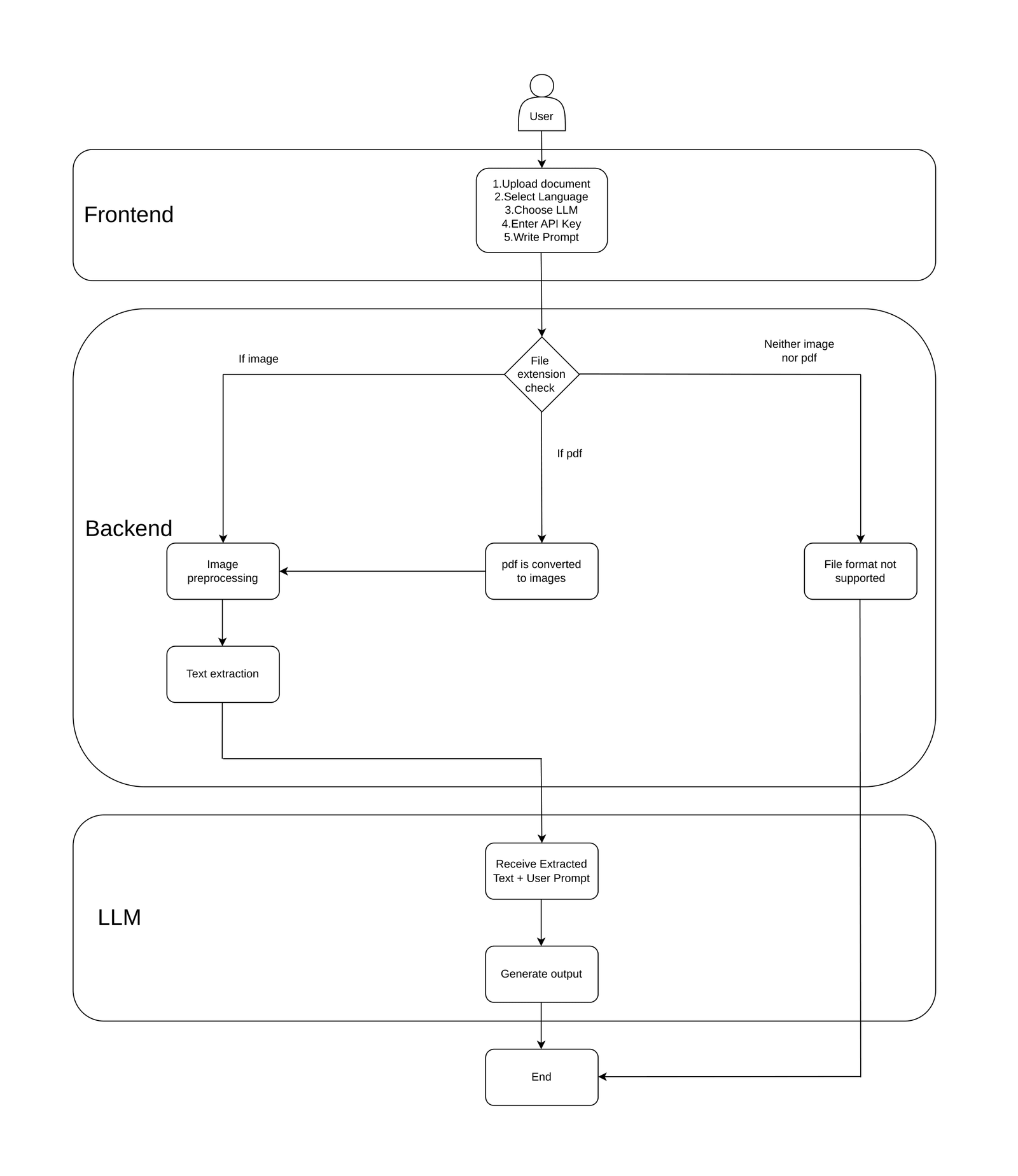
Document Ingestion and Input Handling
The processing flow begins when a user uploads a document through the web interface. The system supports both image files and PDFs.
Once the backend receives the file, it performs an initial check to identify the document type:
- Image files such as JPG or PNG
- PDF files
For PDFs, an additional step is performed to determine whether the document contains embedded text or is fully scanned. Text-based PDFs are handled directly, while scanned PDFs are converted page-by-page into images before further processing. This distinction helps avoid unnecessary OCR work and improves overall efficiency.
Image Preprocessing
Before sending images to the OCR engine, preprocessing is applied to improve extraction accuracy. In real-world documents, scan quality can vary significantly, so preprocessing plays a critical role.
Typical preprocessing steps include:
- Adjusting image resolution
- Reducing noise
- Enhancing contrast and clarity
- Adding padding around image edges to avoid text loss
These steps help the OCR engine detect text more reliably, especially in low-quality scans or mobile-captured images. Temporary images generated during preprocessing are removed once text extraction is complete.
Text Extraction Using OCR
After preprocessing, images are passed to the OCR engine for text extraction. The system uses PaddleOCR, which provides multilingual support and performs efficiently in CPU-only environments.
During OCR processing:
- Text regions are detected within the image
- Characters are recognized within those regions
- Confidence scores are generated for extracted text
The extracted text from all pages or images is consolidated into a single textual representation, which is then prepared for semantic analysis.
AI-Based Understanding and Analysis
Once the text is extracted, it is passed to the AI layer for understanding and interpretation. This is where IDP moves beyond OCR.
Based on user input, the system sends the extracted text to a selected Large Language Model for tasks such as:
- Extracting specific information
- Structuring unorganized content
- Summarizing documents
The system supports models provided by Google Gemini and OpenAI. For use cases where data privacy is critical, local models can also be used via tools such as Ollama, ensuring that sensitive data remains within the local environment
Frontend Integration and User Interaction
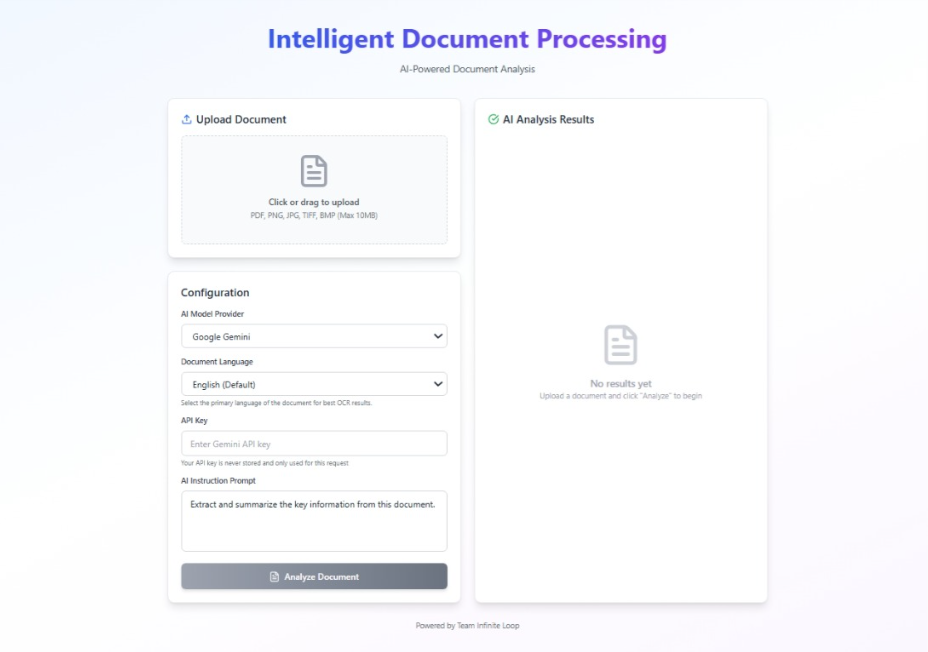
To make the system accessible and user-friendly, a frontend interface can be integrated on top of the processing pipeline. The frontend acts as the primary interaction layer for end users and abstracts away the complexity of the underlying processing.
Through the frontend, users can:
- Upload documents in supported formats
- Select the document language
- Choose the AI model to be used for analysis
- Provide custom prompts defining what information they want to extract
Once submitted, the frontend sends the document and configuration details to the backend and waits for processing to complete. The final structured output is then displayed in a clear and readable format.
Output Processing and Result Delivery
AI-generated outputs often contain formatting inconsistencies or unnecessary symbols. Before sending results back to the user, the system performs output sanitization to ensure clarity and consistency.
The final structured result is then returned to the frontend, where it is displayed in a readable format. From the user’s perspective, the entire process feels simple: upload a document, define the requirement, and receive meaningful output.
Evaluation and Observations
The system was tested using a range of documents, including scanned PDFs, image-based files, and multilingual content. Key observations included:
- Reliable text extraction across supported languages
- Stable performance without GPU acceleration
- Improved accuracy through preprocessing and OCR tuning
- AI outputs closely aligned with user-defined prompts
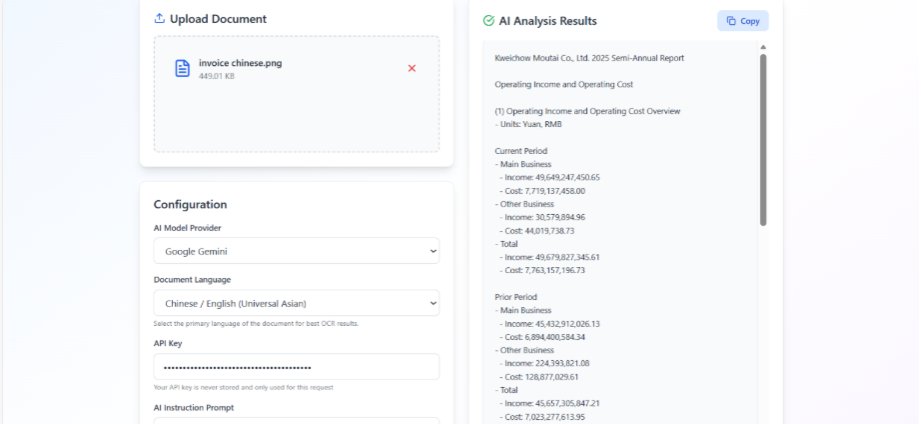
These results indicate that the system is suitable for real-world document automation scenarios.
Future Scope
The current implementation provides a strong foundation, but there is scope for further enhancement. Possible improvements include:
- Advanced layout and tabular extraction
- Automatic language detection
- Optional GPU-based acceleration
- Integration with enterprise document management systems
Conclusion: From Reading to Understanding
Intelligent Document Processing is not just an upgrade to OCR—it is a shift in how enterprises handle data.
By combining:
- OCR for extraction
- AI for understanding
IDP enables organizations to move from manual document handling → intelligent automation → scalable operations.
How Prowess Software Services Helps
At Prowess Software Services, we design AI-enabled data and integration architectures that:
- Combine OCR, AI, and integration platforms
- Enable scalable document processing pipelines
- Integrate with enterprise systems and workflows
We help enterprises turn unstructured data into structured intelligence—faster, smarter, and at scale.

Author: Ankit Kumar

Co- Author: Ankit Sharma
Frequently Asked Questions:
Intelligent Document Processing (IDP) is a technology that uses OCR and AI to extract, understand, and convert unstructured documents into structured data.
OCR only extracts text from documents, while IDP adds context, meaning, and structure to that text using AI and machine learning.
An IDP system processes documents through stages like ingestion, preprocessing, OCR extraction, AI-based understanding, and structured output generation.
IDP can process invoices, resumes, forms, scanned PDFs, images, contracts, and multilingual documents.
Common technologies include OCR engines (like PaddleOCR), AI/LLMs (Gemini, OpenAI), backend processing systems, and storage layers.
- Reduces manual effort
- Improves accuracy
- Handles unstructured data
- Scales document processing
- Enables faster decision-making
Yes, modern IDP systems support multiple languages using advanced OCR and AI models.
Yes, IDP is widely used in enterprises for automation, compliance, data extraction, and workflow optimization.
- Invoice processing
- Resume screening
- Document classification
- Data extraction for analytics
- AI knowledge ingestion pipelines
Future trends include AI-native document understanding, real-time processing, integration with LLMs, and deeper enterprise system integration.