

Missing response headers in Mule RPA disrupt downstream automation logic, as critical details—such as resource IDs or status metadata—become inaccessible. This limitation affects accuracy, slows decision-making, and forces workarounds to maintain smooth, reliable end-to-end automation flows.
Robotic Process Automation (RPA) has become a crucial component in streamlining business processes. RPA allows organizations to automate repetitive tasks, improving efficiency and reducing the likelihood of human error. In the realm of RPA, MuleSoft’s RPA solution stands out for its versatility and ease of MuleSoft integration. However, like any tool, it has its limitations.
The Real Limitation – Why Mule RPA Does Not Return Response Headers
One limitation that users often encounter is the absence of response headers in the Mule RPA REST Calls using Action step. While the action step returns essential data such as the success status, response body, status code, and other outbound variables, it lacks the response headers. In this blog post, we’ll explore a practical workaround to overcome this limitation.
Impact of Missing Response Headers on Automation Flows
Use Case – Extracting VendorBill ID from NetSuite API Headers
Consider a scenario where a POST call is made to create a Vendor Bill on NetSuite using standard REST APIs. Despite receiving a 204 status code, indicating a successful operation with no content, crucial details, such as the vendorBill Id, are nestled within the response headers—a piece of information currently inaccessible through the Mule RPA REST Call Action step. The Mule RPA REST Call Action step returns following data
- isSuccessful (Boolean)
- response body
- status code
- other outbound variables
However, it does not return the response headers.

To use this vendorBill Id in the later process we must capture this but how to do it when there is no option to read the response headers in the Mule RPA REST Call Action Step.
Workaround – How to Capture Response Headers in Mule RPA (Step-by-Step)
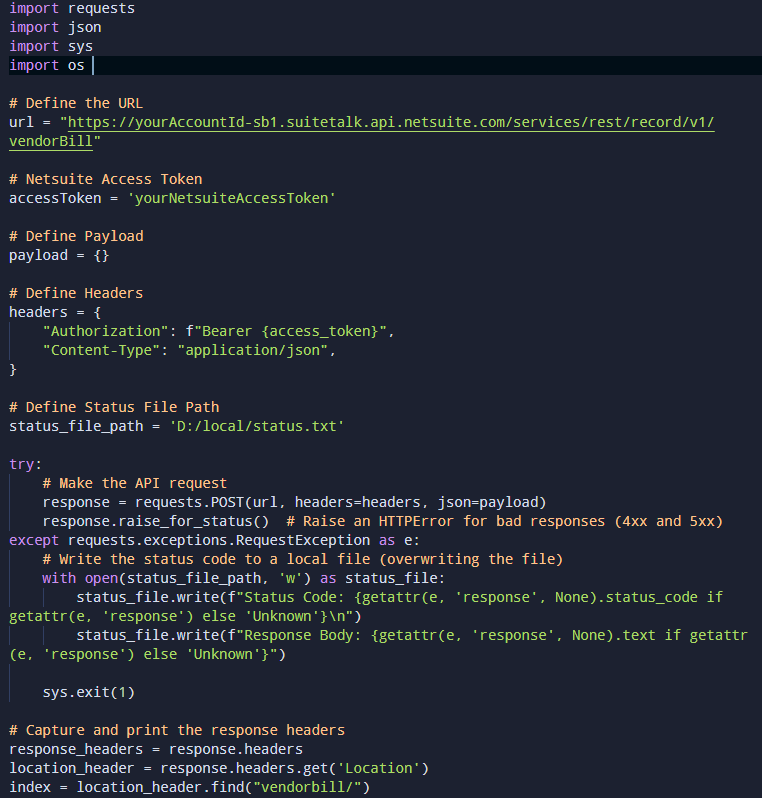
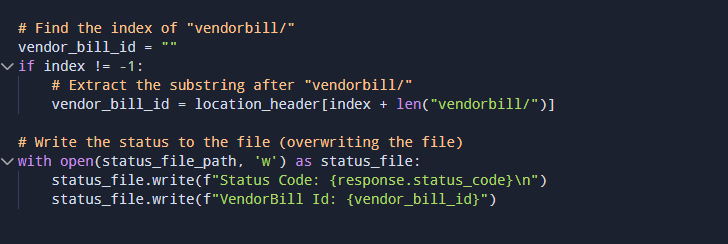
To address this limitation, we propose an innovative solution involving a Python script, allowing users to capture and leverage response headers effectively.
Step 1: Save a Python Script to Capture Response Headers
The Python code given below captures the response headers to a file(status.txt). Save this code to a local repository. (filename example: POSTVendorBill.py)
Step 2: Execute the Script Using the Run Program Action Step
Run this Python script using the Run Program Action Step in the Mule RPA.In this, open the Command prompt, navigate to the code repository, and enter the script python POSTVendorBill.py. This will run the Python code in the background and create a status.txt file.

Step 3: Read the status.txt File
Use the Read from Text File Action Step to read the content of the status.txt file that contains the vendorBill Id.
Step 4: Extract the VendorBill ID
Use the String to Array Action Step to pluck the vendorBill Id from the file.
Step 5: Store the Extracted Value
Now this vendorBill can be stored as a variable and used for further processing.
Important Notes
Different versions of the product may have variations in features, capabilities, syntax and libraries. In the context of the example shared above, the following versions of were used.
- RPA Builder Version: 6.5.2
- Python Version: 3.11
Conclusion – A Smart Workaround for Mule RPA Response Header Limitation
In the world of RPA, every limitation presents an opportunity for innovation. By incorporating a customised script into the Mule RPA workflow, users can circumvent the challenge of missing response headers, ensuring a more comprehensive and effective automation process. This solution showcases Mule RPA’s adaptability and exemplifies the power of integrating in MuleSoft diverse technologies to achieve a seamless and intelligent automation experience. As the RPA landscape continues to evolve, embracing creative mulesoft integration solutions ensures that organizations stay at the forefront of efficiency and innovation.