

Blog
Unlocking AI Integration with MuleSoft: Introducing the MuleSoft AI Chain Connector
- November 05, 2025
- Chenna Aswini Valluru
Bringing AI Intelligence into Integration Flows
The next era of integration is here — powered by Artificial Intelligence (AI).
The MuleSoft AI Chain Connector (MAC Connector) enables developers to design, manage, and deploy AI-driven integration workflows directly within Anypoint Platform AI Integration
Built on the LangChain4j framework, it orchestrates seamless interaction between:
- Large Language Models (LLMs)
- Vector Databases
- External AI Services
—all with minimal coding effort and complete flexibility.
What is the MuleSoft AI Chain Connector?
The MuleSoft AI Chain Connector (MAC Connector) is an open-source MuleSoft connector that allows developers to design, manage, and deploy AI agents directly within Anypoint Platform.
Built on the LangChain4j framework, it orchestrates interactions between:
- Large Language Models (LLMs)
- Vector databases
- External AI services
…all with minimal coding effort.

Key Features MuleSoft AI chain Connector
Feature | Description |
Multi-LLM Support | Connect with OpenAI, Azure OpenAI, Anthropic, Mistral AI, and more. |
Retrieval-Augmented Generation (RAG) | Combine enterprise data with AI reasoning to deliver smarter, more contextual responses. |
Embeddings & Vector Stores | Perform semantic searches and retrieve context-rich data efficiently. |
Image Generation & Analysis | Generate, analyse, or transform images using AI capabilities. |
Sentiment Analysis | Understand user sentiment and extract actionable insights. |
Tool Integration | Extend AI capabilities by integrating APIs or external services as tools. |
Use the Connector in Your Project:
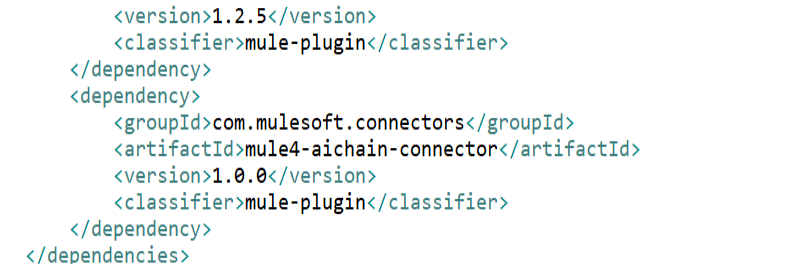
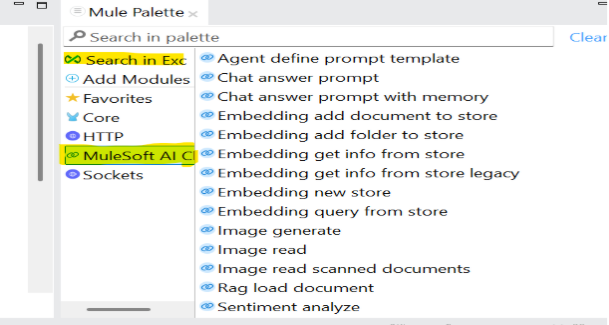
Once the connector dependency is added to your project in the pom, or we can take it from the exchange. Here’s how:
Choose the LLM Provider
The connector supports multiple LLM types — for example:
- Anthropi
- Azure OpenAI
- Mistral AI
- Hugging Face
- Ollama
- OpenAI
- GroqAI
- Google Gemini
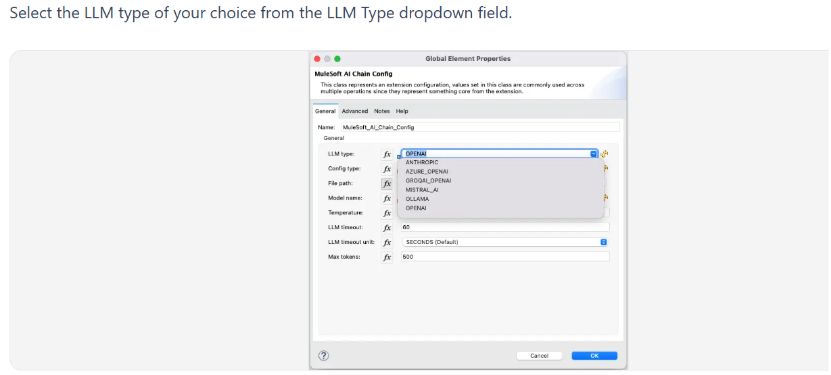
The MuleSoft AI Chain Connector supports two configuration methods:
A) Environment Variables – Set the required LLM environment variables in your Mule runtime OS. Enter – in the File Path field.
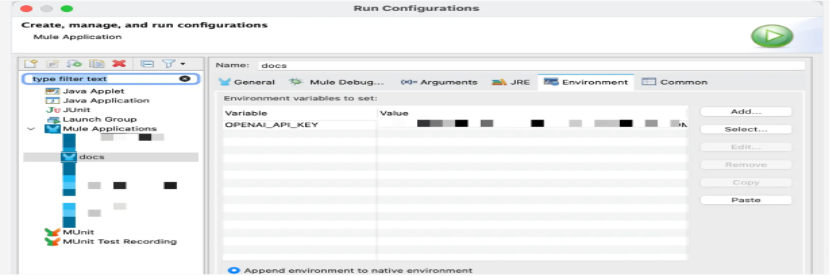
Environment Variables by LLM Type
Based on the LLM Type, you need to set different environment variables. Here is a list of all environmental variables based on the currently supported LLM Types:
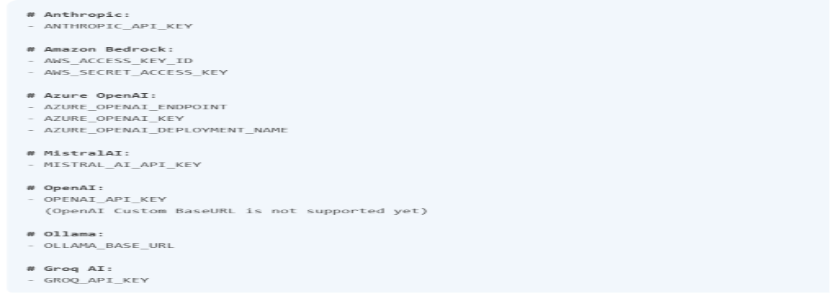
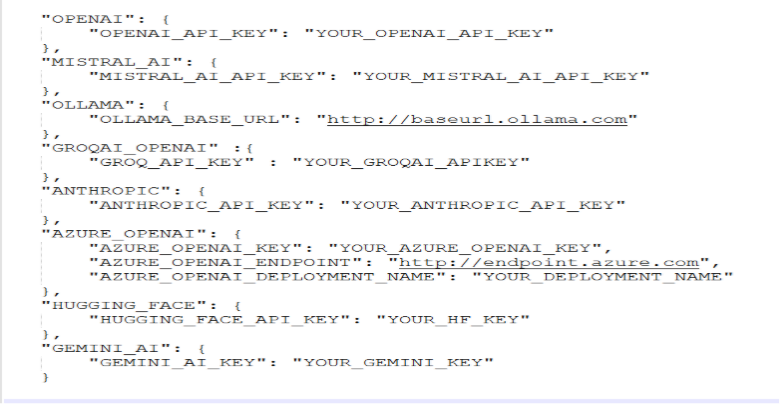
B) Configuration JSON – When choosing the Configuration JSON option, you must provide the dedicated configuration JSON file path that includes all required properties.
You can use a DataWeave expression to store this JSON configuration in the resources folder of your Mule application.
DW Expression:
mule.home ++ “/apps/” ++ app.name ++ “/envVars.json”

Configuration JSON File Example
https://mac-project.ai/docs/mulechain-ai/getting-started#configuration-json-file-example
This is an example of the configuration JSON file. Ensure that you fill out the required properties for your LLM type. The file can be stored externally or added directly to the Mule application in the src/primary/resources folder.
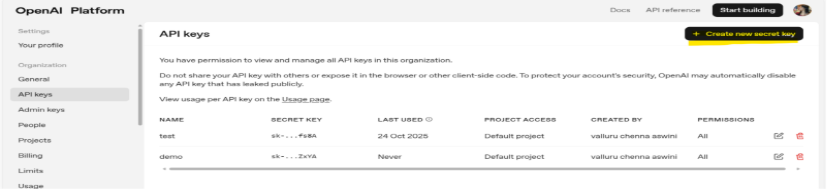
Note: The API token must be generated and placed correctly based on your configuration type.
Example (for OpenAI): If using Environment Variables, use the API from the Platform. Once generated, set it in your MuleSoft Studio environment.
This enables the MuleSoft AI Chain connector to authenticate and interact securely with OpenAI services.
Model Name
https://mac-project.ai/docs/mulechain-ai/getting-started
After choosing the LLM provider, the available and supported models are listed in the model’s name dropdown
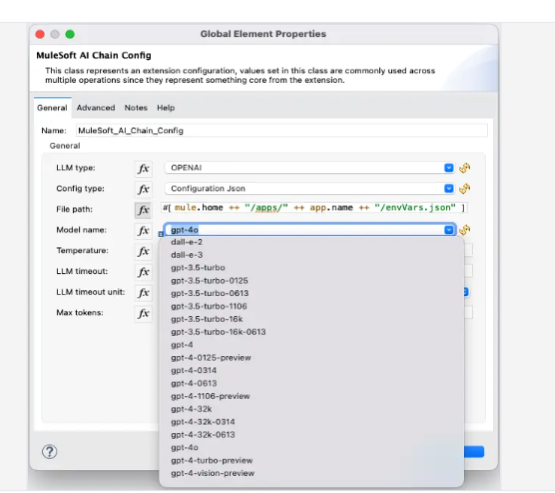
- Temperature: Controls output randomness (0–2, default 0.7).
- Timeout: Max wait time in seconds (default 60).
Max Token: Limits the number of tokens to control cost.

Supported Operations
The connector supports 15 operations grouped across categories (Agent, Chat, Embeddings, Image, RAG, Sentiment, Tools).
Feature | Description |
Multi-LLM Support | Connect with OpenAI, Azure OpenAI, Anthropic, and more. |
Retrieval-Augmented Generation (RAG) | Use external knowledge to improve AI responses. |
Embeddings & Vector Stores | Efficient semantic search and data retrieval. |
Image Generation & Analysis | Generate and analyse images via AI. |
Sentiment Analysis | Understand customer feedback and insights. |
Tool Integration | Extend AI agent capabilities with external tools. |
Use Cases OfAI-Driven Integration Workflows
- Customer Support Automation
Businesses can implement AI workflow automation in MuleSoft to integrate LLMs for generating contextual responses, improving response time and operational efficiency.
- Intelligent Document Processing
With LLM integration in MuleSoft, organisations can analyse and summarise large datasets or documents, enabling faster decision-making.
- Sales Enablement & Lead Intelligence
Using AI agents in MuleSoft, companies can automate lead qualification, generate personalised responses, and streamline CRM workflows.
- Context-Aware Enterprise Search (RAG-based)
By leveraging RAG integration in MuleSoft, businesses can combine internal enterprise data with AI models to deliver accurate, context-aware outputs.
- Cross-System Workflow Automation
The connector supports enterprise AI integration by orchestrating APIs across systems, enabling seamless automation of business processes.
Architecture and Flow of AI Orchestrated Integration Pipelines
The MuleSoft AI Chain Connector works by orchestrating AI components within the MuleSoft Anypoint Platform to create structured and scalable AI integration workflows.
- Step 1: Input & Data Integration
Data is fetched from APIs, databases, or external systems using MuleSoft connectors, forming the base layer for enterprise AI integration workflows. - Step 2: LLM Processing Layer
The connector enables LLM integration in MuleSoft, allowing models to process inputs for tasks such as text generation, summarisation, and classification. - Step 3: Context Enrichment Using RAG
Through Retrieval-Augmented Generation (RAG), enterprise data is combined with AI models to improve accuracy, making outputs more relevant and context-aware. - Step 4: AI Chain Workflow Orchestration
Multiple steps are connected using AI chain workflows in MuleSoft, enabling seamless coordination between APIs, data sources, and AI models. - Step 5: Output Delivery & System Integration
The final output is delivered into business systems such as CRM, applications, or dashboards, completing a full AI-powered automation workflow.
Why the AI Workflow Connector in MuleSoft Matters?
In today’s connected enterprise, AI is the next layer of integration.
The MuleSoft AI Chain Connector bridges business applications, APIs, and AI models, allowing developers to create intelligent, automated, and self-learning workflows.
It helps enterprises:
✅ Automate repetitive processes
✅ Derive real-time insights from data
✅ Enhance customer experiences
✅ Build AI-driven digital ecosystems
It’s not just about connecting systems anymore — it’s about connecting intelligence.
Key Technical Highlights for Developers
- Framework: Built on LangChain4j
- Integration Points: Works within Mule flows via Studio and Anypoint Platform
- Security: Supports environment-based token management
- Scalability: Multi-model and multi-environment ready
- Extensibility: Add your own tools, APIs, or AI endpoints easily
Why Choose Prowess MuleSoft AI Integrations
At ProwessSoft, we specialize in delivering cutting-edge AI-powered enterprise solutions, helping businesses unlock the full potential of their data and applications. With our MuleSoft AI Connector, we empower companies to integrate powerful AI capabilities seamlessly into their workflows, driving smarter business decisions, automating critical processes, and enhancing overall operational efficiency.
Through secure API integrations and AI-driven automation, we enable enterprises to stay ahead of the competition in a rapidly evolving digital landscape.
Conclusion: Why MuleSoft AI Chain Connector Matters Today!
The MuleSoft AI Chain Connector is transforming how enterprises integrate AI into their existing ecosystems. In today’s world, where automation, intelligent integrations, and real-time insights are crucial, this connector seamlessly and securely bridges business applications with AI-driven logic.
With the MuleSoft AI integration, companies can automate their workflows, enhance decision-making, and ensure scalability across all operations. The AI-powered connector provides the perfect solution for businesses looking to leverage API-led connectivity and multi-LLM support to drive efficiency and innovation.
To Learn More connect with our experts today.

Editor: Chenna Aswini Valluru
Frequently Asked Questions:
The MuleSoft AI Chain Connector (MAC Connector) is an open-source connector that enables developers to integrate AI models, vector databases, and external AI services into MuleSoft flows using LangChain4j.
It orchestrates communication between MuleSoft applications and large language models (LLMs), such as OpenAI, Anthropic, and Azure OpenAI. The connector manages prompts, embeddings, and data retrieval, allowing developers to embed intelligence directly into their integrations.
Key features include multi-LLM support, Retrieval-Augmented Generation (RAG), embeddings and vector stores, image generation and analysis, sentiment analysis, and tool integration.
The connector supports multiple AI providers, including OpenAI, Azure OpenAI, Anthropic, Mistral AI, Hugging Face, Ollama, GroqAI, and Google Gemini.
You can configure it using either environment variables or a JSON configuration file in your Mule application. Both methods allow secure management of API keys and model parameters.
It’s used for customer support automation, document processing, predictive supply chain management, personalised marketing, and AI-powered decision-making across business systems.
Yes. The connector is open source and can be customised, extended, or enhanced by developers to suit specific enterprise use cases.
Yes. It enables RAG by combining enterprise data sources with AI models to deliver contextually accurate, relevant responses.
Absolutely. The MuleSoft AI Chain Connector supports multiple LLM providers, enabling developers to switch or combine them based on their workflow requirements.
It enables faster, smarter, and more adaptive digital ecosystems by embedding AI-driven intelligence directly into integration flows — reducing complexity and improving automation efficiency.