

Blog
Unlocking AI Integration with MuleSoft: Introducing the MuleSoft Inference Connector
- December 30, 2025
- Ramisetty Bhavya
Introduction: AI Meets Enterprise Integration
Artificial Intelligence is rapidly becoming a core capability across modern enterprises. From intelligent chatbots and predictive analytics to content generation and image analysis, organizations are looking to operationalize AI within their existing integration landscape—not as isolated experiments.
This is where MuleSoft experts takes a decisive step forward.
With the MuleSoft Inference Connector, enterprises can seamlessly integrate AI inference capabilities directly into MuleSoft flows. This connector enables developers to interact with a wide range of inference providers and large language models (LLMs), making AI a native part of API-led connectivity and enterprise automation.
In this blog, we explore what the MuleSoft Inference Connector is, how it works, its key features, supported providers, configuration approach, and real-world use cases.
What Is the MuleSoft Inference Connector?
The MuleSoft Inference Connector is designed to help developers build, manage, and orchestrate AI-driven agents within the MuleSoft Anypoint Platform.
It provides standardized operations to interface directly with the APIs of multiple inference providers, allowing Mule applications to perform tasks such as:
- Text generation
- Natural language understanding
- Embeddings and semantic search
- Image and vision analysis
- Content moderation and toxicity detection
By abstracting the complexity of individual AI provider APIs, the connector enables consistent, secure, and scalable AI integration across enterprise systems.
Visual Suggestion:
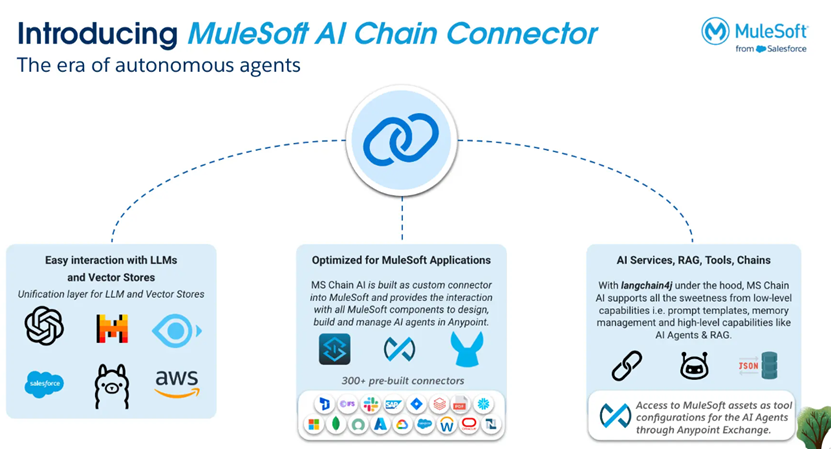
Key Features of the MuleSoft Inference Connector
1. Seamless Interaction with Inference LLMs
The connector allows effortless integration with large language models for:
- Natural language processing
- Text generation and summarisation
- Sentiment and intent analysis
- Complex reasoning and language tasks
Developers can switch providers or models with minimal changes, enabling flexibility and future readiness.
2. Embeddings and Semantic Search
When combined with vector capabilities (such as MAC Vectors), the connector supports:
- Text similarity matching
- Document search and retrieval
- Semantic clustering
- Retrieval-Augmented Generation (RAG)
This enables intelligent search and knowledge-driven applications directly inside MuleSoft.
3. Optimised for Enterprise Performance
The connector is designed for high efficiency and scalability, ensuring:
- Low latency inference calls
- Stable performance under enterprise workloads
- Smooth integration into existing Mule applications
4.Comprehensive AI Tools and Services
Beyond basic inference, the connector supports advanced AI patterns such as:
- Retrieval-Augmented Generation (RAG) for contextual responses
- Function Calling for dynamic tool execution
- Moderation APIs for content filtering
- Vision and image models for multimodal use cases
Supported Inference Providers
The MuleSoft Inference Connector supports a broad ecosystem of AI providers, enabling enterprises to choose models based on performance, cost, compliance, or deployment preferences.
Supported Inference Providers (Highlights)
- AI21Labs
- Anthropic
- Azure AI Foundry
- Azure OpenAI
- Cerebras
- Cohere
- Databricks
- DeepInfra
- DeepSeek
- Docker Models
- Fireworks
- GitHub Models
- GPT4ALL
- Groq AI
- Heroku AI
- Hugging Face
- LM Studio
- Mistral
- NVIDIA
- Ollama
- OpenAI
- OpenAI Compatible Endpoints
- OpenRouter
- Perplexity
- Portkey
- Together.ai
- Vertex AI Express
- XAI
- Xinference
- ZHIPU AI
Supported Moderation Providers
Supported Vision Model Providers
Supported Image Models Providers
Security and Compliance
HTTPS & TLS Security
The MuleSoft Inference Connector supports TLS-based secure communication, ensuring:
- Encrypted data exchange
- Secure authentication with inference providers
- Compliance with enterprise security standards
AI interactions remain governed within MuleSoft’s centralised security framework.
Technical Requirements
Before using the connector, ensure the following prerequisites are met:
- Java SDK: Java 17
- Compilation: Connector must be compiled using Java 17
- Mule Runtime: Minimum version 4.9.4
These requirements ensure compatibility, performance, and long-term support.
Use the Connector in Your Project:
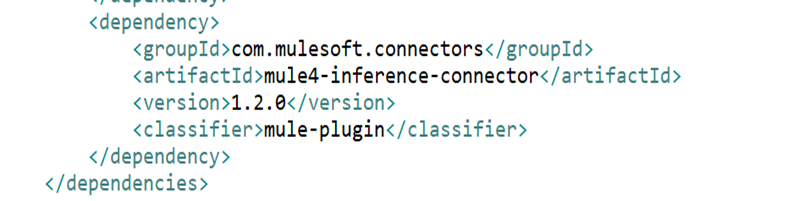
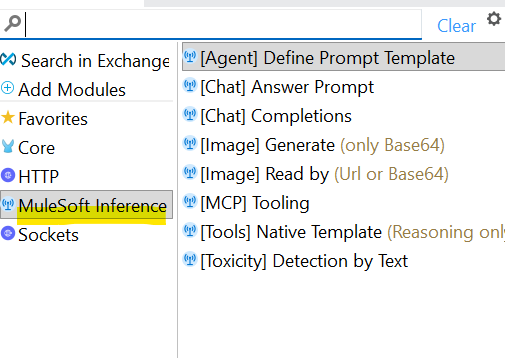
Choose the OpenAI Model Name:
The connector lets you select from multiple supported AI models based on your provider.
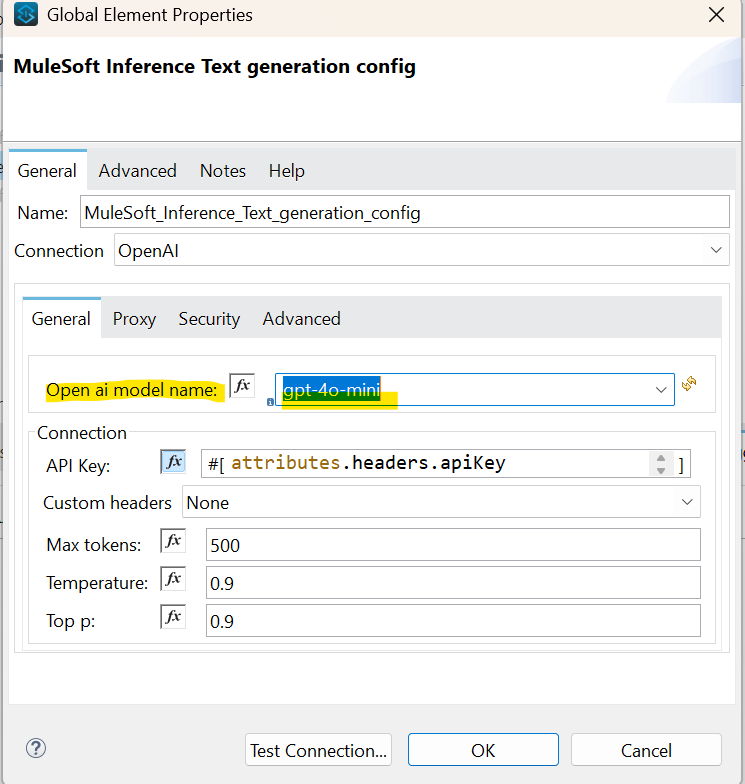
API Key
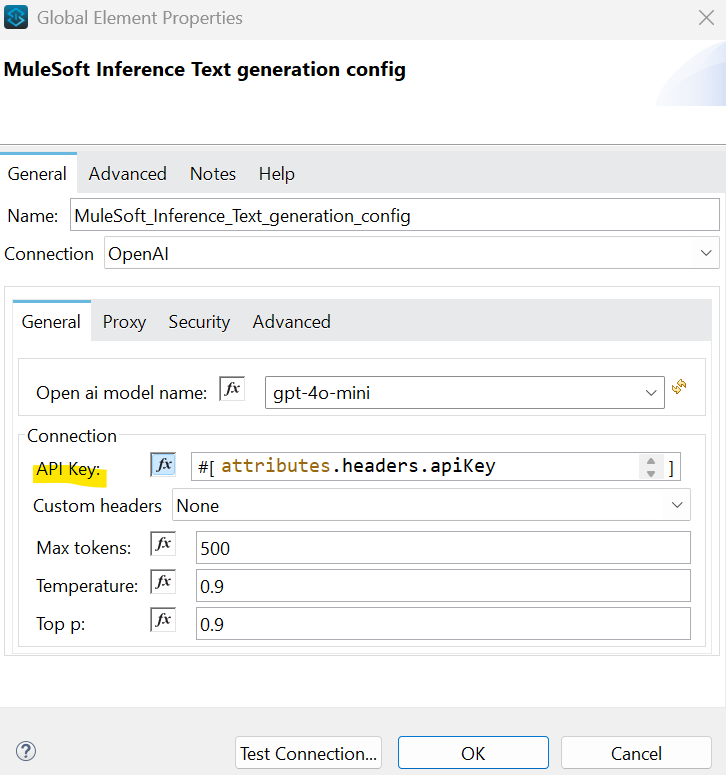
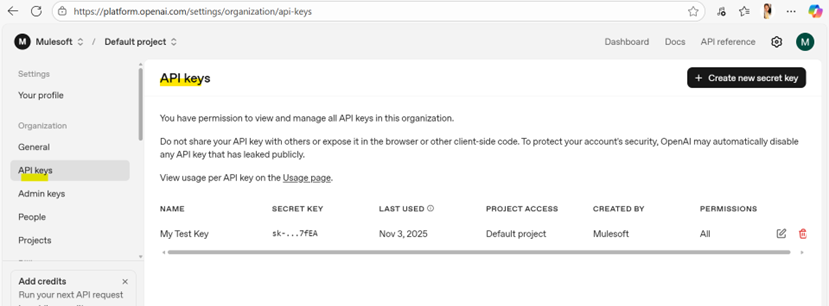
Note: The API Key must be generated and placed correctly based on your configuration type.
Example (for OpenAI):
- Generate your API token from the OpenAI Platform.
- Once generated, add this token to your MuleSoft Studio configuration (for example, inside the global.xml under the connector configuration).
This ensures that the MuleSoft Inference Connector can securely authenticate and interact with OpenAI’s inference services.
Temperature, Top P, and Max Tokens
Temperature is a value between 0 and 2 (default: 0.9) that controls the randomness of the model’s output.
- Higher temperature → more creative and varied responses
- Lower temperature (closer to 0) → more focused, deterministic, and predictable responses
Top P defines the cumulative probability threshold for token selection. Instead of choosing from the entire vocabulary, the model selects from the smallest set of tokens whose probabilities sum to the Top P value. This helps fine-tune the balance between creativity and control.
Max Tokens specifies the maximum number of tokens the LLM can generate in its response.
This parameter is essential for:
- Managing response length
- Controlling performance
- Optimising cost, especially for paid LLM providers
These three parameters together allow you to customise how the model behaves, ensuring the right balance between creativity, accuracy, and cost efficiency in your inference operations.
Real-World Enterprise Use Cases !
🌍 Customer Service Agents
- Auto-summarize cases
- Classify issues
- Assist agents with contextual insights
💬 Customer Support Chats
- Retain conversation context
- Generate accurate, contextual replies
👥 Multi-User Chat Applications
- Maintain conversation history per user
- Enable scalable AI chat experiences
🖼️ Image Analysis
- Analyse images in reports and documents
- Support visual inspection workflows
🛡️ Toxic Input Detection
- Detect and block harmful or abusive inputs
- Ensure safe AI interactions
Conclusion: Why the MuleSoft Inference Connector Matters?
The MuleSoft Inference Connector makes it significantly easier to embed real-time AI intelligence into integration flows. With broad provider support, enterprise-grade security, and flexible configuration, organizations can build smarter, faster, and more adaptive MuleSoft applications.
As enterprises move toward AI-driven automation, this connector plays a critical role in bridging integration and intelligence, turning APIs into intelligent, context-aware services.
How Prowess Software Services Can Help ?
At Prowess Software Services, we help enterprises design and implement AI-led MuleSoft architectures, including:
- MuleSoft AI Chain & Inference Connectors
- Intelligent API-led integration
- Secure, scalable AI orchestration
- Enterprise automation strategies.
Ready to operationalise AI in your MuleSoft ecosystem?
Talk to our MuleSoft & AI experts today !

Editor: Ramisetty Bhavya
Frequently Asked Questions:
The MuleSoft Inference Connector is a native MuleSoft component that allows applications to connect with AI inference providers and large language models to perform tasks such as text generation, embeddings, and image analysis.
It simplifies AI integration by eliminating the need for custom API development, allowing enterprises to securely embed AI inference directly into MuleSoft integration flows.
The connector supports multiple inference providers including OpenAI, Azure OpenAI, Anthropic, Hugging Face, Mistral, NVIDIA, Vertex AI, and other OpenAI-compatible endpoints.
Yes. The connector is designed to work with LLMs for natural language processing, summarization, classification, chat applications, and other AI-driven use cases.
Yes. When combined with vector storage capabilities, it supports embeddings for semantic search, document similarity, clustering, and Retrieval-Augmented Generation (RAG).
Yes. It supports TLS-based secure communication and runs within MuleSoft runtime, ensuring enterprise-grade security, governance, and compliance.
Temperature controls response creativity, Top-P manages probability-based token selection, and max tokens limit response length—together enabling control over accuracy, creativity, and cost.
Yes. It supports vision and image models that can analyze images in documents, reports, customer interactions, and business workflows.
Common use cases include customer support automation, intelligent chatbots, content moderation, document summarization, image analysis, and AI-assisted decision-making.
It enables enterprises to operationalize AI within integration workflows, transforming APIs into intelligent services that support scalable, adaptive, and context-aware automation.