

Background
MuleSoft supports processing of messages in batches. This is useful for processing large number of records. MuleSoft has many processors for specific usage in batch processing and implementing business logic. Batch Processing in MuleSoft is typically used while organizations need to process excessive-volume of records such as consumer records, orders, invoices, documents, Salesforce facts records, database rows records, or API payloads asynchronously and reliably. Batch processing in Mule 4 allows integration teams to split massive payloads into individual records, process them through multiple batch steps, handle failures record by record, and generate a final processing report.
When the batch job starts executing, mule splits the incoming messages into records and stores them in a queue and schedules those records in blocks of records to process. By default, a batch job divides payload with records of 100 per batch, and it concurrently processes using a max of 16 threads. After all the records have passed through all the batch steps, the runtime ends the batch job instance and reports the batch job result indicating which records succeeded and failed during processing.
Optimizing batch processing in Mule 4 with batch aggregators improves efficiency. Learn MuleSoft error handling and performance tuning for large-scale jobs to boost Mule 4 job processing and scalability. Use MuleSoft’s batch processing for fast data-heavy integrations, fast, scalable and fault-tolerant. For millions of records with parallel processing, error handling and smart queuing. Minimal overhead for enterprise automation.
For enterprise integration solutions tasks, MuleSoft Batch Job is specially useful whilst real-time API processing isn’t always the first-rate alternative. Instead of processing the whole lot synchronously, batch processing allows big datasets to be processed within the heritage whilst enhancing scalability, fault tolerance, and operational visibility.
What is Batch Processing in MuleSoft?
Batch processing in MuleSoft is a Mule runtime functionality used to process large datasets asynchronously by splitting input payloads into individual records. Each report passes through one or extra batch steps, wherein transformation, filtering, validation, enrichment, or target-machine updates can occur.
In simple terms, batch processing is beneficial whilst you do now not need to method heaps or millions of facts in a unmarried synchronous float. Instead, MuleSoft handles the records in attainable blocks, tracks achievement and failure, and provides a very last BatchJobResult after the execution is entire.
Example use cases include:
- Salesforce data migration
- Large CSV file processing
- Database bulk updates
- CRM to ERP synchronization
- Invoice or order processing
- Legacy system modernization
- High-volume API data processing
- Scheduled enterprise data sync jobs
Batch Processing has three phases in Mule 4
- Load and Dispatch
- Process
- On Complete
Load and Dispatch
This is an implicit phase. This phase creates a job instance, converts the payload into a collection of records and then splits the collection into individual records for processing. Mule exposes batch job instance id through the “BatchJobInstanceId” variable, this variable is available in every step. It creates a persistent queue and associates it with new batch job instance. Every processed record of the batch job instance starts with the same initial set of variables before the execution of the block.
After each record is processed in this phase, the flow continues to execute the dispatched records, asynchronously. It does not wait for the rest of the records to be processed.
This phase is critical because it prepares the entered statistics data for report-degree processing. For large datasets, MuleSoft no longer procedure the entire payload as one single object. Instead, it breaks the information into facts and dispatches them for asynchronous execution. This improves scalability and makes MuleSoft batch processing suitable for enterprise workloads.
Process
In this phase, the batch job instance processes all individual records asynchronously. Batch step in this phase allows for filtering of records. The record goes through a set of Batch Steps that has a set of variables within the scope of each step. A Batch aggregator processor may be used to aggregate records into groups by setting aggregator processor size. There are many processors that could be used to customize the batch processing behavior. For example, an “Accept Expression” processor may be used to filter out the records that do not need processing, any record that evaluates to “true” is forwarded to continue processing.
A Batch job processes large number of messages as individual records. Each Batch Job contains functionality to organize the processing of records. Batch job continues to process all the records and segregates them as “Successful” or “Failed” through each batch step. It contains the following two sections, “Process Records” and “On Complete”. The “Process Records” section may contain one or more “Batch Steps”. Any record of the batch job goes through each of these process steps. After all the records are processed, the control is passed over to the On Complete section.
The Process phase is wherein most of the business common sense is implemented. For example, a MuleSoft developer can validate each record, transform the data using DataWeave, name external APIs, replace databases, publish messages, or path failed records to a separate errors-handling step.
This phase is also where Accept Policy, Accept Expression, and Batch Aggregator come to be essential for controlling which information must move to the following step and the way facts need to be grouped for bulk processing.
On Complete
On Complete section provides summary of the processed record set. This is an optional step and can be utilized to publish or log any summary information. After the execution of entire batch job, the output becomes a BatchJobResult object. This section may be used to generate a report using information such as the number of failed records, succeeded records, loaded records, etc.
The On Complete phase in MuleSoft batch processing is useful for reporting, logging, notifications, and audit tracking. Since enterprise batch jobs often process thousands or millions of records, the final BatchJobResult helps teams understand how many records were loaded, processed, succeeded, or failed.
This makes the On Complete phase important for monitoring batch execution, creating operational reports, and triggering alerts when failed records cross an acceptable threshold.
Batch Processing Steps
- Drag and drop flow with http listener and configure the listener.
- In the example below, 50 records are added to the payload that will be processed.
- “A batch job in Mule 4 processes all the records from the payload using two parts – (1) Process Records and (2) On Complete
- In the “Process Records” the batch step is renamed as Step1. In process records we have multiple batch steps.
- Below screenshot shows multiple batch steps.

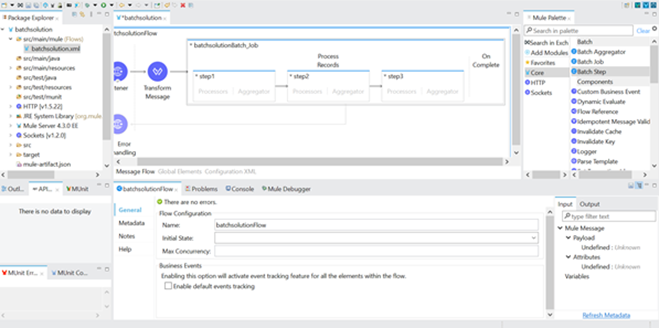
In a real-time MuleSoft batch processing example, the HTTP Listener can trigger a payload containing multiple records. These records are then passed into the Batch Job, where MuleSoft splits the payload and processes each record independently. This approach is useful for testing batch processing logic before applying it to files, databases, Salesforce, or other enterprise systems.
Accept Policy in MuleSoft Batch Processing
- In all the batch steps there is an “Accept Policy” i.e., whether the next step accept or not decided by the “Accept Policy”. There are three values in “Accept Policy”.
- “NO_FAILURES” (default) i.e., Batch step process only succeeded records.
- “ONLY_FAILURES” i.e., Batch step process only failed records.
- “ALL” i.e., Batch step process all the records whether it is failed to process.
- There is an “Accept Expression” in the batch step it has to evaluate to true, then only the record accepted by the next step.
- There is a need to aggregate bulk records, use “Batch Aggregator” by specifying aggregator size as required.
- Below screenshot shows how to configure the batch aggregator.

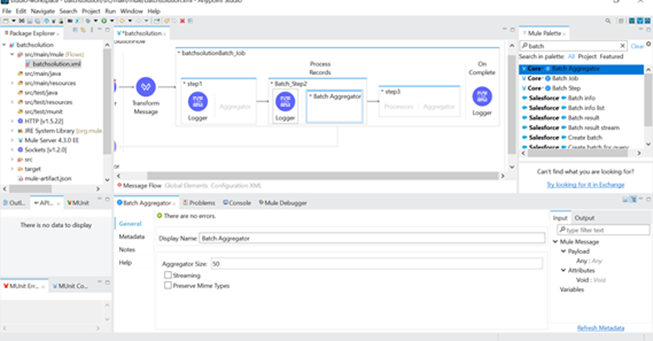
Accept Policy in MuleSoft Batch Processing helps developers control record flow between batch steps. This is very useful when you want one batch step to process only successful records, another step to handle failed records, and another step to process all records for logging or reporting.
For example, if a record fails validation in Step 1, you can use ONLY_FAILURES in the next step to process only those failed records and write them to an error file, database table, or notification queue.
Batch Aggregator in Mule 4
Batch aggregator in Mule 4 is used when records need to be grouped and processed together instead of individually specifically useful for bulk insert, bulk update, bulk API calls, or database operations.
- Use the logger in the batch aggregator and the configure it.
Batch Aggregator in Mule 4 is used while records need to be grouped and processed together in place of separately. This is specially useful for bulk insert, bulk update, bulk API calls, or database operations wherein sending records in businesses improves overall performance.
For instance, in place of updating 10,000 facts one at a time in a database, a Batch Aggregator can group information into batches of one hundred or 500 and perform bulk operations. This reduces network calls, improves throughput, and makes MuleSoft batch processing more green.
Common use cases of Batch Aggregator include:
- Bulk database insert or update
- Salesforce bulk operation
- Writing records to files in groups
- Publishing grouped records to queues
- Reducing external API calls
- Improving batch job performance
On Complete and BatchJobResult
- All the steps are executed, then the last phase of the job called as “On Complete” will trigger.
- On Complete phase, there is a BatchJobResult object gives information about, exceptions if any, processed records, successful records, total number of records.
- We can use this BatchJobResult object to extract the data inside it and generate reports out of it.
- Below screenshot shows the BatchJobResult.

- In On Complete phase, if we configure the logger as Processed Records then it will process the Processed Records.
- Run the mule application
- Give the request in order to trigger the batch job. The batch job sends the payload as one by one records to batch step.
- The screenshot shows the logs in the console.

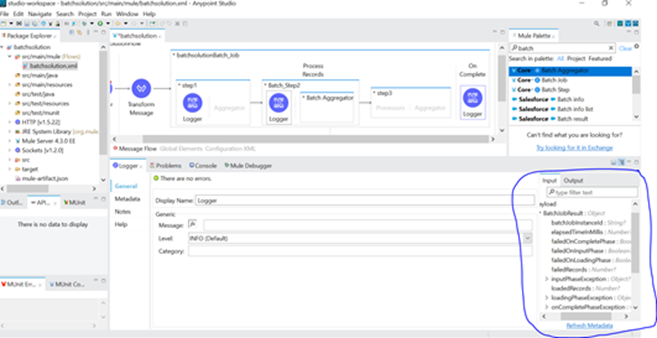
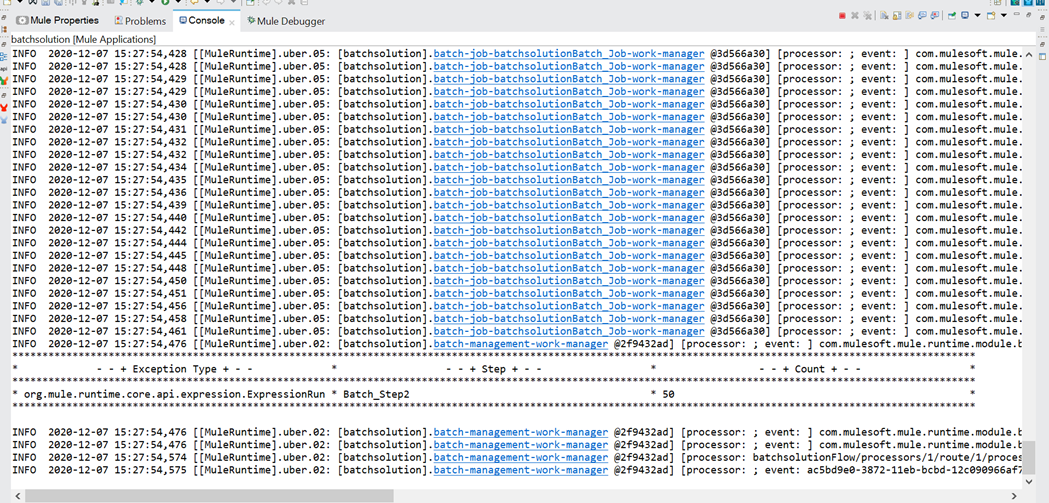
BatchJobResult in MuleSoft is useful for publish-processing visibility. It helps developers and operations teams recognize the final status of the batch task. This information may be logged, saved in a database, sent via electronic mail, or driven to a tracking dashboard.
For manufacturing-grade batch processing, it is recommended to seize failed facts, total processed records, fulfillment rely, failure matter, and mistakes info so that help groups can quickly troubleshoot problems. Batch processing in Mule 4 is the right approach when your application needs to process a large number of records asynchronously and record-level tracking is required.
When Should You Use Batch Processing in MuleSoft?
Use Batch Processing in MuleSoft when the application needs to process a large number of records asynchronously and record-level tracking is required.
Batch processing is suitable when:
- You are processing thousands or millions of records
- You need asynchronous processing
- Each record needs independent transformation or validation
- Failed records should not stop the entire job
- You need success and failure reporting
- You want to process data in multiple steps
- You need bulk operations through Batch Aggregator
Avoid using batch processing for very small payloads or real-time API responses where immediate output is required. In those cases, For Each, Parallel For Each, or normal flow processing may be more suitable.
Performance Tuning
MuleSoft batch processing performance tuning involves analyzing, improving, and validating throughput when handling millions of records in a single execution. Mule handled to process huge amount of data efficiently. Mule 4 erase the need of manual thread pool configuration as this is done automatically by the mule runtime which optimizes the execution of a flow to avoid unnecessary thread switches.
Consider there are 10 million records to be processed in three steps. Many input operations occur during the processing of each record. The disk characteristics along with workload size, play a key role in the performance of the batch job because during the input phase, an in-disk queue is created of the list of records to be processed. Batch processing requires enough memory available to process threads in parallel. By default, the batch block size is set to 100 records per block. This is the balancing point between the performance and working memory requirements based on batch use cases with various record sizes.
MuleSoft batch processing performance tuning should focus on memory usage, batch block size, aggregator size, record size, external system limits, disk performance, and error-handling strategy. Since batch processing can create persistent queues and process records asynchronously, poor configuration can impact throughput and resource consumption.
Best practices for MuleSoft batch processing performance tuning include:
- Filter unnecessary records early using Accept Expression
- Use Batch Aggregator for bulk operations
- Avoid heavy transformations inside every batch step if they can be done earlier
- Choose the right batch block size based on record size and memory availability
- Avoid unnecessary variables that increase memory usage
- Monitor failed records and retry patterns
- Separate heavy batch workloads from real-time APIs
- Test performance with realistic production-like data volumes
Common Mistakes in MuleSoft Batch Processing
While batch processing is powerful, poor implementation can create performance and maintenance issues.
Below are common mistakes to avoid:
- Using Batch Job for small datasets where For Each is enough
- Not handling failed records properly
- Choosing the wrong Accept Policy
- Using a very small or very large Batch Aggregator size
- Calling slow external APIs for every individual record without bulk handling
- Not logging BatchJobResult properly
- Not testing with production-like record volume
- Expecting batch jobs to behave like real-time synchronous flows
Avoiding these mistakes helps improve batch job reliability, performance, and operational control.
MuleSoft Batch Processing Best Practices
To make MuleSoft batch processing scalable and reliable, follow these best practices:
- Design batch jobs around record-level processing
- Use clear batch step names to make debugging easier
- Use Accept Policy to separate successful and failed records
- Use Batch Aggregator for bulk target-system operations
- Store failed records for reprocessing
- Use On Complete for reporting and monitoring
- Monitor memory, disk, and external system response time
- Avoid overloading downstream systems with too many parallel calls
- Use proper logging without logging sensitive data
- Document the batch flow for future maintenance
These practices are especially important for enterprise MuleSoft applications where batch jobs may process business-critical records across CRM, ERP, databases, files, and cloud platforms.
Conclusion
In summary, MuleSoft batch processing is a powerful approach for handling large-scale, asynchronous, and record-based integration workloads.. With Mule 4 Batch Job, Batch Steps, Accept Policy, Batch Aggregator, and On Complete reporting, developers can build scalable batch flows that support enterprise automation, data synchronization, migration, and high-volume processing.
Batch Processing used for parallel processing of records in MuleSoft. By default, payload divides 100 records a batch. By matching the number of records with respect to the thread count and input payload the batch processing is achieved.
CTA:
Looking to implement or optimise batch processing in your MuleSoft environment? Our certified MuleSoft experts at ProwessSoft have helped enterprises design and deliver scalable, high-performance integration solutions. Explore our MuleSoft Services to see how we can accelerate your integration journey.