

 aravind.konda
Blog
AGENT DEFINE PROMPT TEMPLATE CONNECTOR IN MULE 4: ENABLING INTELLIGENT AI-POWERED INTEGRATIONS
- November 25, 2025
- Valluru Chenna Aswini
Introduction: Bringing AI Intelligence into Mule 4 Flows
The Agent Define Prompt Template Connector in Mule 4’s AI Chain framework marks a new era of intelligent integration. It allows MuleSoft developers to define and structure prompt templates that interact seamlessly with Large Language Models (LLMs) — transforming text-based operations into AI-driven automation.
At ProwessSoft, we believe integrations should not only connect systems but also think intelligently. This connector empowers enterprises to design structured, reusable, and composable AI-powered prompts directly within Mule flows — bridging the gap between APIs and artificial intelligence.
What Does the Agent Define Prompt Template Connector?
The Agent Define Prompt Template Connector is designed to integrate AI logic into Mule applications by defining prompt templates, datasets, and instructions for your chosen LLM.
This enables developers to manage AI interactions with precision — controlling how models interpret, process, and generate responses — all from within MuleSoft.
General Operation Fields
- Instructions: Defines the role and task behaviour for the AI.
- Template: Provides the prompt structure or pattern for generating responses.
- Dataset: References internal or external data to improve contextual understanding.
1️. Instructions Field
The Instructions field guides the AI’s behaviour before it processes input or templates. It defines tone, goal, and structure.
Example:
- You are an intelligent shipment assistant.
- Always provide clear, concise, and professional updates on delivery status.
- This ensures consistency and clarity across every AI response.
2️.Template Field
The Template field defines the dynamic prompt structure that the AI uses during execution. Mule can replace variables at runtime.
Example:
- You are a shipment assistant.
- Check the current status for order ${orderId} and respond as:
- "Order ${orderId} is currently ${status}."
- This ensures reusability and automation across different contexts.
3️. Dataset Field
The Dataset field connects the AI with structured or unstructured data, acting as contextual memory for decision-making.
Example Query:
“What is order 987654’s current status?”
AI Response:
Order 987654 is currently in transit and expected to arrive by tomorrow.
How It Works ?
The connector defines how the AI interprets, processes, and responds to natural language inputs within your Mule flow.
By combining instructions, templates, and datasets, developers can achieve dynamic, intelligent automation without manual logic.
Process Flow:
- The connector reads instructions to determine tone and task behaviour.
- It applies the template with runtime variables.
- The dataset provides context or business data.
- The model generates intelligent responses within the Mule application.
Example: Order Status Inquiry Using Agent Define Prompt Template
Scenario:
A customer support chatbot built in MuleSoft needs to deliver real-time order updates.
Solution:
Using the Agent Define Prompt Template Connector, developers can define how the AI behaves, structure responses, and reference data — all in a single reusable template.
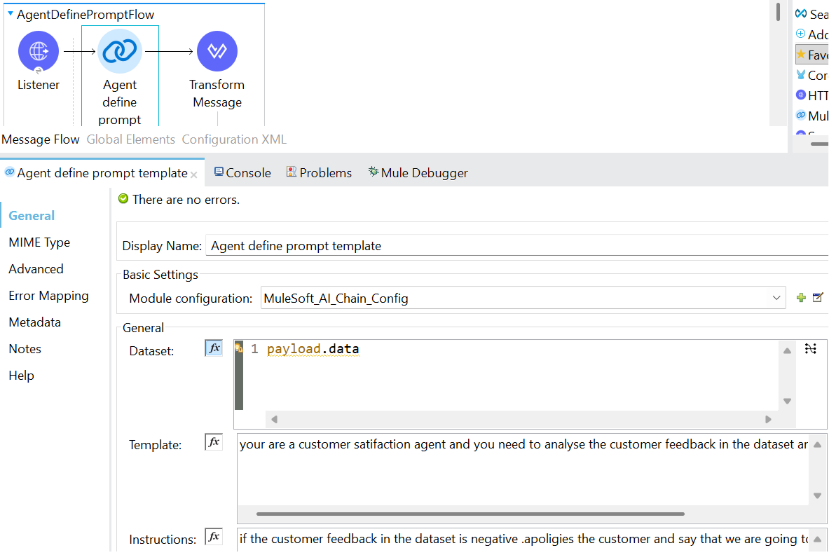
Sample Configuration Snippet
<flow name=“AgentDefinePromptFlow” doc:id=“6e2df15a-7b57-4485-bcdc-dc49482979b9” >
<http:listener doc:name=“Listener” doc:id=“77f831ae-7f34-40b9-9522-dd26fee2a9d3” config-ref=“HTTP_Listener_config” path=“/prompt”/>
<ms-aichain:agent-define-prompt-template doc:name=“Agent define prompt template” doc:id=“78fe044b-b3aa-4a4a-aa57-104d5a8114ba” config-ref=“MuleSoft_AI_Chain_Config”>
<ms-aichain:dataset ><![CDATA[#[payload.data]]]></ms-aichain:dataset>
<ms-aichain:template ><![CDATA[you are a customer satisfaction agent, and you need to analyse the customer feedback in the dataset and answer via plain text]]></ms-aichain: template>
<ms-aichain:instructions ><![CDATA] if the customer feedback in the dataset is negative. .apoligies the customer and say that we are going to check and reslove the issue]]></ms-aichain: instructions>
</ms-aichain:agent-define-prompt-template>
<ee:transform doc:name=“Transform Message” doc:id=“762422ba-71ee-42f5-b733-6e586d21bf42” >
<ee: message >
<ee:set-payload ><![CDATA[%dw 2.0
output application/json
—
payload]]></ee:set-payload>
</ee: message>
</ee: transform>
</flow>
Response: { “response”: “{\n \”type\”: \”positive\“,\n \” response\”: \”Thank you for your positive feedback on the training last week. We are glad to hear that you had a great experience. Have a nice day!\“\n}”}
Key Benefits
- ⚡ Faster AI Integration: Seamlessly embed LLMs into Mule flows.
- 🧩 Composable Workflows: Chain multiple AI steps for complex logic.
- 📚 Dataset Support: Improve context and accuracy through structured data.
- 🧠 Intelligent Automation: Combine Mule APIs and AI for more thoughtful decision-making.
- 💡 Reusable Templates: Standardise and reuse prompt structures.
- ⏱️ Reduced Development Time: Eliminate repetitive logic for similar use cases.
Real-World Applications
- Customer Service Agents: Summarise cases, classify feedback, or draft responses.
- Sales Operations: Write personalised emails, assess lead potential, or summarise deals.
- Marketing Teams: Generate content, social posts, or analyse campaign performance.
By leveraging the Agent Define Prompt Template, organisations can automate complex text-based reasoning directly within MuleSoft’s integration framework.
How to Get Started
Step 1: Set Up Your Environment
- Install and configure MuleSoft AI Chain Connector in Anypoint Studio.
- Connect to your LLM provider (OpenAI, Azure OpenAI, etc.)
Step 2: Create Your Prompt Template
- Define instructions, template, and dataset based on your business use case.
Step 3: Integrate with Mule Flows
- Combine with components like Transform Message, Database, or HTTP Request for full automation.
Step 4: Test and Optimise
- Monitor and fine-tune responses through Anypoint Monitoring and logs.
Step 5: Deploy and Scale
- Deploy to CloudHub or Runtime Fabric.
Conclusion
The Agent Define Prompt Template Connector in Mule 4’s AI Chain framework marks a significant step forward in integrating AI-driven intelligence into enterprise APIs. By allowing developers to define structured prompts, use datasets, and control instructions, it bridges the gap between traditional system logic and natural language understanding.
With its ability to automate reasoning, handle complex workflows, and generate human-like insights, this connector empowers organisations to build smarter, more adaptive integrations. Whether it’s enhancing customer service, streamlining business operations, or analyzing large datasets, this connector makes AI more accessible and powerful within the MuleSoft ecosystem.
In short, the Agent Define Prompt Template Connector is not just a feature — it’s a foundation for building the next generation of AI-powered, intelligent integrations.
Frequently Asked Questions:
It is a MuleSoft AI Chain operation that defines instructions, prompt templates, and datasets for LLM-powered automation within Mule flows.
The Instructions field tells the AI how to behave, including tone, style, and response goals during execution.
The Template field provides a reusable prompt structure with variables that Mule replaces dynamically at runtime.
The Dataset field loads contextual business data from Mule payloads or sources to improve the accuracy of AI-generated responses.
It enables chatbots and APIs to dynamically respond with real data and AI reasoning, without requiring custom code for each request.
MuleSoft supports OpenAI, Azure OpenAI, and other LLMs connected through the AI Chain platform.
Yes — multiple AI operations can be orchestrated to perform multistep reasoning or decision-based workflows.
Yes — MuleSoft enforces API policies, access controls, and encryption for secure AI-augmented workflows.
Absolutely — reusable templates eliminate repetitive logic, enabling faster AI-enabled API development.
Customer service, sales, marketing, logistics, and analytics functions across BFSI, retail, manufacturing, and tech industries.