

Blog
How to Dynamically Authenticate MuleSoft SFTP with SSH Keys from an External Source in CloudHub 2.0
- October 09, 2026
- Jithendra Mouli Devi Chundi
- Software Engineer
Overview
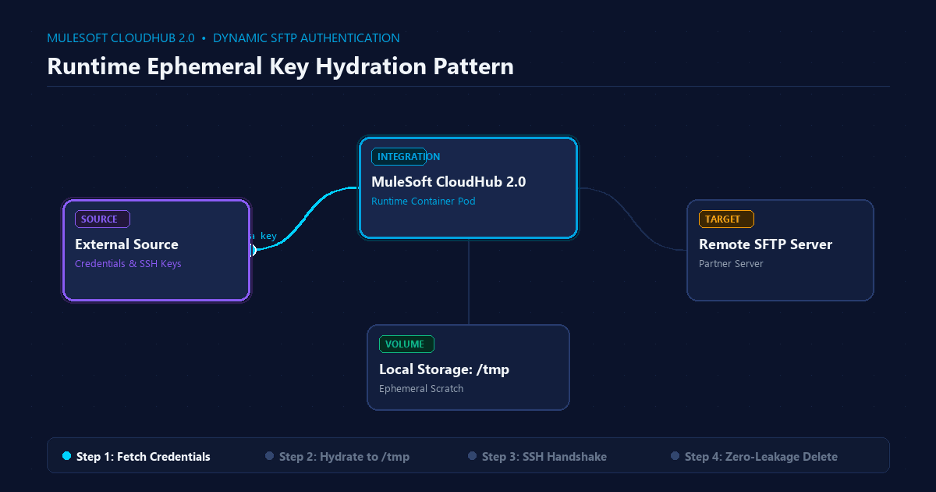
External Credential Fetch → Ephemeral /tmp Hydration → Encrypted SFTP Handshake
If you build B2B integrations in MuleSoft, chances are you connect to multiple external SFTP servers.
In a real enterprise environment, however, those connections rarely stay static. Credentials change. SSH keys rotate. New partners are onboarded. Existing partners move to new hosts or update their security requirements.
Redeploying a Mule application every time one of those values changes is not a scalable approach.
A more flexible design is to retrieve the SFTP configuration dynamically at runtime from an external source. That configuration may include the host, port, username, password, SSH private key, passphrase, and host key.
That sounds straightforward—until the Mule 4 SFTP Connector asks for something your external configuration source cannot directly provide.
The Problem Every Mule Developer Eventually Faces
The MuleSoft SFTP Connector expects the SSH identity key and known-hosts information as physical filesystem paths.
In other words, the connector configuration requires values such as:
identityFile
and
knownHostsFile
It does not directly consume an in-memory string, Base64 variable, or raw binary stream retrieved dynamically from an external system.
That creates a practical problem.
You may already have the SSH key available at runtime, but the connector still needs a file path.
CloudHub 2.0 adds another constraint. Applications run inside restricted, non-root Linux containers, where writing files to arbitrary filesystem locations can result in permission errors.
The solution is what I call the Ephemeral Key Hydration Pattern:
Retrieve the key dynamically, temporarily hydrate it into writable ephemeral storage, use that file for the SFTP connection, and immediately remove it afterward.
The pattern keeps the application dynamic without forcing credentials into the deployment package.

Prerequisites
Before building the flow, you will need:
- Anypoint Studio 7.x+ with Mule 4 Runtime
- Mule SFTP Connector v2.x+
- Mule File Connector v1.5+
- An SFTP server for testing, such as SFTPCloud or a local Docker-based SFTP server
- An external configuration source—or mock payload—containing the partner’s SFTP credentials
Step 1: Design the Studio Flow
At a high level, the Anypoint Studio flow follows this lifecycle:
Listener → Transform → Write → SFTP Operation → Delete → Transform
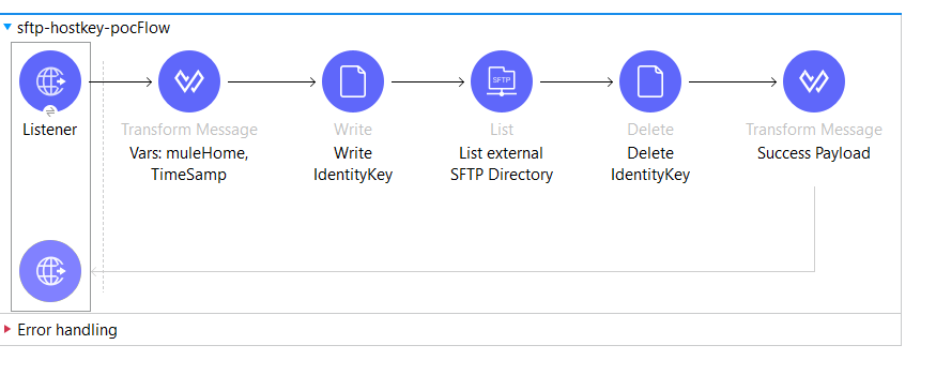
Figure 1: Studio Flow
The flow has five clear stages.
- Trigger / Ingest
An HTTP Listener receives the request. A Scheduler could also trigger retrieval of credentials from an external configuration service. - Transform Message
Prepare the SFTP configuration and define the temporary storage path. - File Write
Write the private-key stream into /tmp. - SFTP Operation
Use the generated file path to authenticate and perform the required SFTP operation, such as list, read, or write. - File Delete
Delete the temporary SSH private-key file immediately after the SFTP operation.
The important principle is simple:
The key exists on disk only for the period in which the connector actually needs it.
Step 2: Target Ephemeral Storage with vars.muleHome
In the Transform Message component, create a variable called:
vars.muleHome
and assign:
/tmp
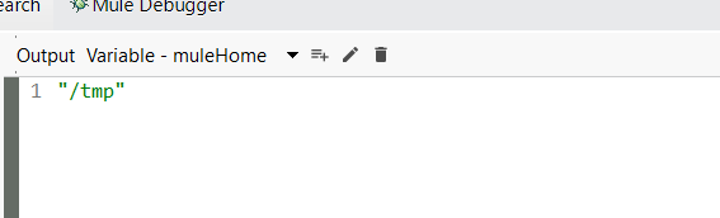
Figure 2: Defining vars.muleHome as /tmp
Why /tmp?
For this pattern, /tmp acts as the writable scratch location available to the running application.
Each running replica has its own temporary filesystem context, so temporary files created by one replica are not being used as a common shared key store across replicas.
That makes /tmp appropriate for short-lived runtime artifacts such as the SSH identity file required by the connector.
The important word here is temporary.
Do not treat /tmp as persistent storage.
Step 3: Hydrate the SSH Key by writing to a file
Then add a File Write operation for using the Mule File Connector.
Write the private-key content retrieved from your external source into:
#[vars.muleHome ++ “/identityKey”]
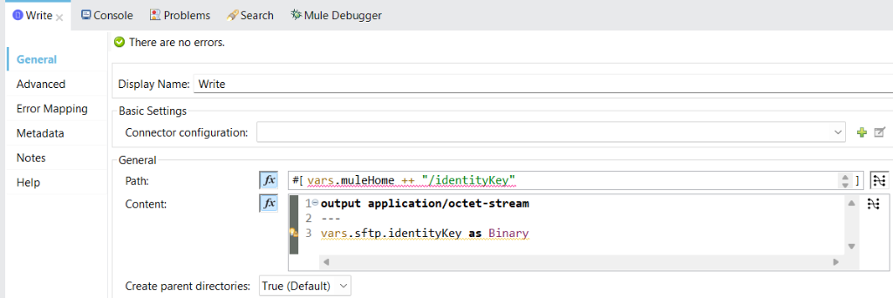
Figure 3: Writing the SSH key to /tmp/identityKey
Configure the component using:
Path
#[vars.muleHome ++ “/identityKey”]
Content
output application/octet-stream
—
vars.sftp.identityKey as Binary
Create parent directories
true
Writing the key as application/octet-stream and converting it to Binary helps preserve the original private-key content as it is written to disk.
That matters for OpenSSH private keys because unexpected changes to line endings, whitespace, or encoding can make an otherwise valid key unusable.
This is one of those implementation details that looks insignificant until authentication starts failing with a key that appears perfectly correct when viewed as text.
Step 4: Configure the SFTP Connector with Dynamic Values
Now configure the SFTP Global Element.
Instead of hardcoding the connection details, bind them to values retrieved at runtime.
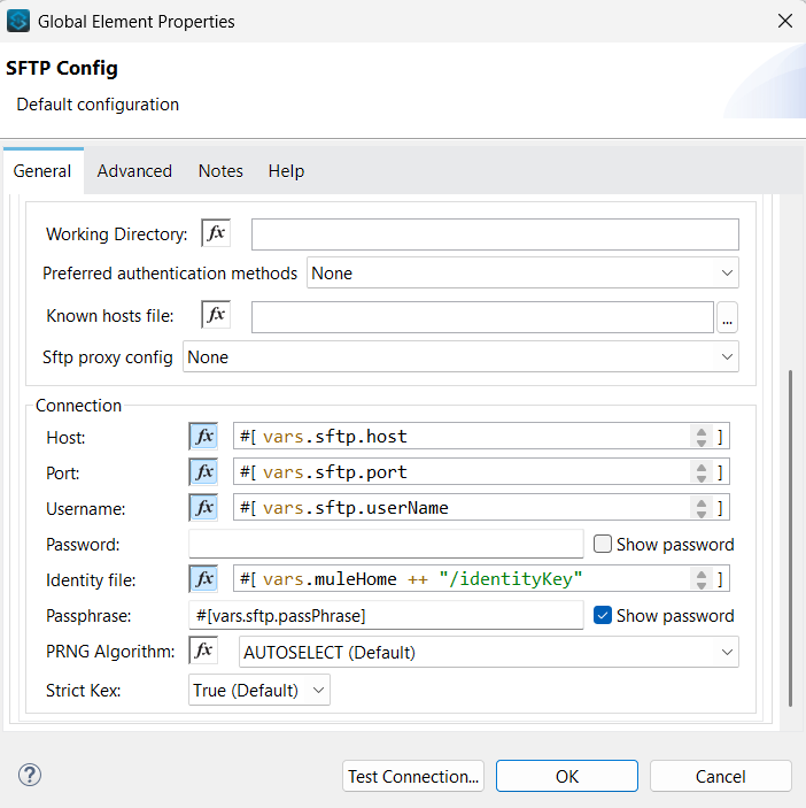
Figure 4: Dynamic SFTP configuration
Map the fields as follows.
Host
#[vars.sftp.host]
Port
#[vars.sftp.port]
Username
#[vars.sftp.userName]
Identity File
#[vars.muleHome ++ “/identityKey”]
Passphrase
#[vars.sftp.passPhrase]
At this point, the application has bridged the gap between two different requirements:
External source: provides the SSH key dynamically.
Mule SFTP Connector: expects the SSH key as a filesystem path.
The temporary file is the bridge between them.
The key itself remains externally managed while Mule receives only the runtime material it needs to establish the encrypted SFTP connection.
Step 5: Sanitize and Guarantee Cleanup
Writing the private key to /tmp solves the connector limitation, but it introduces another responsibility:
The key must be removed.
Place a File Delete operation immediately after the SFTP operation.
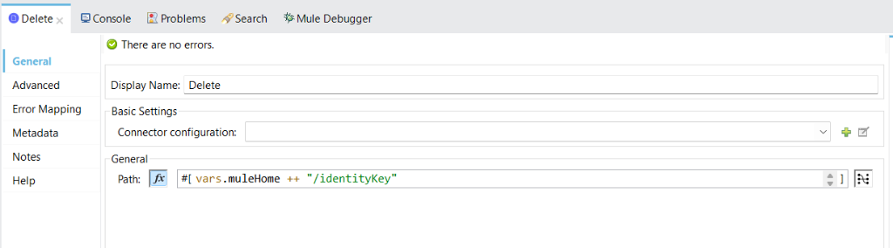
Figure 5: Deleting the temporary identity file
Target:
#[vars.muleHome ++ “/identityKey”]
On a successful execution, the lifecycle becomes:
Retrieve Key
↓
Write /tmp/identityKey
↓
Open SFTP Connection
↓
Perform SFTP Operation
↓
Delete /tmp/identityKey
That is the happy path.
Production systems also need to handle the unhappy path.
The Zero-Leakage Rule
Suppose the SFTP connection fails because:
- The host is unavailable
- The SSH key is invalid
- The passphrase is wrong
- Authentication is rejected
- The connection times out
If Mule throws an error during the SFTP operation, execution may jump directly into the flow’s error-handling logic.
That means the file delete sitting after the SFTP operation in the normal flow may never execute.
This is a critical detail.
You therefore need cleanup logic in the error path as well.
Place the corresponding File Delete operation inside the flow’s <error-handler>, or structure the SFTP interaction inside a scope where cleanup is performed regardless of whether the operation succeeds or fails.
The design requirement should be:
Whether the transfer succeeds or fails, /tmp/identityKey must not remain behind.
Step 6: The Senior Developer Gotcha—Concurrency and Race Conditions
The previous design works correctly when one transaction is executing.
Now consider two transactions hitting the same replica simultaneously.
The Race Condition
Thread 1 — Partner A
Write /tmp/identityKey
————————–> SFTP Connect → Delete
Thread 2 — Partner B
Write /tmp/identityKey
overwrites Partner A’s key
————————–> SFTP Connect
Both transactions use exactly the same physical filename:
/tmp/identityKey
Thread 1 writes Partner A’s key.
Before Thread 1 opens its SFTP connection, Thread 2 writes Partner B’s key to the same path.
Thread 1 may now attempt authentication using Partner B’s credentials.
At best, authentication fails.
At worst, you have created a security problem.
This is why temporary storage alone does not make the pattern production safe. You also have to think about concurrency.
Solution 1: Sequential Flow Execution
The simplest option is to configure:
maxConcurrency=”1″
on the flow.
This prevents more than one transaction from running the following at a time:
Write -> SFTP -> Delete
sequence in the same replica.
This is often the cleanest way for lower-volume integrations where sequential execution will suffice.
Solution 2: Decoupled Queue Processing
Another approach is to put outbound requests behind a queue.
For instance:
Anypoint MQ > Single Consumer > SFTP Processing
or a proper persistent queue architecture.
The queue feeds concurrent requests; the SFTP processing layer processes transfers sequentially.
This architecture also provides a natural place to introduce retry and failure of handling strategies.
Solution 3: Scale over replicas
Each CloudHub 2.0 replica has its own local temporary filesystem context.
Thus, scaling the application across replicas spreads the workload across isolated runtime instances, instead of having each replica write to one shared /tmp/identityKey.
This helps to scale the integration horizontally, but concurrency within an individual replica still needs to be taken into account.
Step 7: Test the Pattern Before Production
Do not confirm this implementation only with a successful SFTP connection.
Test the failure paths as deliberately as the happy path.
Test 1: Happy Path
Provide:
- Valid SFTP host
- Valid username
- Valid private key
- Valid passphrase
Expected result:
SFTP operation succeeds
HTTP response succeeds
/tmp/identityKey is deleted
Test 2: Authentication Failure and Cleanup
Pass an invalid passphrase.
Result Expected:
SFTP authentication fails
Error Handler runs
/tmp/identity Key still is removed
This test is crucial because it proves that cleanup is not contingent on the success of the SFTP operation.
Test 3: CloudHub 2.0 Deployment
Deploy the application to CloudHub 2.0 and execute the same transaction.
Please review the Runtime Manager logs and confirm the following:
- The SFTP connection succeeds
- /tmp can be used as expected
- No permission-denied errors occur
- Error-path cleanup behaves correctly
Passing all three tests gives you much more confidence than simply proving that the connector can authenticate once.
Bonus: Storing SSH Keys in a Database
Many enterprise implementations retrieve partner configuration from databases.
If you store your private SSH key and known_hosts data there, pay attention to the database data type.
A practical option is to store key material as BLOB—Binary Large Object—data rather than treating it as ordinary business text.
Why?
SSH keys depend on their exact content.
Changes to:
- Line endings
- Character encoding
- Whitespace
- Trailing characters
- Multiline formatting
can corrupt a valid key.
Keeping the content in binary form reduces the opportunity for intermediate string handling to alter the key before Mule writes it to the temporary filesystem.
The same principle applies throughout the integration:
Treat cryptographic material as cryptographic material—not as ordinary application text.
Production Design Checklist
Before using this pattern in a production integration, validate all of the following:
- Credentials are from an approved external source.
- Mule project source code never checks in private keys.
- Application logs do not contain the key information.
- Temporary files are created only in the designated writable location.
- Temporary keys are discarded after successful operations.
- Temporary keys are also deleted by error handlers.
- The credentials of concurrent transactions cannot override each other.
- Secrets, including passphrases, are never exposed in logs.
- Explicitly test failure scenarios.
You do not have to redeploy the application to rotate the key.
The pattern is simple.
Securing its entire lifecycle is what makes it production-ready.
Why This Pattern Matters for B2B Integration
The real benefit is not simply getting the SFTP Connector to accept a dynamically retrieved SSH key.
The larger benefit is decoupling partner credentials from application deployments.
Without dynamic credential retrieval, a typical partner key rotation may require:
Partner rotates key
↓
Developer updates application configuration
↓
Application rebuilt
↓
Application redeployed
↓
Connection retested
With externalized credentials and ephemeral hydration:
Partner rotates key
↓
External credential source updated
↓
Mule retrieves current key at runtime
↓
Temporary key hydrated
↓
SFTP connection established
↓
Temporary key deleted
That is a much better operational model for organizations managing many B2B partners.
It becomes particularly valuable when:
- Partners rotate SSH keys frequently
- Different partners use different credentials
- Credentials are centrally governed
- Security teams control secret rotation independently
- Mule applications must avoid redeployment for credential-only changes
The application remains responsible for the integration logic.
The credential system remains responsible for the credentials.
That separation is exactly what we want.
Conclusion
The MuleSoft SFTP Connector’s file-based SSH identity requirement can initially look incompatible with a runtime credential model.
It does not have to be.
By using the Ephemeral Key Hydration Pattern, you can retrieve SSH credentials dynamically, temporarily materialize the private key in /tmp, provide that path to the SFTP Connector, and remove the key immediately after use.
The complete lifecycle becomes:
External Credential Source → Binary Key → Ephemeral /tmp File → SFTP Authentication → Guaranteed Cleanup
But the production-ready version of the pattern depends on more than the File Write component.
You also need to account for:
error handling, cleanup, concurrency, race conditions, key integrity, and secret leakage.
Those details are what turn a working demo into an enterprise integration pattern.
With the right controls in place, MuleSoft applications can support dynamic partner credential rotation without hardcoded SSH keys and without requiring a redeployment every time those credentials change.
Hydrate only when needed. Authenticate securely. Delete immediately.

Editor: Jithendra Mouli Devi Chundi
FAQs
Yes, but when the connector configuration requires an identityFile path, a dynamically retrieved key must first be materialized as a temporary file. The application can write the key to writable ephemeral storage such as /tmp and then pass that path to the SFTP configuration.
SSH key-based SFTP authentication is configured using an identity file that the connector can access from the runtime filesystem. This creates a challenge when the private key originates dynamically from an external configuration or secrets source rather than from a packaged file.
For the pattern described in this guide, the temporary SSH key is written to:
/tmp
The key should be treated as an ephemeral runtime artifact rather than persistent application storage.
Use the Mule File Connector’s Write operation and write the retrieved key to a temporary path such as:
#[vars.muleHome ++ “/identityKey”]
The guide writes the key as application/octet-stream and converts the credential value to Binary before writing it.
Writing the key as binary helps preserve its original content when moving it from the external credential source to the filesystem. Unexpected changes to multiline formatting, encoding, or whitespace can prevent an otherwise valid SSH key from working.
Add a Mule File Connector Delete operation after the SFTP operation.
Cleanup must also exist in the error-handling path because an SFTP authentication or connection failure can interrupt normal flow execution before the standard delete operation runs.
Cleanup should be designed for both success and failure paths. The temporary identity file should be deleted after successful processing and also from the flow’s error-handling logic or an equivalent cleanup mechanism when an exception occurs.
I would use “minimize credential exposure” in marketing copy rather than claiming absolute “zero leakage,” because correct cleanup still depends on implementation.
Two simultaneous transactions can overwrite the same path—for example:
/tmp/identityKey
One transaction may then attempt authentication using another partner’s private key. This is a race condition and can result in authentication failures or a security issue.
The guide describes several approaches, including:
- Processing transactions sequentially with maxConcurrency=”1″
- Buffering transfers through a queue with controlled consumers
- Scaling across CloudHub 2.0 replicas while still controlling concurrency within each replica
For more advanced implementations, unique per-transaction filenames are also worth evaluating as part of the architecture.
Yes. If SSH credentials are stored externally and fetched dynamically at runtime, the external credential can be updated without packaging the new key inside the Mule application.
The Mule flow retrieves the current key when needed, temporarily hydrates it for the SFTP Connector, and removes it afterward.