Blog
Headless Enablement: Bringing Jira and Salesforce Actions to Where Employees Work
- September 23, 2026
- Hari Krishna Kasetty
- Anil Kumar Samayam
Introduction
Digital transformation has helped organizations modernize customer experiences, automate processes, and connect systems at scale. Yet even after significant investments in platforms such as Salesforce and Jira—and collaboration tools such as Slack and Microsoft Teams—one challenge continues to quietly erode employee productivity:
People still spend too much time moving between systems to get work done.
The problem is not necessarily a lack of technology. In many organizations, the required systems, APIs, data, and workflows already exist.
The opportunity is to make those capabilities available where employees are already working.
This is the idea behind headless enablement: keeping enterprise platforms such as Salesforce and Jira as systems of record while exposing selected actions through APIs, MCP, and conversational interfaces such as Slack and Microsoft Teams.
Instead of asking employees to constantly navigate between applications, organizations can begin bringing the actions to the employee.
The Cost of Context Switching
A sales representative wraps up a call in Slack and opens Salesforce to update the opportunity. A support engineer flags a bug in a Teams thread and switches over to Jira to file it properly. A project lead reviewing a blocked ticket has to leave the conversation entirely just to check its status.
The issue isn’t a lack of technology. Most organizations already have the right systems in place.
The challenge is how employees interact with those systems.
As organizations explore AI-powered experiences, agent-based architectures, and digital workplace initiatives, a simple question keeps surfacing:
Why should employees leave the tools where they already work to perform actions that Jira and Salesforce can already expose through APIs?
This is where headless enablement is beginning to reshape how organizations think about employee productivity.
Before looking at the solution, it’s worth quantifying the problem it solves.
Context switching is rarely measured directly, which is precisely why it goes unaddressed. But its downstream effects are visible in metrics that product, sales, support, and engineering organizations already track.
Delayed Data Entry
Opportunity stages, close dates, and case notes lag behind what has actually happened in the business, directly undermining forecast accuracy and pipeline reporting.
Slower Issue Resolution
A bug or request raised in conversation takes longer to become a tracked, assignable work item—and in some cases, it never does.
Redundant Status Checks
Without a shared, chat-visible source of truth, teams default to asking:
“Any update on this?”
instead of checking the system of record, creating duplicate conversations that consume time without adding information.
Adoption Debt
Systems that require deliberate, effortful engagement to update accrue what can be thought of as adoption debt over time.
The gap between what a system could capture and what it actually captures widens as more friction is embedded in using it.
What Salesforce Headless 360 Actually Means
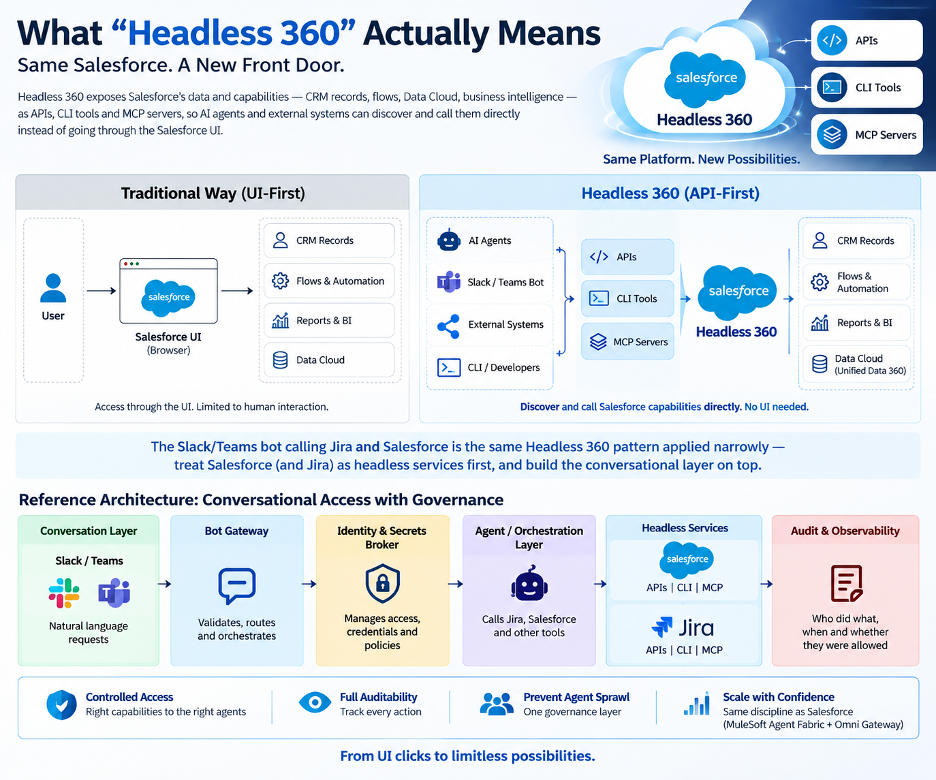
Salesforce uses the term Headless 360 for a broader platform shift: making Salesforce capabilities available outside the traditional Salesforce user interface through APIs, MCP, CLI tools, and other headless experiences.
This enables authenticated applications, developers, and AI agents to interact with Salesforce capabilities programmatically rather than assuming that the browser UI is always the front door.
Salesforce’s Summer ’26 positioning describes Headless 360 as making major Salesforce capabilities available through APIs, MCP tools, or CLI commands to authenticated callers. (Developer)
The pattern this blog describes—a Slack or Teams bot calling Jira and Salesforce on a user’s behalf—is the same idea applied narrowly and deliberately:
Treat Salesforce and Jira as headless services first, and build the conversational layer on top.
A Note on the Current Headless 360 MCP Architecture
Earlier Headless 360 material referenced 60+ MCP and CLI tools across Salesforce capabilities. MuleSoft’s May 2026 Headless 360 guidance used that framing. (MuleSoft Blog)
Salesforce has since introduced the Headless 360 MCP Server Beta, which presents agents with four primary MCP tools:
- Discover
- Describe
- Dispatch
- Dispatch Read Only
Those tools are backed by a growing library of Salesforce skills and operations. Salesforce designed the model this way so agents don’t need to reason over thousands of individual tool definitions. (Developer)
The underlying architectural principle remains the same:
Enterprise capabilities become accessible outside their traditional interfaces while Salesforce continues to enforce authenticated user permissions and platform security controls.
Why Governance Matters in Headless Architecture
The distinction that matters for a rollout like this one is governance.
Headless access itself isn’t necessarily the problem. The risk emerges when many bots, agents, MCP clients, and external applications begin calling enterprise capabilities without a shared way to answer:
Who initiated this action?
What system or agent performed it?
What data was accessed?
Was the caller authorized?
Then What happened?
This is where capabilities such as identity propagation, authorization, audit logging, policy enforcement, and centralized observability become essential.
MuleSoft’s current Agent Fabric architecture positions Omni Gateway as an inline governance layer for multi-agent and MCP environments, including policy enforcement, access controls, PII handling, audit logging, identity propagation, and observability. (MuleSoft Blog)
For the architecture described here, an Identity & Secrets Broker and Audit Log represent a lightweight application of that same governance discipline.
Architecture: What Has to Be True Underneath
The interesting engineering problem isn’t calling the Jira or Salesforce API—both expose well-documented REST capabilities.
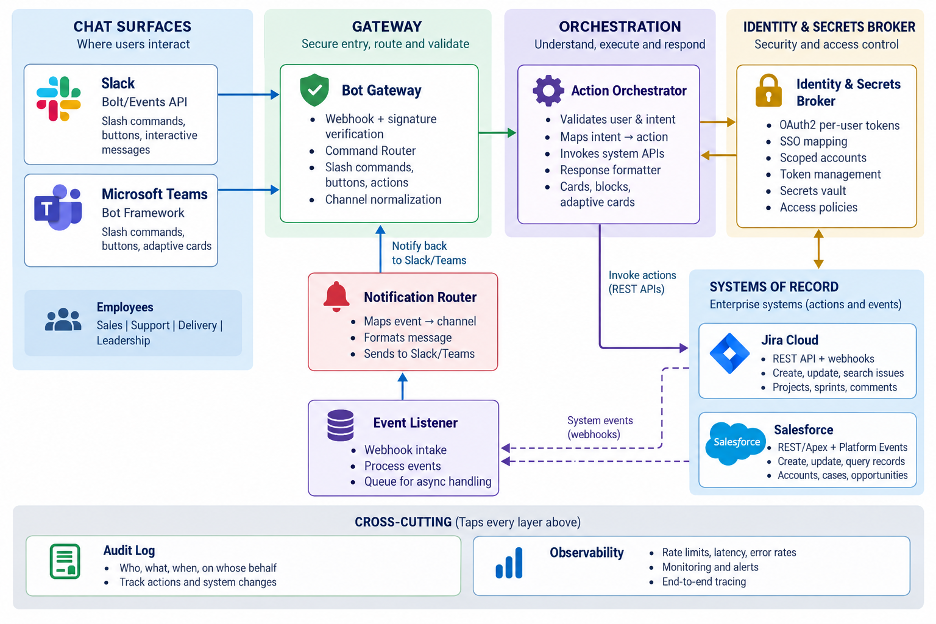
The challenge is building a layer that can sit in front of two very different systems, communicate through different conversational interfaces—such as Slack’s APIs and Microsoft Teams—and still give security and platform teams one place to answer:
“Who did what, and were they allowed to?”
Suggested Architecture Diagram Caption
Reference architecture for exposing governed Salesforce and Jira actions through Slack and Microsoft Teams while maintaining identity, authorization, and auditability.
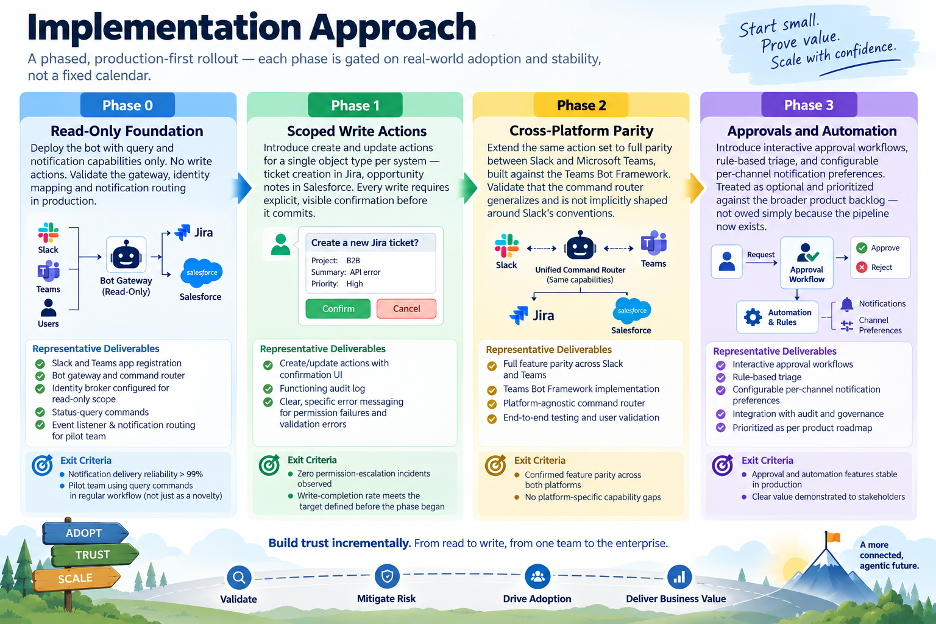
Implementation Approach: Building Trust Through Phased Adoption
A successful conversational AI rollout is not measured by how quickly features are delivered, but by how confidently users adopt them.
A phased approach reduces risk, validates governance at each stage, and gradually expands capabilities from read-only insights to controlled actions and intelligent automation.
A practical implementation can be arranged in three stages:
Phase 1: Reading.
Start with low-risk interactions:
- Verify Jira ticket status
- See details of the opportunity
- Check your assigned issues
- Surface/project CRM information
Phase 2: Managed Actions
Add well-defined write functions:
- Create Jira tickets
- Update sales stages
- Post a Comment
- Modify some fields
- Trigger approved work flows
Require explicit confirmation for write operations that affect material.
Phase 3: Proactive and Agent-Assisted Workflows
Identity, auditability, security and adoption proven, expand to:
- Pro-active warnings
- Suggested actions
- Approval workflows
- Orchestration across multiple systems
- Automation of Agents
It’s not about achieving maximum automation from day one.
It is progressive trust.
Critical Success Factors for Conversational Jira and Salesforce Adoption
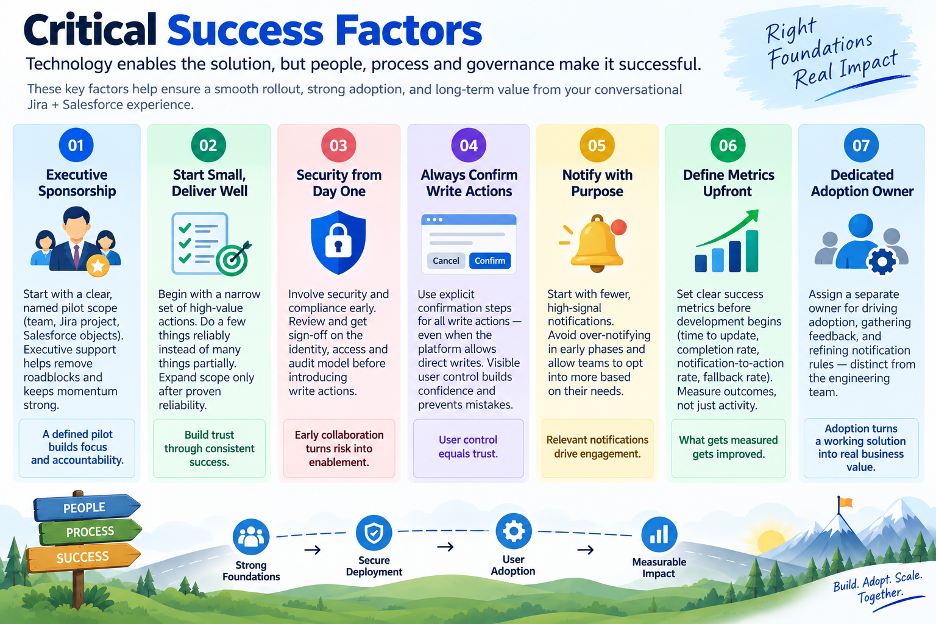
A successful headless enablement initiative depends on more than technology.
Strong executive sponsorship, focused pilot scope, security first governance, controlled user actions, meaningful notifications, measurable outcomes and dedicated ownership for adoption are the key pillars to drive trust, adoption and long term business value.
- Key Highlights
- Begin with a targeted pilot and good executive sponsorship.
- Start with a few high-value initiatives, then broaden the scope.
- Build security and compliance in from day one.
- Write actions require confirmation to build user trust
- Make notifications actionable and relevant.
- Set success metrics early and measure results consistently.
- Assign an adoption owner to drive engagement and feedback.
High-Impact Salesforce and Jira Use Cases in Slack and Teams
A few patterns are already showing the clearest return.
Ticket Creation and Triage
Bugs and requests can be filed when they’re raised in conversation instead of depending on someone remembering to create the ticket later.
Opportunity Updates
Sales representatives can update stages, notes, and close dates in the same workflow as their call recap instead of making a separate trip into Salesforce.
Status Queries
Questions such as:
“What’s the status of PROJ-482?”
or
“What’s the close date on the Acme opportunity?”
can be answered inline without requiring users to open either application.
Push Notifications
A ticket becoming blocked or a deal crossing an important stage can appear in the relevant channel automatically instead of waiting for someone to look for the change.
Approvals
Deal-desk or triage decisions can eventually surface as controlled actions directly within a message once the underlying identity, authorization, and audit model has proven itself.
Driving Productivity with Headless Enablement
Headless enablement transforms Jira and Salesforce from applications employees must constantly navigate into enterprise services that can be accessed through the environments where work is already happening.
Teams can create tickets, update opportunities, check statuses, receive proactive notifications, and approve requests without repeatedly leaving their collaboration platform.
The potential benefit is not simply fewer clicks.
It is better workflow continuity, faster action capture, fresher enterprise data, and reduced friction between conversation and execution.
Built for Governance, Security, and Adoption
Success is not just about automation.
It is about trust.
Organisations can confidently scale their conversational experiences with the right capabilities to ensure compliance, visibility and user control: secure authentication through OAuth, real-time authorisation checks, full audit logging, phased rollout strategies and clear success metrics.
This becomes even more important as enterprise actions can originate from:
- Human users
- Slack or Teams bots
- AI assistants
- External agents
- MCP clients
- Automated workflows
The interface may change.
The enterprise security model cannot disappear with it.
Looking Ahead: From Applications to Enterprise Capabilities
The future of enterprise tooling won’t be defined by how many applications an organization runs.
It will be defined by how easily employees can reach the actions those applications expose.
Salesforce will remain a system of customer truth.
Jira will remain a system that drives delivery.
Slack and Microsoft Teams will remain where much of the day-to-day conversation happens.
Headless enablement creates an architectural bridge between those worlds.
Instead of forcing every business interaction back through a traditional application interface, organizations can expose the right capability in the right context—while keeping the underlying system authoritative.
Conclusion
The next evolution of enterprise productivity is not necessarily another application.
It is making the capabilities organizations have already invested in available where employees actually need them.
Salesforce and Jira do not need to stop being enterprise systems of record. Slack and Microsoft Teams do not need to become CRM or issue-management platforms.
Each system can continue doing what it does best.
Headless enablement simply changes how employees reach those capabilities.
But as enterprise actions move outside traditional application boundaries, governance has to move with them.
Identity. Authorization. Auditability. Security. Observability.
Those elements determine whether conversational enterprise experiences remain convenient experiments or become scalable enterprise architecture.
The goal is straightforward:
Less switching between applications. More work completed where work already happens.
Why ProwessSoft
Headless enablement sits at the intersection of enterprise integration, APIs, Salesforce, MuleSoft, automation, AI, identity, and governance.
ProwessSoft helps organizations connect these layers so that Salesforce, Jira, and other enterprise systems can expose useful business capabilities beyond their traditional interfaces—without creating another generation of uncontrolled point-to-point integrations.
Our approach can help organizations address:
- API and integration architecture
- Salesforce and MuleSoft connectivity
- MCP and agent readiness
- Identity and authorization
- Security and policy enforcement
- Observability and auditability
- Conversational workflow enablement
- Reusable enterprise capabilities
The objective is not to replace the platforms employees already depend on.
It is to make those platforms easier to access, easier to act on, and easier to govern.
Bring Enterprise Actions into the Flow of Work
If your employees are constantly moving between Salesforce, Jira, Slack, Microsoft Teams, and other enterprise platforms to complete connected tasks, there may be an opportunity to simplify how that work gets done.
ProwessSoft can help assess the integration, API, identity, governance, and conversational architecture required to bring enterprise actions closer to the employee.
Connect the systems. Bring actions into the conversation. Keep governance intact.
References
I would retain the author’s existing reference section rather than removing it. It is useful for E-E-A-T, technical credibility, and source transparency, especially the official MuleSoft, Salesforce, Slack, Microsoft, Atlassian, OAuth, and event-driven architecture links.

Author: Hari Krishna Kasetty

Co-Author: Anil Kumar Samayam
FAQs
Headless enablement separates enterprise capabilities from the application’s traditional user interface. It allows systems such as Salesforce and Jira to expose selected actions through APIs, MCP, bots, or other interfaces while remaining the underlying systems of record.
Salesforce Headless 360 is a model for exposing Salesforce data and capabilities beyond the Salesforce UI through interfaces such as APIs, CLI tools, and MCP so external systems and AI agents can discover and use them programmatically.
Yes. With the appropriate integration, authentication, authorization, and APIs, selected Salesforce actions—such as checking opportunity details or updating records—can be surfaced within Slack instead of requiring users to open Salesforce separately.
Yes. Jira APIs can be integrated with Microsoft Teams to support use cases such as creating tickets, checking issue status, receiving notifications, and triggering controlled workflow actions.
Common use cases include:
- Jira ticket creation and triage
- Salesforce opportunity updates
- Ticket and opportunity status queries
- Proactive workflow notifications
- Approvals within Slack or Teams
These are the same high-impact patterns identified by the author.
No. Salesforce and Jira continue to operate as the underlying enterprise systems. Headless enablement simply allows selected capabilities to be accessed from other interfaces, such as Slack, Microsoft Teams, or AI agents.
As more bots, agents, APIs, and MCP clients interact with enterprise systems, organizations need to know who performed an action, what they accessed, whether they were authorized, and what happened afterward. Authentication, authorization, audit logging, and policy controls therefore become essential.
Instead of forcing users to leave Slack or Microsoft Teams to perform actions in Salesforce or Jira, relevant capabilities can be brought directly into the collaboration environment. This can reduce redundant system switching and improve workflow continuity.
Start with a focused pilot and a small number of high-value actions. Build security and compliance into the architecture from the beginning, require confirmation for sensitive write actions, and measure adoption and business outcomes before expanding.
MCP can give a standardized way for compatible AI agents and systems to discover and invoke enterprise capabilities. In a headless architecture, it can complement traditional APIs by making selected tools and actions available to AI-driven experiences.