Blog
MuleSoft Vibes: Building My First Mule Application with AI
- October 13, 2026
- Gayathri Mhetre
- Senior Software Engineer
Introduction
When I started learning MuleSoft, building an integration meant thinking in Mule terms from the beginning.
Flows. Connectors. DataWeave. XML configuration. API specifications. Dependencies. Error handling. Testing. Deployment.
All of that is still important.
But MuleSoft Vibes made me start from a different place.
Instead of asking myself:
Which Mule components do I need to build this integration?
I could begin with:
What do I actually want the integration to do?
Then I could describe that requirement in plain English and let MuleSoft Vibes help create the initial application structure.
That was what I wanted to test.
Could I describe a fairly normal integration requirement, let AI build the first version, and then use my MuleSoft knowledge to review and improve what it generated?
The answer was yes—but the experience also made one thing very clear:
AI can shorten the path to a first draft. It does not remove the need to understand what you are building.
What Is MuleSoft Vibes?
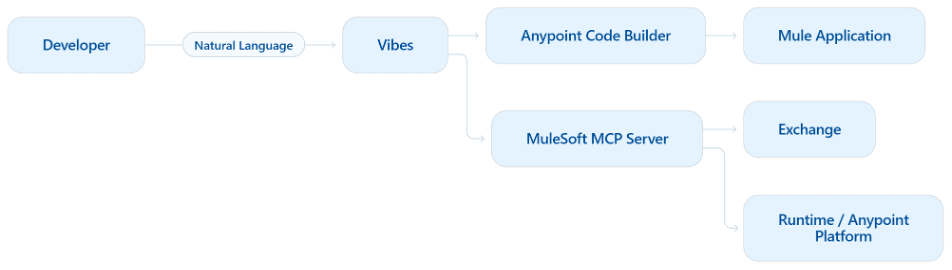
MuleSoft Vibes is an AI-powered development tool that can be found directly in Anypoint.
MuleSoft describes it as a purpose-built assistant for the development lifecycle. Developers can use natural-language messages to create and modify integrations and API specifications, search assets, manage applications, and perform other supported MuleSoft tasks through MuleSoft MCP Servers.
It is important to separate two things:
MuleSoft is the integration platform.
MuleSoft Vibes is an AI assistant that works with that platform.
For example, instead of manually creating a Mule project and configuring every component one by one, I can ask:
Create a Mule application with a GET /customers/{id} endpoint that accepts a customer ID and returns customer information as JSON.
Vibes can translate that request into Mule artifacts.
For integrations, MuleSoft currently documents generated output such as flows, connector configurations, a sample config.properties file, and the dependencies required by the connectors being used.
That gives me something concrete to inspect instead of starting from an empty project.
What Can MuleSoft Vibes Do?
The current MuleSoft Vibes experience goes beyond simple code generation.
It can help developers create API specifications, build and configure Mule applications, search reusable assets, work with project context, deploy and manage instances, and interact with supported MuleSoft capabilities through MCP tools.
For me, the easiest way to understand the workflow was:
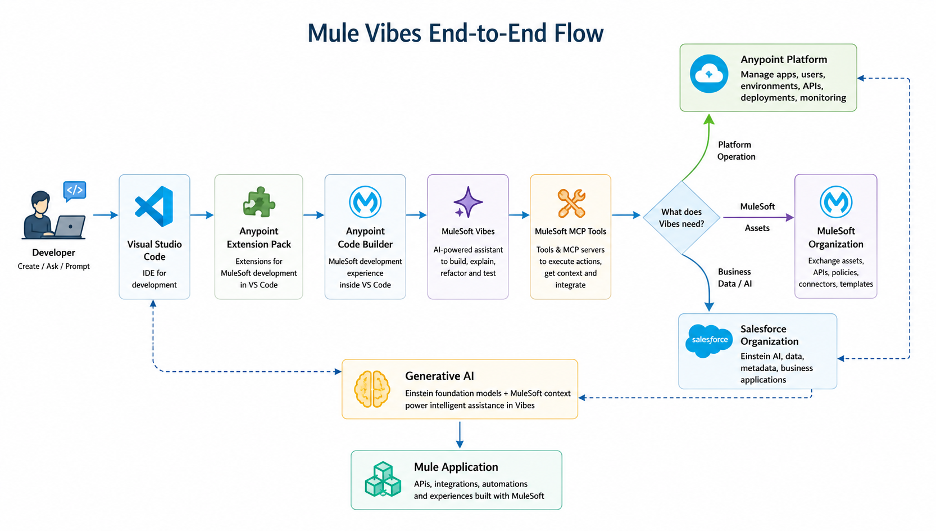
Requirement → Prompt → Plan → Mule artifacts → Review → Test → Refine → Deploy
That is more useful than thinking of Vibes as a chatbot.
It is part of the development workflow.
But the developer still owns the result.
Starting with a Business Requirement
Imagine I want to build this integration:
Create a MuleSoft integration that exposes the GET /customers endpoint.
Call external HTTP customer service.
Convert the answer into:
{ “customers”: [ { “id”: “123”, “name”: “John”, “email”: “john@example.com” } ]}
Add status code handling for 400, 404, and 500 responses.
Add good logs.
Without Vibes, I would probably translate that mentally into something like:
HTTP Listener → HTTP Request → Transform Message → Logger → Error Handler
With Vibes, I can start with the requirement itself.
That may sound like a small difference, but it changes the development experience.
I spend less time initially asking, “Which component do I drag onto the canvas next?” and more time defining what the integration needs to achieve.
A Few Things I Learned Before Starting
Vibes lives inside Anypoint Code Builder and works with MuleSoft MCP Servers to access supported MuleSoft development and platform capabilities. MuleSoft’s current documentation also confirms that Vibes operates using the permissions of the developer authenticated in Anypoint Code Builder—it cannot perform actions that the user is not authorized to perform.
The underlying models used for Vibes operate within the Salesforce Shared Trust Boundary, according to MuleSoft’s documentation.
This information matters in an enterprise environment.
AI-powered development should not create a second, unmanaged track that bypasses the platform’s current access model.
What Did I Need Before I Start?
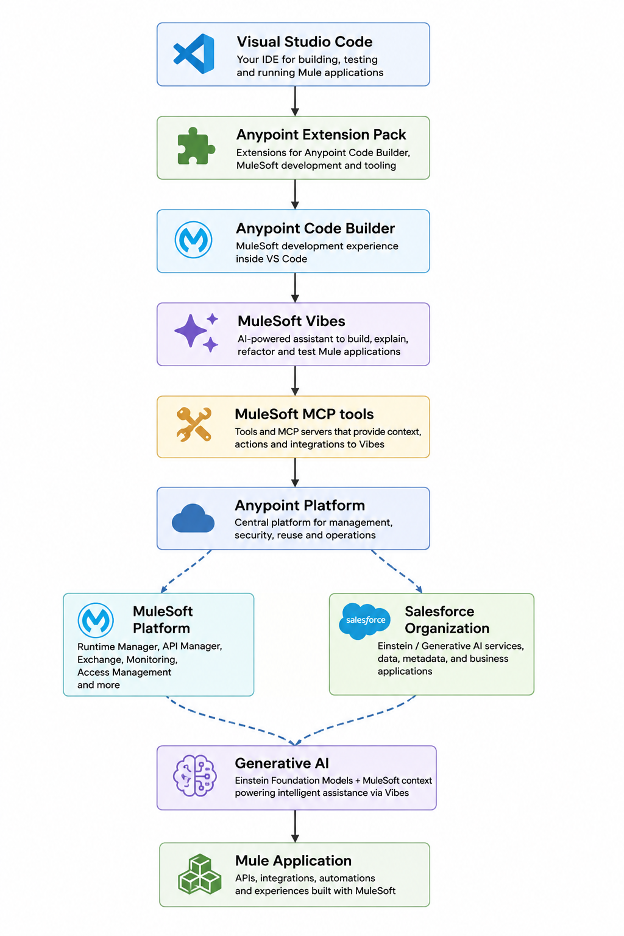
For my setup that had Visual Studio Code with the Anypoint Extension Pack, an Anypoint Platform account, the correct MuleSoft permissions, and a Salesforce org connected to Anypoint Platform with generative AI enabled.
Anypoint Code Builder itself relies on tooling including VS Code, Java, Node.js, Maven, and local build artifacts.
For Vibes, the important Anypoint Platform permission is:
Mule Developer Generative AI User
Additional permissions depend on what I want Vibes to do—for example, publishing an asset or deploying an application requires the relevant platform permissions as well.
Step 1: Install Visual Studio Code
I started with Visual Studio Code.
After installation, I confirmed that VS Code was available from the command line:
code –version
Then I created the workspace where I wanted to build the Mule application.
Nothing unusual here. The important part is that Anypoint Code Builder runs within the development environment I already use.
Step 2. Install the Anypoint Extension Pack
Then I installed the AnyPoint Extension Pack.
This brings the Anypoint Code Builder development experience into VS Code and includes the functionality you need to develop Mule applications and APIs.
After installation, I opened Anypoint Code Builder from the VS Code interface and confirmed that I could access the MuleSoft tools.
At this stage, I was still setting up a normal Mule development environment.
The AI part comes after the environment and permissions are ready.
Step 3: Configure the Right Anypoint Permissions
This was worth paying attention to.
To use MuleSoft Vibes, the user needs the:
Mule Developer Generative AI User
Permission.
One detail I would clarify from my initial notes: if you are using Anypoint Code Builder for Desktop, the Anypoint Code Builder Developer permission is not itself required merely to use the desktop IDE. MuleSoft currently documents that permission specifically for creating and using cloud IDE instances.
The permissions needed beyond Vibes depend on the action.
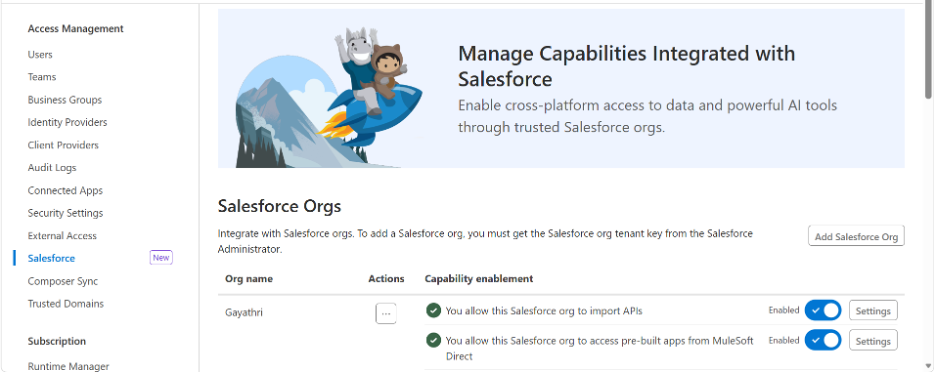
If I want to deploy, publish, manage APIs, or interact with other MuleSoft resources, my user still needs permission to perform those operations.
That is a sound design principle:
The AI assistant should work within my access—not around it.
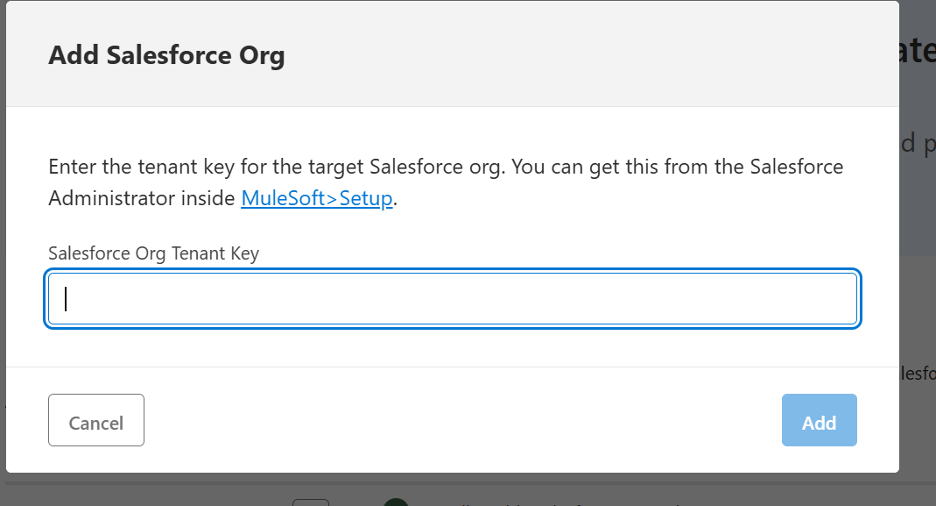
Step 4: Connect Salesforce and Anypoint Platform
Create salesforce developer account
Anypoint Platform:
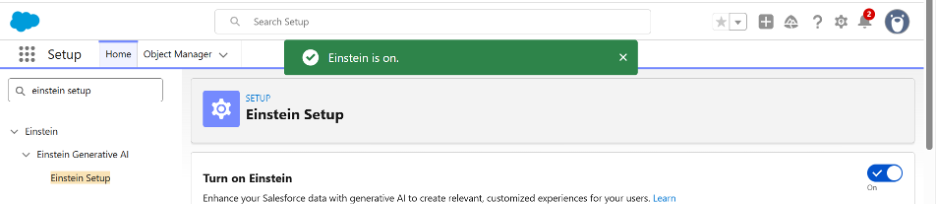
- Go to settings-> setup -> search Einstein and enable it.
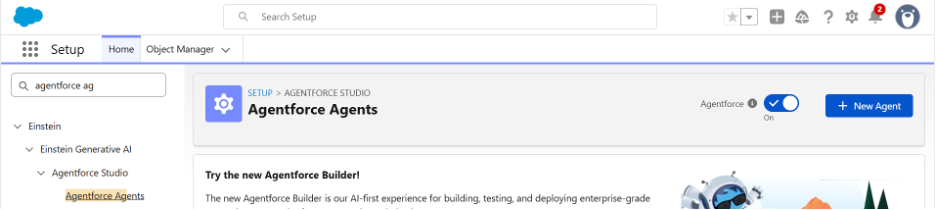
- Go to settings-> setup -> search agentforce Agents and enable it
- Go to settings-> setup -> search anypoint platform setup and connect the platform credentials
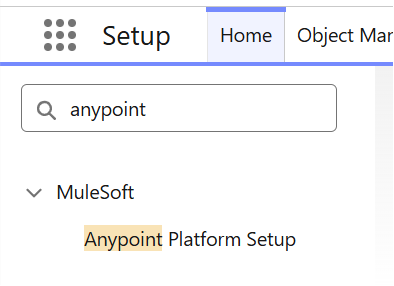
- Take Your Salesforce org tenant key: core/prod/000000 and paste in anypoint platform at step 3
- Take Anypoint Platform Organization ID from platform and paste in salesforce in the same window
The high-level relationship looks like this:
Salesforce Organization
↓
Einstein Generative AI
↓
Trusted Salesforce ↔ Anypoint Platform connection
↓
Generative AI enabled in Anypoint Platform
↓
Mule Developer Generative AI User
↓
MuleSoft Vibes
The Salesforce organization is important because the current MuleSoft architecture uses the connected Salesforce organization for the generative AI capability.
Step 5: Log In to the Anypoint Platform from VS Code
Once the organization setup was complete, I signed in to Anypoint Platform from Anypoint Code Builder.
This authentication matters because Vibes operates in the context of that user.
If the user cannot deploy an application, Vibes should not suddenly be able to deploy it on the user’s behalf.
If something is unavailable, the first things I would check are the signed-in account, generative-AI enablement, and the user’s MuleSoft permissions.
Step 6: Plan Mode vs. Act Mode
This was one of the features I liked most.
MuleSoft Vibes currently provides Plan Mode and Act Mode.
Plan Mode
Plan Mode lets Vibes analyze the requirement and show how it intends to approach the task without at once changing the project.
For example:
Create customer API integration
1. Create Mule application
2. Configure HTTP Listener
3. Add HTTP Request
4. Configure external customer service
5. Transform response with DataWeave
6. Add Error Handling
7. Add logging
8. Prepare testing
I can read that first.
If something looks wrong, I can change the requirement before Vibes starts changing files.
Act Mode
Act Mode allows Vibes to carry out supported actions using the available MuleSoft tools.
My preferred workflow is therefore:
Understand
↓
Plan
↓
Review
↓
Act
↓
Inspect the changes
↓
Test
The important word is review.
I do not want AI speed at the expense of understanding what changed.
Step 7: Create My First Mule Application
I created a new integration project and named it:
mulesoft-vibes-first-app
Then I opened MuleSoft Vibes inside the project.
At this point, I deliberately avoided starting with Mule components.
I started with the requirement.
Step 8: Provide Vibes Enough Context
A prompt like:
Create an API.
is technically a request, but it leaves most design decisions undefined.
No, I used something more specific.
Create an integration called customer-api in MuleSoft.
Create an endpoint GET /customers.
Call External HTTP Customer Service
Change response:
{ “customers” : [ { “id” : “123”, “name” : “John”, “email” : “john@example.com” } ] }
Handle Error Handling for HTTP Error Codes (400, 404, 500)
Add some meaningful logging.
Keep the implementation simple and use standard MuleSoft components.
That produced a much more useful starting point.
The lesson for me was not simply “write better prompts.”
It was:
Treat the prompt like a lightweight technical requirement.
Tell the assistant what the integration must do, what constraints matter, what output is expected, and what should happen when things go wrong.
MuleSoft’s own guidance similarly recommends providing clear, specific messages and relevant project context to improve generated integrations.
Step 9: Review What Vibes Generated
This is where MuleSoft knowledge becomes increasingly important.
The resulting flow might look perfectly reasonable :
HTTP Listener ↓ HTTP Request ↓ Transform Message ↓ Error Handler
This does not mean I should take it as it is.
I review the host and port, base path, credentials, authentication, TLS, connection timeouts, DataWeave mappings, null handling, connector versions, runtime compatibility, logging, error behavior, and externalized properties.
I also look for something AI-generated integrations can easily hide:
assumptions.
Did it choose a timeout because I specified one—or because it had to choose something?
Did it interpret a field as optional when the downstream system requires it?
Did it add logging that could expose sensitive data?
Did it hardcode anything that should live in a configuration or secure property?
This is where the developer provides the context the model does not have.
Step 10: Test Before You Trust the Result
The most useful rule I took away from this experiment is:
Generated quickly does not mean validation.
The application still needs normal engineering discipline.
I build it. Run it. Exercise the failure paths. Inspect the DataWeave result. Test invalid inputs. Verify authentication. Check logs. Review configuration. Add MUnit tests where proper. Please verify that the secrets are being handled correctly.
AI may reduce the time needed to construct the first implementation.
It does not lower the standard that the implementation must meet.
One Capability I Would Use More as a Team
For my first application, I concentrated on prompting, generation, review, and testing.
For broader team adoption, another current Vibes capability is particularly interesting: rules, workflows, and reusable skills.
MuleSoft now allows teams to define workspace or global rules that guide Vibes—for example, naming standards, security expectations, or needed error-handling patterns. Reusable skills can package development guidance for specific tasks, and these rules and skills can also be shared through GitHub.
That changes the conversation from:
“How does one developer prompt AI correctly?”
to:
“How do we make AI-assisted development follow our engineering standards consistently?”
For enterprise MuleSoft teams, that is the most important long-term question.
What Building My First Application with Vibes Taught Me
The most interesting change was that Vibes could create a flow.
Mule developers already know how to create flows.
The change was where the development process began.
Previously, I might start by thinking:
Listener. Connector. Transform. Error Handler.
With Vibes, I can start with:
Customer lookup. External service. Expected response. Failure behavior.
The implementation components come afterward.
That makes Vibes useful for more than just speed.
It can help shorten the distance between a business requirement and the first technical implementation.
But that advantage becomes much more valuable when the person using Vibes understands MuleSoft well enough to challenge what it produces.
Does MuleSoft Vibes Replace the MuleSoft Developer?
My experience did not suggest that.
If anything, it made architectural judgment more visible.
Someone still has to decide whether the generated API design makes sense.
Someone has to understand DataWeave.
Someone has to validate security.
Someone has to know whether an error handler is appropriate.
Someone has to recognize a bad connector configuration.
Someone has to decide whether the integration belongs in production.
Vibes can help build faster.
The developer still decides whether what was built is acceptable.
Why ProwessSoft
AI-assisted development becomes more useful when it sits on top of good integration engineering.
ProwessSoft works across MuleSoft, APIs, integration, automation, data, and AI, helping enterprise teams adopt newer development approaches without losing the architecture and governance required for production systems.
For organizations exploring MuleSoft Vibes, the opportunity is broader than giving developers another AI tool.
It is about defining how AI-assisted development fits into:
API standards, reusable integration patterns, security, code review, testing, CI/CD, governance, and developer enablement.
As Vibes adds capabilities such as workspace rules, workflows, skills, MCP tools, and deployment actions, establishing those engineering guardrails becomes increasingly important.
The objective should not be to generate more code.
It should be to help teams move faster without lowering the quality bar.
Conclusion
My first MuleSoft Vibes project changed how I think about the beginning of an integration.
I did not stop thinking about flows, connectors, DataWeave, dependencies, errors, or deployment.
I simply did not have to start there.
I could begin by explaining what the integration needed to accomplish.
Vibes could help turn that intent into a first implementation.
Then my job became reviewing it, questioning its assumptions, testing its behavior, and improving it.
That is the role I see for AI in MuleSoft development:
not replacing integration knowledge, but giving that knowledge a faster way to become working software.
For developers who already understand MuleSoft, Vibes can remove some of the repetitive setup work.
For developers learning MuleSoft, it can make experimentation easier—but it should never become a substitute for understanding the platform underneath.
Describe the intent. Review the plan. Inspect the implementation. Test the result.
That is how I would use MuleSoft Vibes.
Explore AI-Assisted MuleSoft Development
If your MuleSoft team is evaluating Vibes or broader AI-assisted development, ProwessSoft can help define the development standards, governance model, reusable patterns, and delivery practices needed to use it effectively.
Build faster with AI. Keep engineering judgment in control.

Editor: Gayathri Mhetre
Role: Senior Software Engineer
FAQs
MuleSoft Vibes is an AI-powered development assistant available in Anypoint Code Builder. Developers can use natural-language prompts to create and modify integrations and API specifications, search assets, deploy applications, manage instances, and perform other supported MuleSoft development tasks.
No. MuleSoft is the broader integration and API platform. MuleSoft Vibes is an AI-assisted development experience within Anypoint Code Builder that helps developers interact with MuleSoft capabilities using natural language.
Yes. MuleSoft documents that Vibes can transform business logic described in natural language into Mule applications containing flows, connector configurations, a sample config.properties file, and required connector dependencies.
MuleSoft Vibes can support tasks such as creating integrations, developing API specifications, configuring applications, searching assets, deploying and managing instances, managing metadata, and working with MuleSoft MCP Server tools.
The key documented permission is Mule Developer Generative AI User. Developers also need the appropriate Anypoint Platform permissions for any additional actions they want Vibes to perform, such as deployment or asset management.
No. Vibes uses the permissions of the Anypoint Platform user who is signed in to Anypoint Code Builder and can only perform actions that the authenticated user is authorized to execute. MuleSoft
Plan Mode lets Vibes analyze a requirement and propose an implementation approach before making changes. Act Mode allows Vibes to perform supported actions once the developer is comfortable with the plan. This gives developers a review point before AI modifies the project.
Yes. MuleSoft Vibes integrates with MuleSoft MCP Servers, which provide agentic tools for capabilities such as API design, application deployment, asset management, governance, and platform interaction.
Yes. When generating Mule integrations, Vibes can create flows and connector configurations and can assist with transformation logic as part of the application it generates. Developers should still inspect mappings, data types, null handling, connector versions, and other implementation details before production use.
No. AI-generated integrations should go through the same engineering process as manually developed Mule applications: code review, security validation, error-path testing, configuration review, observability checks, and MUnit or other relevant testing.