

Blog
Unlocking Voice AI in MuleSoft with the Whisperer Connector
- June 18, 2026
- Valluru Chenna Aswini
Bringing Speech-to-Text and Text-to-Speech Capabilities into Enterprise Integrations
Introduction: Voice Is Becoming the New User Interface
Voice-powered experiences are rapidly becoming a core part of modern applications.
From:
- Virtual assistants
- Customer service automation
- Meeting transcription
- Accessibility solutions
Organisations are increasingly leveraging voice as a natural way to interact with systems.
As AI adoption accelerates, enterprises need a way to integrate voice capabilities directly into their workflows and business processes.
This is where the MuleSoft Whisperer Connector comes in.
Part of the MuleSoft AI Chain (MAC) project, the Whisperer Connector enables MuleSoft applications to seamlessly incorporate:
- Speech-to-Text (STT)
- Text-to-Speech (TTS)
capabilities into enterprise integration flows.
Why the Whisperer Connector Matters
Traditionally, MuleSoft has focused on connecting systems, applications, and data.
With AI-focused connectors like Whisperer, MuleSoft is evolving into an intelligent integration platform capable of handling multimodal interactions.
The connector bridges three important domains:
- Voice AI
- Enterprise Integration
- Business Automation
This enables organizations to build voice-enabled workflows without complex custom development.
What Is the MuleSoft Whisperer Connector?
The Whisperer Connector is a custom MuleSoft extension that provides access to:
- OpenAI Whisper models
- Local Whisper implementations using Whisper JNI
It allows Mule applications to process audio files and convert them into actionable business data or generate audio from text.
In simple terms:
Audio → Text (Speech Recognition)
and
Text → Audio (Speech Synthesis)
within MuleSoft integrations.
Core Capabilities
The connector supports two primary operations.
1. Speech-to-Text
Convert audio files such as:
- WAV
- MP3
- Audio recordings
into structured text.
Common Use Cases
- Call center transcription
- Voice command processing
- Customer interaction analysis
- Meeting notes generation
2. Text-to-Speech
Convert text into audio output.
Common Use Cases
- Voice assistants
- Automated notifications
- Interactive voice systems
- Accessibility solutions
These two operations form the foundation of voice-enabled enterprise integrations.
Supported Providers
The Whisperer Connector supports multiple processing options.
| Provider | Speech-to-Text | Text-to-Speech |
|---|---|---|
| Whisper JNI (Local) | ✓ | × |
| OpenAI Whisper | ✓ | ✓ |
When to Use Each Provider
Whisper JNI (Local Processing)
Best for:
- Offline environments
- High-security deployments
- Data-sensitive use cases
Benefits:
- No internet dependency
- Complete local execution
OpenAI Whisper
Best for:
- Cloud deployments
- Full speech capabilities
- Enterprise scalability
Benefits:
- Supports STT and TTS
- Easy deployment
- Managed infrastructure
Deployment Options
One of the key strengths of the connector is deployment flexibility.
Local Deployment (Whisper JNI)
Runs using:
- whisper.cpp
- Local machine resources
Advantages:
- Offline processing
- Enhanced data privacy
Limitations:
- Requires system dependencies
- Not supported on CloudHub
Cloud-Based Deployment (OpenAI)
Supported on:
- CloudHub
- CloudHub 2.0
- Runtime Fabric
Requirements:
- OpenAI API Key
Advantages:
- Fully managed
- Scalable
- Supports both STT and TTS
Architecture Overview
Speech-to-Text Flow
Audio File
↓
Whisperer Connector
↓
Text Output
↓
DataWeave / API / Database
Text-to-Speech Flow
Text Input
↓
Whisperer Connector
↓
Audio Output
↓
Client Application / Notification Service
This architecture allows voice processing to become a native part of MuleSoft workflows.
Installing the Whisperer Connector
Since the connector is not available in Anypoint Exchange, it must be added manually.
Step 1: Add Maven Dependency
Add the following dependency to your pom.xml:
<dependency>
<groupId>io.github.mulesoft-ai-chain-project</groupId>
<artifactId>mule4-whisperer-connector</artifactId>
<version>{latest}</version>
<classifier>mule-plugin</classifier>
</dependency>
Step2: Connector configuration
Adding Credentials to Connector Configuration
Choose:
OpenAI (API-based)
Whisper JNI (local model)
And add api key

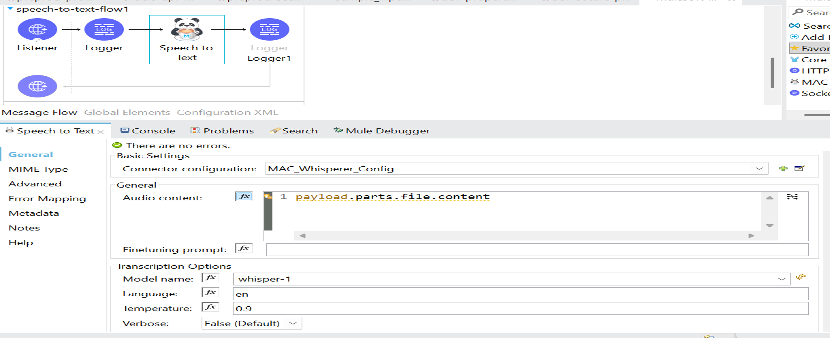
Supported Operations (Core Capabilities)
- Speech-to-Text
Converting audio files (wav, mp3, etc.) to text
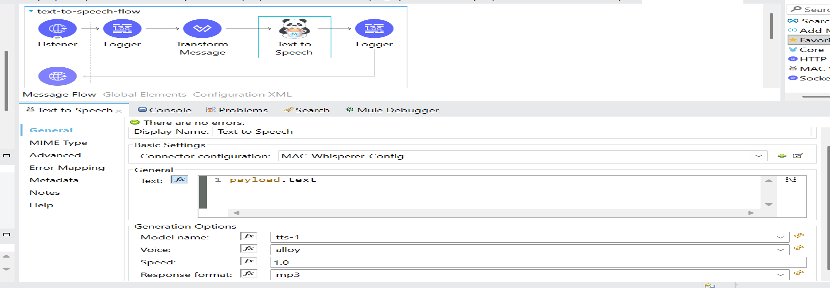
- Text-to-Speech:
Converting text to audio files (wav, mp3, etc.)
Real-World Use Cases
1. Call Center Automation
Automatically:
- Transcribe customer calls
- Analyze conversations
- Detect customer intent
2. AI Voice Assistants
Enable systems to:
- Accept voice commands
- Process requests
- Respond with synthesized speech
3. Meeting Transcription
Convert:
- Internal meetings
- Training sessions
- Recorded calls
into searchable text records.
4. Accessibility Solutions
Provide audio-based experiences for:
- Visually impaired users
- Hands-free interactions
- Inclusive applications
Best Practices
For optimal results:
✔ Use OpenAI mode for cloud deployments
✔ Use Whisper JNI for secure offline environments
✔ Optimize audio formats (WAV or MP3)
✔ Combine with:
- DataWeave for transformations
- MuleSoft AI Chain for LLM processing
- MAC WebCrawler for knowledge ingestion
Limitations to Consider
Before implementation, consider:
Whisper JNI Limitations
- Not supported on CloudHub
- Requires local system dependencies
Performance Considerations
- Large audio files may increase processing time
- Local environments require sufficient resources
Why Voice AI Matters for Enterprise Integration
Voice data is one of the fastest-growing enterprise data sources.
Organizations increasingly need:
- Voice-enabled APIs
- AI-driven assistants
- Automated transcription workflows
- Conversational experiences
The Whisperer Connector allows MuleSoft to participate directly in this evolution.
Conclusion
The MuleSoft Whisperer Connector extends MuleSoft beyond traditional integration use cases and into the world of Voice AI.
By enabling:
- Speech-to-Text
- Text-to-Speech
- Offline and cloud deployments
it allows enterprises to build intelligent, voice-enabled workflows with minimal effort.
Whether you’re building:
- AI assistants
- Voice-driven APIs
- Automated transcription systems
- Accessibility-focused applications
the Whisperer Connector provides a practical foundation for next-generation AI integrations.
How Prowess Software Services Helps
At Prowess Software Services, we help organizations build AI-powered integration solutions using:
- MuleSoft AI Chain
- Voice AI technologies
- OpenAI integrations
- Enterprise automation platforms
We combine APIs, Data, AI, and Automation to create intelligent, scalable, and future-ready digital ecosystems.
Referrer
Some sites validate where the request is coming from.

Editor: Valluru Chenna Aswini
10 Frequently Asked Questions
The MuleSoft Whisperer Connector is a MuleSoft AI Chain (MAC) connector that enables speech-to-text and text-to-speech capabilities within MuleSoft applications.
The connector supports:
- Speech-to-Text (audio transcription)
- Text-to-Speech (audio generation)
allowing MuleSoft applications to process voice interactions.
Yes. The connector supports OpenAI Whisper for speech-to-text and text-to-speech operations, depending on the provider’s configuration
Whisper JNI runs locally and supports speech-to-text only, while OpenAI Whisper supports both speech-to-text and text-to-speech capabilities through cloud APIs.Whisper JNI runs locally and supports speech-to-text only, while OpenAI Whisper supports both speech-to-text and text-to-speech capabilities through cloud APIs.
Yes, when using OpenAI-based processing. However, Whisper JNI is not supported on CloudHub due to local system dependency requirements.
The connector commonly supports audio formats such as:
- WAV
- MP3
for speech recognition and audio generation workflows.
Popular use cases include:
- Call center transcription
- AI voice assistants
- Meeting transcription
- Accessibility solutions
- Voice-enabled APIs
Yes. It can be integrated with MuleSoft AI Chain, DataWeave, and other AI connectors to build intelligent voice-enabled workflows.
Yes. Whisper JNI mode allows completely offline speech processing, making it suitable for environments with strict security and compliance requirements.
Voice AI enables organizations to automate customer interactions, transcribe conversations, improve accessibility, and build conversational experiences across enterprise systems.