

Blog
How to Use Workato Event Streams for Real-Time Integration
- April 22, 2026
- Veera Shivaji Nayineni
Introduction: The Shift from Workflow Chains to Event-Driven Integration
As enterprise systems scale, traditional iPaaS integration approaches begin to break down. Tightly coupled workflows — where one recipe directly triggers another — create fragility across the entire automation stack. A single change cascades failures across dependent processes, dependencies become unmanageable, and scaling turns complex and risky.
Modern enterprise automation demands a better model — one built on decoupled, scalable, event-driven architecture rather than brittle recipe chaining. Workato Event Streams introduces exactly that — bringing real-time, message-driven integration and Publish/Subscribe (PubSub) workflow orchestration natively into the Workato low-code platform
What Are Workato Event Streams?
Modern enterprise integration demands more than point-to-point recipe chaining. As organizations scale their iPaaS workflows, tightly coupled recipes become brittle — one change cascades failures across dependent processes.
Workato Event Streams solves this with a fully decoupled, event-driven architecture built natively into the Workato platform. Using a Publish/Subscribe (PubSub) model, it separates publishers from consumers — enabling real-time integration, guaranteed message delivery, and persistent event topics with zero downtime.
Unlike traditional message brokers, Event Streams delivers all of this within the same low-code enterprise automation environment your teams already use.
“Event Streams empowers integration solutions by offering an event-driven, message-oriented architecture that separates publishers and consumers — ensuring guaranteed and persistent message delivery.”
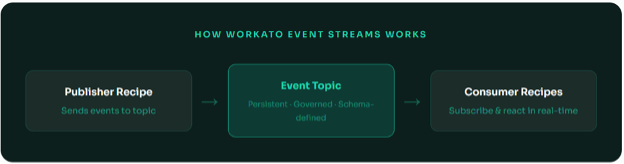
Pillars of Workato Event Streams
1. Visual Topic & Schema Designer
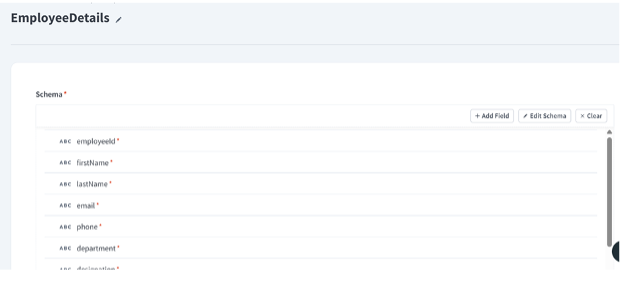
Gone are the days of manual JSON mapping. With the Visual UI, we can define the exact “contract” for our data. For our EmployeeDetails topic, we’ve mapped critical fields like employeeId, designation, and email to ensure every downstream consumer receives perfectly structured data.
2. Publish From Anywhere
Once a topic is live, it becomes a universal “Drop Box” for data. Whether it’s a Workato recipe triggered by a hire in Workday or a custom internal app sending data via the Event Streams API, the message is captured instantly and persisted for up to 7 days.
3. Real-Time Subscription
This is where the power of decoupling shines. You can have 40+ different consumer recipes all listening to the same EmployeeDetails topic. Using the New Message (Real-time) trigger, these recipes fire simultaneously to provision IT hardware, set up security badges, and announce the new hire on Slack — all without the original HR system ever knowing they exist.
Building Your First Event Stream in Workato
Follow along as we walk through a real-world example — publishing employee data events from one recipe and consuming them in another using the EmployeeDetails event topic.
Navigate to Event Streams & Create a New Topic
From the Workato platform, go to Platform → Event Streams. Click “New topic” and give it a meaningful name. Here we’re creating EmployeeDetails — a topic that will carry employee data payloads between recipes.
Define the Topic Schema
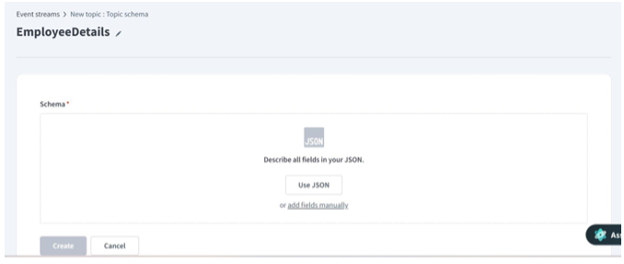
After pasting your JSON sample or adding fields manually, Workato automatically maps all fields. You’ll see strongly-typed field — employeeId, firstName, lastName, email, phone, department, designation — all marked as required (red asterisk). This schema is enforced at publish time, preventing malformed messages.
Pro Tip: Schema Enforcement
By defining a strict schema, Workato validates every message before it’s published to the topic. This means downstream consumer recipes always receive clean, predictable data — no null-check spaghetti required.
Publishing Messages to an Event Topic
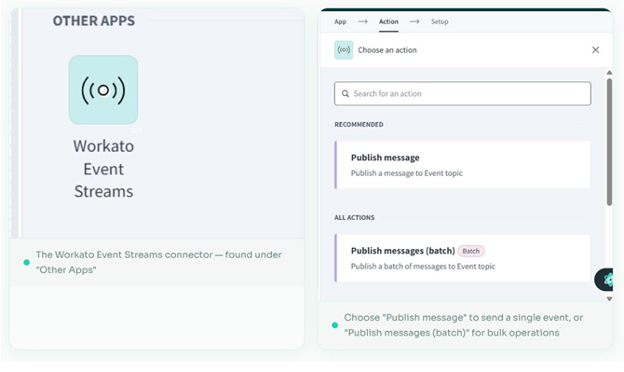
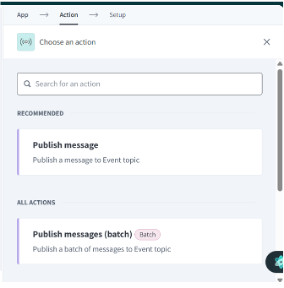
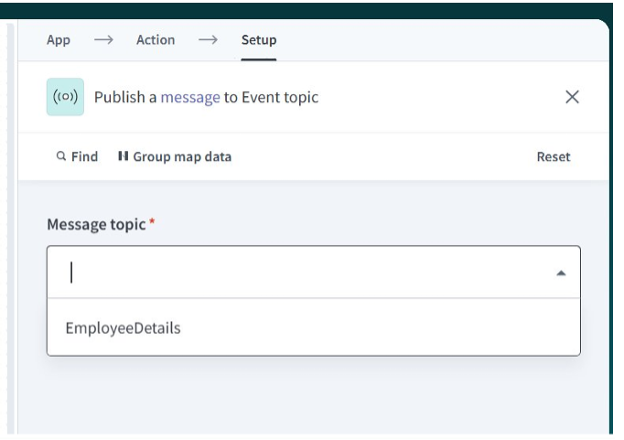
Select “Publish message” as the action. In the setup step, you’ll see a dropdown that lists all your event topics. Select EmployeeDetails and then map your recipe data fields to the schema fields. The topic dropdown automatically reflects your available topics.
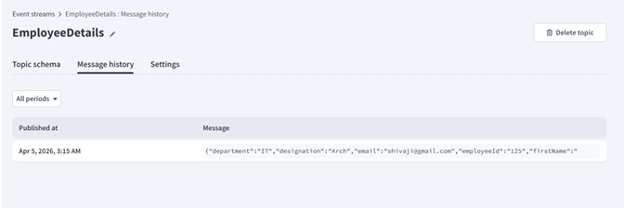
Once your publisher recipe runs, navigate back to Platform → Event Streams → EmployeeDetails and click the Message history tab. You’ll see every published message with its timestamp and full JSON payload — perfect for debugging and audit trails.
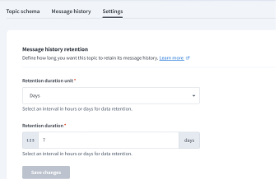
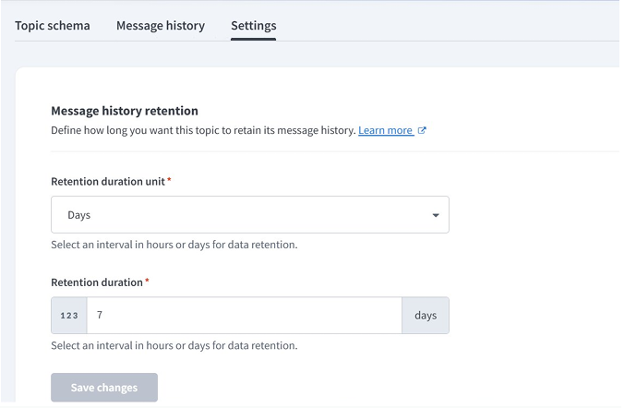
Under the Settings tab, you can configure how long messages are retained. This is critical for systems that need replay capability — set it to hours for high-frequency topics, or up to days for critical business events that need recovery windows.
Subscribing to Events in Real-Time
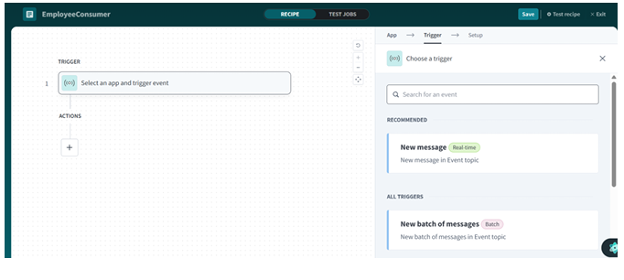
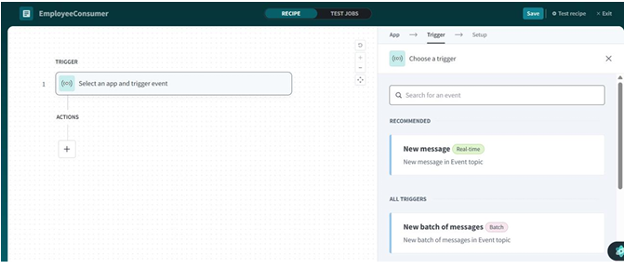
The real power of Event Streams is on the consumer side. Any recipe can subscribe to an event topic as its trigger — completely independent of the publisher. Create a new recipe called EmployeeConsumer, add a trigger, and select Workato Event Streams → New message (Real-time).
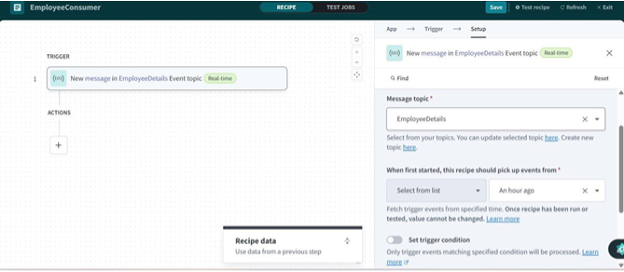
In the trigger setup, select EmployeeDetails as the Message topic. You can also configure when this recipe should start picking up events — from “An hour ago”, from a specific date, or from the very beginning of the topic’s history. This makes replaying missed events trivial.
Managing Topics Across Your Organization
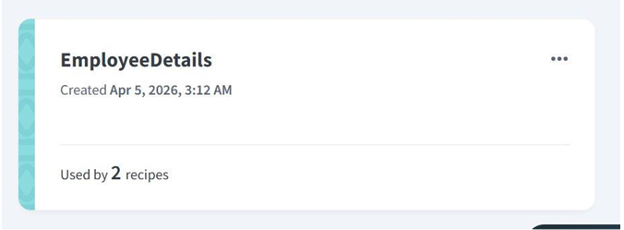
Event topics are first-class citizens in Workato. From the Event Streams dashboard, you can see every topic, when it was created, and how many recipes depend on it. The EmployeeDetails topic below is already used by 2 recipes — showing the decoupled fan-out model in action.
Key Benefits for Enterprise Teams
| Zero-Downtime Publisher Changes | Add, modify, or remove consumer recipes without touching the publisher recipe. Your data-producing workflows keep running uninterrupted — no deployment coordination required. |
| Guaranteed Message Delivery | Unlike direct recipe chaining, Event Streams persists messages even if consumer recipes are temporarily stopped. When they restart, they pick up exactly where they left off — no data loss. |
| Fan-Out to Multiple Consumers | One publisher can trigger dozens of independent workflows simultaneously — HR systems, ticketing tools, notification services — all reacting to the same event in parallel. |
| External System Integration via API | Not everything lives inside Workato. The PubSub API lets external systems publish events directly to your topics — bridging legacy apps, microservices, and third-party webhooks into your event fabric. |
Why Event Streams Matter in Modern Integration
Traditioonal integration focuses on:
- APIs
- Workflow chaining
- Sequential execution
Event-driven integration focuses on:
- Real-time responsiveness
- Decoupled systems
- Scalable architecture
Event Streams brings enterprise-grade messaging into a low-code environment.
Conclusion: From Integration to Event Fabric
Workato Event Streams represents a shift:
From:
- Tightly coupled workflows
To:
- Event-driven, decoupled systems
It combines:
- Message broker reliability
- iPaaS simplicity
- Real-time enterprise responsiveness
How Prowess Software Services Helps
At Prowess Software Services, we design modern integration architectures that:
- Combine Workato, MuleSoft, and event-driven patterns
- Enable real-time enterprise workflows
- Reduce system dependencies
- Improve scalability and resilience
We help organizations move toward event-driven, AI-ready integration ecosystems.

Editor: Veera Shivaji Nayineni
10 FAQs for Google Snippets & AEO
Workato Event Streams is a native event-driven integration feature built into the Workato iPaaS platform. Using a Publish/Subscribe (PubSub) model, it enables real-time data processing and decoupled workflow automation — without needing external message brokers like Kafka or RabbitMQ. It allows enterprise systems to communicate asynchronously for scalable, loosely coupled architectures.
Workato Event Streams lets recipes or external systems publish messages to a named event topic. Consumer recipes independently subscribe to that topic and trigger in real time when new messages arrive. Since publishers and consumers operate independently, changes to one workflow never break others — and messages are persisted for replay and recovery.
The Publish/Subscribe (PubSub) model separates data producers from consumers in a loosely coupled architecture. Publishers send messages to a centralized event topic without knowing which downstream systems consume them. Multiple subscriber recipes then process those messages in parallel — enabling fan-out automation across HR, IT, CRM, and notification workflows simultaneously.
Key benefits include real-time event processing with no batch delays, decoupled architecture with zero-downtime deployments, guaranteed message delivery even during consumer downtime, scalable fan-out across parallel workflows, schema enforcement for consistent data contracts, and REST API support for legacy apps and microservices.
Yes. Workato Event Streams natively supports fan-out messaging — a single published event can trigger multiple independent consumer recipes simultaneously. For example, a new employee event can instantly trigger IT provisioning, Active Directory setup, Slack notifications, and payroll updates in parallel, with no changes needed to the original publisher recipe.
Yes. Messages are persisted within an event topic for a configurable retention period — up to 7 days. If a consumer recipe is stopped or temporarily unavailable, it resumes processing from exactly where it left off with zero message loss. This built-in replay capability supports audit trails, failure recovery, and end-to-end data integrity.
Events can be published two ways — via a Workato recipe using the built-in Publish Message action, triggered by apps like Workday, Salesforce, or ServiceNow, or externally through the Event Streams Public API, allowing legacy systems, microservices, and third-party webhooks to participate in your event-driven architecture without being built on Workato.
Schema enforcement ensures every message published to an event topic follows a pre-defined data structure — including field names, data types, and required fields. It acts as a data contract between publishers and consumers, ensuring downstream recipes always receive clean, predictable payloads and eliminating pipeline failures across HR, finance, and IT workflows.
Common use cases include employee onboarding automation, real-time order management across ERP and CRM systems, Slack and Microsoft Teams notifications on business events, Salesforce and Workday synchronization without point-to-point dependencies, inbound lead routing to marketing and sales platforms, and microservices event routing across a unified enterprise event fabric.
Traditional Workato recipes use tightly coupled trigger-action chains where one recipe directly depends on another — creating fragile workflows where one change cascades failures downstream. Event Streams replaces this with a fully decoupled, message-oriented architecture, enabling zero-downtime deployments, independent scaling, and faster time-to-integrate without modifying existing publisher recipes.