
 aravind.konda
Blog
Real-Time Salesforce Insights for Marketing: Governed AI Access with MuleSoft Agent Fabric
- October 29, 2026
- Hari Krishna Kasetty
- Role: Senior Director
How Marketing Teams Can Ask Live Questions of Salesforce Data Without Bypassing Salesforce Permissions
Marketing has become increasingly real-time.
A prospect registers for a webinar.
Someone from a target account visits an event booth.
An existing customer opens a support case.
A high-value opportunity moves stages.
The signal may be valuable for only a few hours.
But in many organizations, acting on that signal still involves a surprisingly manual process.
Marketing exports a Salesforce report.
Someone cleans the spreadsheet.
Another person checks account ownership.
Sales Ops validates the list.
Or the team waits for an overnight data synchronization before the information reaches another platform.
By the time the answer arrives, the moment that made the signal valuable may already be gone.
The problem is not that Salesforce lacks the data.
The problem is how quickly the right person can ask a question of that data and receive an answer they are actually authorized to see.
That creates an interesting use case for AI, MuleSoft Agent Fabric, Omni Gateway, and Salesforce-hosted MCP servers.
The goal is straightforward:
Let Marketing ask live questions of Salesforce in natural language while keeping every request inside the same identity, permission, policy, and audit boundaries the enterprise already trusts.
The Marketing Problem: The Data Is Live, but Access to Insight Isn't
Marketing teams increasingly work around events that happen in minutes.
Campaign responses.
Webinar attendance.
Trade-show scans.
Website intent signals.
Open opportunities.
Customer-support activity.
The value of these signals depends heavily on timing.
Suppose a webinar ends at 2:00 PM.
Marketing has 140 registrants and attendees.
The team wants to know:
- Which attendees belong to target accounts?
- Who owns those accounts?
- Are any active opportunities already open?
- Which accounts deserve immediate follow-up?
The answers may already exist in Salesforce.
But retrieving them often means opening multiple reports, applying filters, exporting data, joining spreadsheets, or asking someone with deeper Salesforce access to build the list.
That is a workflow problem AI can potentially simplify.
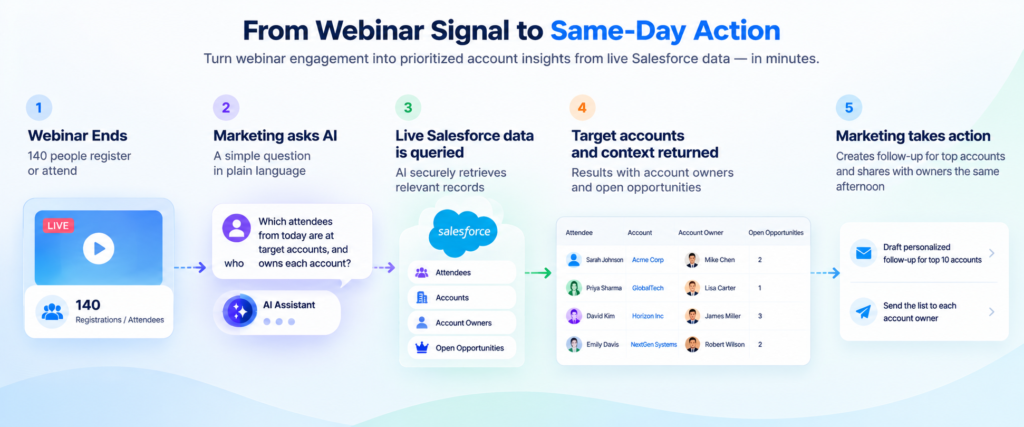
A Real-Time Use Case: Same-Day Webinar Follow-Up
Consider a typical post-webinar workflow.
2:00 PM — The Webinar Ends
A campaign generates 140 registrations and attendees.
Instead of exporting the attendee list and manually matching it against Salesforce accounts, the marketing manager asks an AI assistant:
“Which attendees from today’s webinar are at target accounts, and who owns each account?”
The assistant interprets the question and sends a governed request for the relevant live Salesforce data.
Within seconds, Marketing receives a list containing the permitted matching records, including information such as:
- Attendee
- Account
- Account owner
- Relevant account context
- Open opportunity information the user is permitted to access
The manager can then narrow the list:
“Show me the top 10 accounts with open opportunities.”
From there, the team can prepare personalized follow-up and send the prioritized account list to the appropriate owners that same afternoon.
The difference is important.
The answer reflects:
Salesforce now
not:
Salesforce as it looked during last night’s export.
Why Real-Time Salesforce Context Matters
The value is not simply convenience.
The architecture reduces the delay between signal and action.
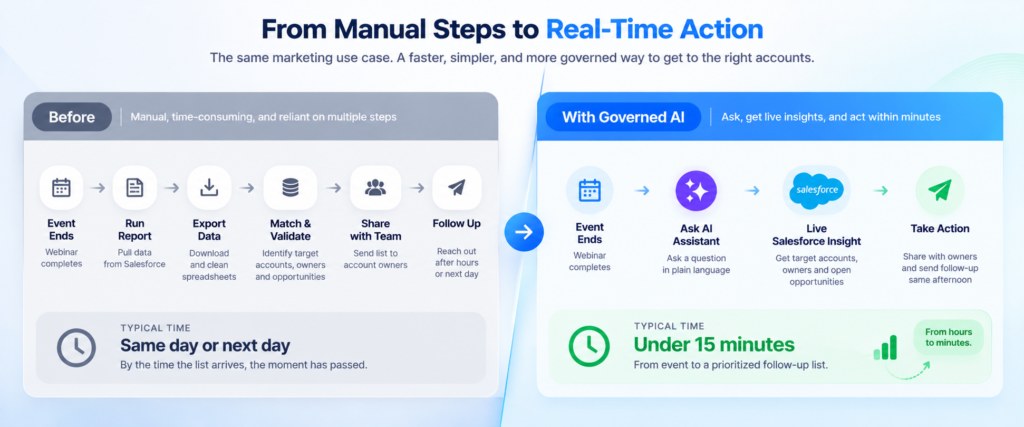
The traditional process might look like:
Campaign Event → Export → Clean → Match → Validate → Share → Follow Up
The proposed experience becomes:
Campaign Event → Ask → Governed Salesforce Query → Prioritized Answer → Follow Up
For Marketing, that can mean responding while the event, conversation, or customer signal is still fresh.
For Sales, it means receiving better-qualified follow-up requests rather than another spreadsheet to investigate.
For IT and security teams, however, speed is only acceptable if the architecture preserves enterprise controls.
That is where the governed layer becomes critical.
The Architecture: From Question to Live Salesforce Data
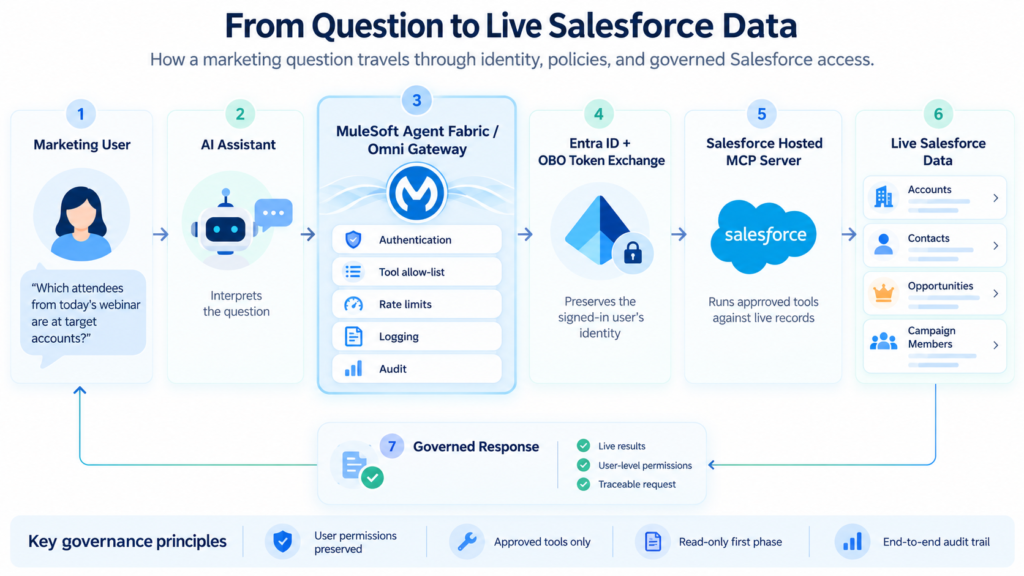
At a high level, the request path looks like this:
Marketing User
↓
AI Assistant
↓
MuleSoft Agent Fabric / Omni Gateway
↓
Authentication + Policies + Identity Propagation
↓
Salesforce Hosted MCP Server
↓
Live Salesforce Records
↓
Governed Response
Every request passes through the governed layer before a Salesforce tool executes.
The signed-in user’s identity stays central to the interaction.
Step 1: The marketing user asks a question
The user does not need to build SOQL or go through a pre-defined report.
They ask a business question:
“Which attendees from today’s webinar belong to target accounts?”
The AI assistant interprets the request and determines which Salesforce capability is needed.
The important architectural point is that the AI assistant itself should not become an unrestricted Salesforce identity.
The request remains associated with the person who asked it.
Step 2: Omni Gateway Authenticates the Request
The request enters the MuleSoft governance layer.
For an enterprise using Microsoft Entra ID, the incoming user token can provide the identity context associated with the authenticated Marketing user.
Omni Gateway then becomes an enforcement point between the assistant and the downstream Salesforce capability.
This is where organizations can apply controls before Salesforce is invoked.
Step 3: Policies Determine What the Assistant Can Do
Before any tool executes, the gateway can enforce policies around the request.
Depending on the implementation, those controls can include:
- Authentication
- Tool access
- Rate limits
- Logging
- Traffic controls
- Sensitive-data policies
- Identity propagation
This matters because connecting an AI assistant directly to a powerful enterprise system creates a much broader surface than connecting a traditional application to one fixed API operation.
The safer principle is:
Expose only what the use case requires.
If Marketing only needs to query Salesforce during the first phase, the architecture should not expose unnecessary write operations.
Step 4: Preserve the User's Identity with On-Behalf-Of
One of the most important parts of this design is avoiding a shared service identity that gives every marketing user the same Salesforce access.
Instead, the architecture may use an On-Behalf-Of (OBO) token-exchange pattern.
In concept:
Marketing User → Entra ID User Token → Omni Gateway → OBO Token Exchange → Downstream Access in User Context
MuleSoft’s Omni Gateway supports an OAuth 2.0 OBO Credential Injection policy, including the On-Behalf-Of flow for Microsoft Entra ID.
The goal is simple:
Keep user context instead of replacing it with one broadly privileged technical account.
Step 5: Salesforce Applies Its Own Security Model
The request ultimately reaches the appropriate Salesforce-hosted MCP capability.
This creates another important security boundary.
The gateway may determine which tools are available.
Salesforce still determines what the authenticated user is allowed to see.
That means the response remains subject to Salesforce controls such as:
- Object permissions
- Field-level security
- Sharing rules
- User permissions
- Permission sets
Salesforce’s hosted MCP architecture is explicitly designed around this model: tool calls run in the context of the authenticated user rather than bypassing the Salesforce authorization layer.
So if two Marketing users ask the exact same question, they do not necessarily receive the same answer.
They receive the data each person is authorized to access.
That is a feature, not a limitation.
Which Salesforce MCP Server Fits This Use Case?
This is worth separating from the broader architecture.
Salesforce currently provides several hosted MCP servers.
For a first-phase Marketing use case focused entirely on querying Salesforce data, a read-only SObject capability is a strong fit because the requirement is deliberately narrow:
Ask questions. Retrieve permitted records. Do not change Salesforce.
A broader Salesforce Headless 360 MCP Server can support a much wider set of Salesforce operations, but broader capability also means the governance model must be designed carefully.
For this use case, starting narrow is preferable.
Read first. Prove governance. Measure adoption. Expand later.
What Keeps the Experience Governed?
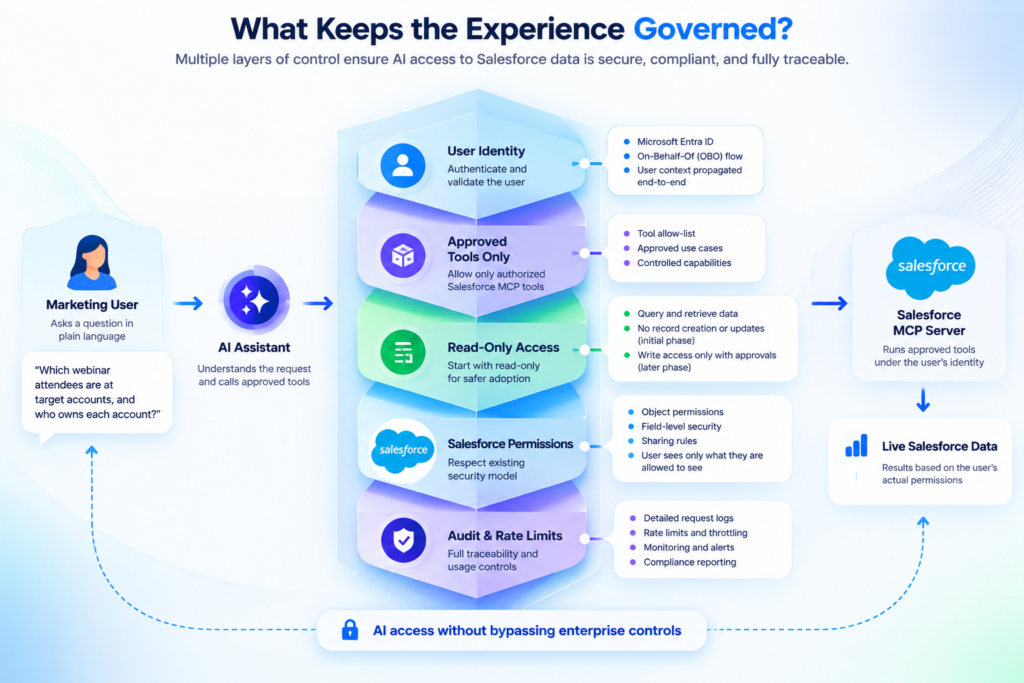
The usefulness of this architecture comes from the controls surrounding the AI—not simply from the model’s ability to understand a question.
1. Each User Sees Only What They Are Authorized to See
The Marketing user should not inherit a new set of Salesforce privileges simply because the request is coming through AI.
If a person cannot access a particular account, opportunity, object, or field in Salesforce, the assistant should not become a workaround.
The AI experience should respect the same authorization model.
2. Only Approved Tools Are Available
The AI assistant should not automatically receive every operation Salesforce can expose.
If the Marketing use case only requires account, campaign, contact, and opportunity queries, that tool surface should remain intentionally limited.
This follows a basic least-privilege principle:
Give the agent enough capability to complete the business task—and no more.
3. Start Read Only
The first phase should focus on:
- Search
- strainer
- Summary
- Focus your efforts
- Give context
not:
- Add records
- Opportunities for change
- Transfer ownership
- Remove information
- Drive high-impact business actions
If the use case is deemed valuable and the organization can articulate appropriate confirmation and approval controls, write operations can be introduced at a later time.
Read-only access is a cleaner place to build trust.
4. Maintain an Audit Trail
When AI interacts with enterprise systems, accountability cannot disappear.
The architecture should make it possible to determine:
- Who initiated the request?
- When was it made?
- What capability was invoked?
- What system was accessed?
- Which policy path applied?
- Was the request successful?
That becomes particularly important as AI moves from answering questions toward taking actions.
5. Protect Salesforce API Capacity
A successful AI experience can generate far more requests than a traditional manually operated dashboard.
Campaign periods may create spikes.
Large events may cause dozens of marketers to ask similar questions simultaneously.
Rate limits and other traffic controls help prevent the AI layer from unintentionally placing excessive pressure on downstream Salesforce services.
The Governance Model in One View
The pattern can be summarized as:
User Question
↓
Authenticated User Identity
↓
Approved AI Assistant
↓
Omni Gateway Policies
↓
Approved MCP Tools Only
↓
Salesforce Permission Enforcement
↓
Live Data
↓
Audited Response
The architecture does not rely on AI behaving correctly by itself.
Controls exist around the AI.
That is the important distinction.
Why Not Just Export Salesforce Data into an AI Platform?
That approach can work for some analytical workloads.
But it introduces a different set of trade-offs.
A replicated dataset can become stale.
Access policies may have to be recreated in another platform.
More copies of sensitive customer and opportunity information may need to be governed.
The marketing team may receive yesterday’s state rather than the current Salesforce state.
For questions where timing and authorization matter, querying the governed system of record can be more appropriate.
This use case is therefore not about moving Salesforce data into an AI model.
It is about allowing an AI experience to reach Salesforce safely when live Salesforce context is required.
What Changes for Marketing?
The technology matters, but the business experience is simple.
Before:
“Can someone pull the latest Salesforce list for me?”
After:
“Which webinar attendees are at target accounts with open opportunities?”
Before:
Report → Export → Spreadsheet → Match → Send
After:
Ask → Review → Act
That gives Marketing a much shorter route from campaign signal to account-level action.
Measuring Whether the Use Case Actually Works
The pilot should not be evaluated based on how impressive the AI demonstration looks.
It should be measured against operational outcomes.
Time to Insight
Target: Under 15 minutes from the campaign event to the first prioritized follow-up list.
This is comparable to the current same-day or next day workflow.
Permission Integrity
Access no data outside the signed-in user’s Salesforce permissions in the relevant environment.
This confirms that access control has not been sacrificed for convenience.
Auditability
Target: Every production request can be traced to a named user.
This provides an operational and governance baseline before expanding capability.
Other useful measures could include adoption, reduction in ad hoc Salesforce reporting requests, follow-up speed, and the percentage of generated lists actually used by Sales or Marketing.
A Sensible Rollout Path
This use case does not need to begin as a fully autonomous marketing agent.
A phased approach is safer and easier to validate.
Phase 1 - Read
Allow approved marketing users to query relevant Salesforce information.
Phase 2 - Summarize and Prioritize
Allow the assistant to combine permitted information into useful account-level context and prioritized lists.
Phase 3 — Assist
Generate draft follow-up copy, recommended next steps, or owner-specific summaries while keeping humans responsible for the decision.
Phase 4 — Controlled Actions
Only after governance and adoption are proven should the organization consider selected Salesforce write actions, ideally with explicit approvals for higher-impact changes.
The goal is not maximum autonomy on day one.
It is useful autonomy within clearly understood boundaries.
Why MuleSoft Agent Fabric Matters
Salesforce can enforce what an authenticated user is allowed to do.
But enterprise AI architectures often span more than Salesforce.
An assistant may eventually need access to:
- Salesforce
- ServiceNow
- ERP systems
- Marketing automation
- Product databases
- Data platforms
- Internal APIs
- Other AI agents
MuleSoft Agent Fabric is designed as a control plane for this broader environment, while Omni Gateway acts as a runtime enforcement point for governed agent, MCP, and API interactions.
That allows organizations to extend familiar API-management principles—identity, policy enforcement, rate control, observability, and governance—into agentic workflows rather than building an entirely separate control model for AI.
Why ProwessSoft
The difficult part of a use case like this is not getting an AI model to understand the question.
The difficult part is connecting the experience to enterprise systems without weakening identity, security, integration, or governance.
ProwessSoft works across MuleSoft, Salesforce, APIs, enterprise integration, data, automation, and AI.
That combination is relevant for organizations moving from AI demonstrations to production use cases where agents need secure access to live enterprise systems.
For scenarios such as governed marketing access to Salesforce, we can help with:
- Use case and architecture definition
- MuleSoft Agent Fabric and Omni Gateway design
- MCP integration strategy
- Salesforce-hosted MCP connectivity
- Identity propagation and OBO patterns
- Tool and policy design
- Read-only pilot architecture
- Auditability and observability
- Security and access validation
- Production rollout planning
The objective is not simply to put an AI interface in front of Salesforce.
It is to make live enterprise data easier to use without making it harder to govern.
Conclusion: Real-Time Insight Without Giving Up Control
Marketing does not necessarily need another dashboard.
Sometimes it simply needs a faster way to ask the systems it already trusts the right questions.
For a use case such as post-webinar follow-up, the business value is straightforward to understand:
A signal occurs.
Marketing asks a question.
The assistant retrieves the permitted live Salesforce context.
The team acts while the signal is still relevant.
But the architecture only becomes enterprise-ready when that speed is accompanied by identity, least-privilege access, policy enforcement, rate control, and auditability.
That is what turns:
“Let AI query Salesforce.”
into:
“Let the right employee use AI to access the right Salesforce information, at the right time, under the right controls.”
And that is a much more useful foundation for enterprise AI.
Bring Real-Time Salesforce Context into Your AI Workflows
If your teams still depend on reports, exports, and manual Salesforce lookups before they can act on campaign signals, ProwessSoft can help evaluate a governed real-time access model.

Editor: Hari Krishna Kasetty
Role: Senior Director
FAQs
Marketing users can ask an AI assistant natural-language questions, such as which webinar attendees belong to target accounts. The request can pass through MuleSoft Agent Fabric and Omni Gateway before an approved Salesforce MCP capability queries live Salesforce records.
Real-time access reduces the delay between a marketing signal and follow-up action. Instead of waiting for exports, reports, or overnight synchronization, teams can work with the current Salesforce state and prioritize accounts while the signal is still relevant.
It should not. In a governed design, the assistant operates using the authenticated user’s access context, so Salesforce permissions such as sharing rules, object permissions, and field-level security continue to determine what that user can see.
MuleSoft Agent Fabric provides governance for agentic and AI interactions across enterprise systems. It can help control which tools are exposed, how requests are routed, how interactions are observed, and how enterprise policies are applied.
Omni Gateway acts as a runtime enforcement layer between the AI assistant and downstream enterprise capabilities. It can apply controls such as authentication, access policies, rate limits, logging, and other governance measures before a Salesforce tool is invoked.
A Salesforce hosted MCP server exposes approved Salesforce capabilities as tools that compatible AI assistants or agents can invoke. The tools can operate within the authenticated user’s Salesforce security context rather than bypassing existing access controls.
An On-Behalf-Of (OBO) flow helps preserve the identity of the signed-in user when accessing downstream services. This avoids giving every Marketing user the same shared, highly privileged technical identity.
For an initial rollout, a read-only model is usually safer. Marketing can query, summarize, and prioritize Salesforce information first. Record creation or updates can be introduced later with explicit approvals and additional governance controls.
Useful starting points include:
- Identifying webinar attendees from target accounts
- Finding account owners
- Checking open opportunities
- Prioritizing high-value accounts
- Summarizing account context
- Drafting follow-up messaging
- Preparing same-day Sales handoff lists
These work especially well because they reduce manual reporting and context switching without immediately introducing write operations.
Useful measures include:
- Time from campaign signal to follow-up list
- Reduction in manual Salesforce report requests
- User adoption
- Percentage of results used by Marketing or Sales
- Zero unauthorized data access
- Full traceability of production requests
- Salesforce API usage within expected limits
For the webinar scenario, a practical target would be reducing the time from event completion to a prioritized follow-up list from hours to under 15 minutes.