

Blog
The AI Gatekeeper: How MuleSoft LLM Proxy Turns Scattered AI into Smart, Safe Enterprise Power
- September 16, 2026
- Vijay Kumar Kothapalli
Introduction: Enterprise AI Is Growing Faster Than Enterprise Control
Enterprise AI adoption rarely happens through one carefully coordinated program. It often starts department by department.
Marketing experiments with one model. Developers choose another. Legal selects a model better suited to document analysis. Customer support builds its own chatbot. Finance adopts yet another provider.
Each initiative may work well independently. The problem appears when organizations try to manage all of them together.
Different API keys. Different providers. Different security controls. Different cost structures. Different retry logic. Different approaches to sensitive data. And very little centralized visibility.
The result is an emerging enterprise architecture problem: AI fragmentation.
The challenge is therefore no longer simply choosing the best LLM. Enterprises need a way to control how applications access AI, which models they use, what information they can send, how much they spend, and how every interaction is monitored.
This is where MuleSoft LLM Proxy becomes relevant.
Rather than requiring every application to manage its own AI connections, MuleSoft LLM Proxy introduces a centralized gateway between enterprise applications and LLM providers—creating a more governed, secure, and manageable approach to enterprise AI.
To understand why that matters, consider a simple scenario.
Imagine This…
You own VSmart, one of India’s fastest-growing online grocery retailers. Your company has enthusiastically embraced AI across every department:
- Customer Support Chatbot
- HR Assistant for employees
- Sales Copilot for the field team
- Marketing Content Generator
- Legal Document Assistant
- Coding Assistant for developers
Each team picked their favorite AI model. Marketing loved GPT, Legal preferred Claude, Developers used Gemini, and Finance went with Azure OpenAI.
Everything seemed to work fine at first.
Six Months Later…
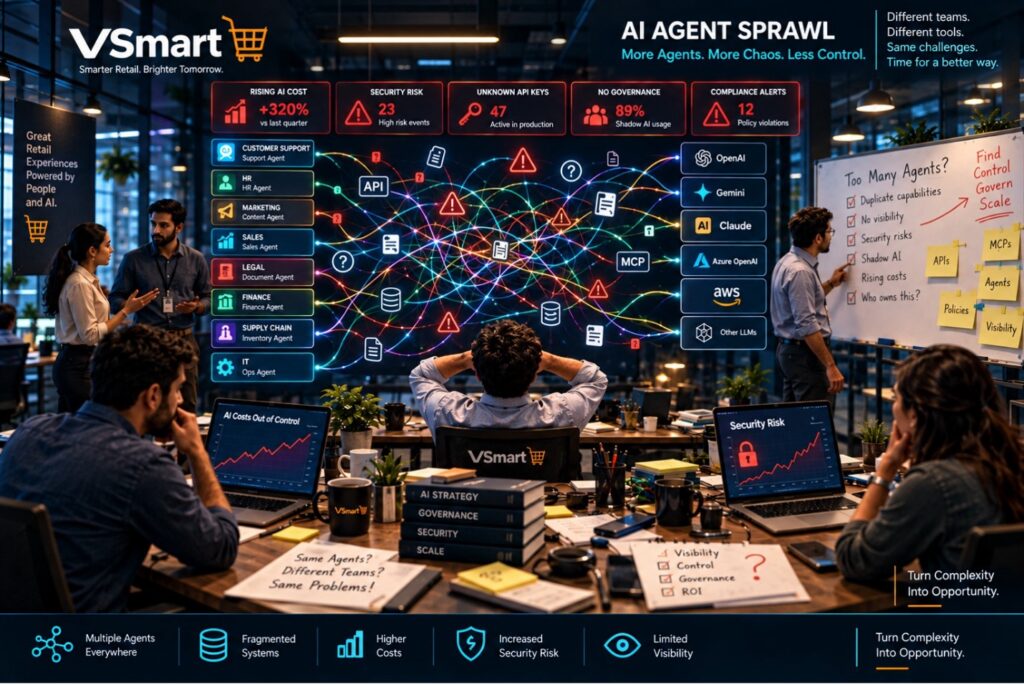
The problems started piling up.
The CIO asked:
“How much are we spending on AI every month?”
Nobody could give a clear answer.
The Security team asked:
“Are employees accidentally sending customer phone numbers, addresses, or payment details to public AI models?”
No one knew for sure.
Finance raised alarms:
“Why has our AI bill suddenly tripled?”
The architecture team wanted to switch providers for better pricing:
“Can we move from GPT to Gemini without updating 50 different applications?”
The answer was painful: No.
Every application had its own direct connections, API keys, retry logic, error handling, and model selection code.
The setup looked like this:
Chatbot → OpenAI
HR System → Claude
Website → Gemini
Sales App → Azure OpenAI
Developer Tool → GPT
Legal Assistant → Claude
Duplication everywhere. Chaos growing. Costs rising. Risks increasing.
This Is Where MuleSoft LLM Proxy Changes Everything
Instead of every application talking directly to multiple AI providers, all applications now talk to just one single, secure endpoint—the MuleSoft LLM Proxy.
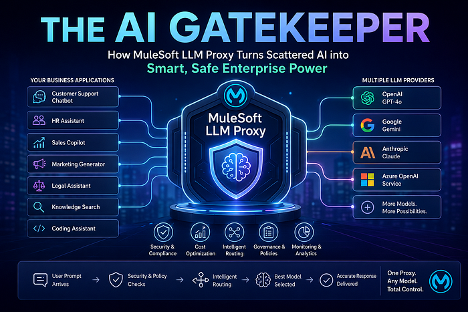
Applications no longer need to know:
- Which model is best
- Which provider is cheapest today
- How to handle authentication
- How to mask sensitive data
- How to track costs
They simply send a prompt.
The Proxy handles everything else intelligently.
Think of the LLM Proxy Like an Air Traffic Controller for AI
Hundreds of planes—prompts—arrive every hour.
Instead of each pilot choosing their own runway—LLM—the control tower decides the best runway, checks safety conditions, manages traffic, logs everything, and ensures smooth landings, all while the pilots—your applications—follow simple instructions.
What Exactly Is MuleSoft LLM Proxy?
MuleSoft LLM Proxy is a unified, intelligent gateway that sits between your business applications and multiple Large Language Model providers.
It is deployed on MuleSoft’s Omni Gateway or Flex Gateway and provides one consistent front door for AI interactions.
It doesn’t replace the LLMs.
It governs, optimizes, secures, and routes requests to them.
That distinction matters. Organizations can continue using different AI providers for different requirements while centralizing how those providers are accessed and governed.
End-to-End Journey of One Real AI Request
Let’s follow a complete request through the system.
A customer opens the VSmart app and types:
“Suggest healthy breakfast ideas under ₹300 using items available today.”
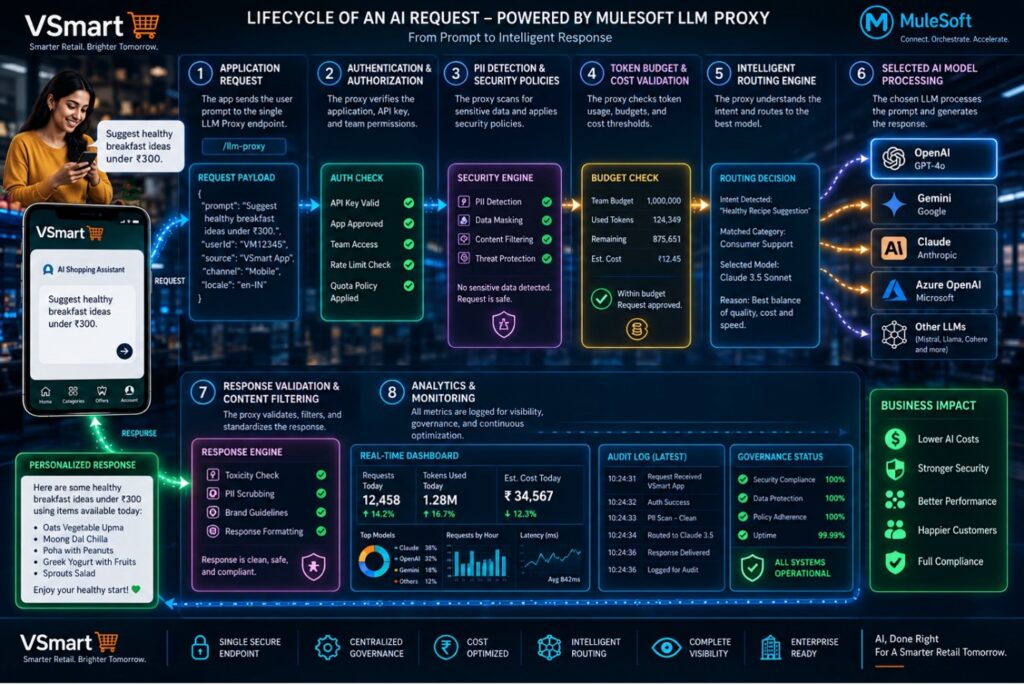
Step 1: Application Sends the Prompt
The mobile app makes one simple call:
POST /llm-proxy
{
“prompt”: “Suggest healthy breakfast ideas under ₹300…”
}
The app doesn’t specify any model or provider.
Step 2: Authentication & Basic Checks
The Proxy verifies:
- Is this app allowed to use AI?
- Is the API key valid?
- Which team/business unit does this belong to?
Step 3: Security & Compliance Policies
The Proxy scans the prompt for sensitive data such as names, addresses, payment information, and other protected information.
If anything risky is found, it can mask, block, or log it automatically.
Step 4: Budget & Quota Check
It checks whether the Marketing or Support team’s monthly token budget is still available.
If limits are near, it can downgrade the model or notify administrators.
Step 5: Intelligent Routing — The Smart Decision
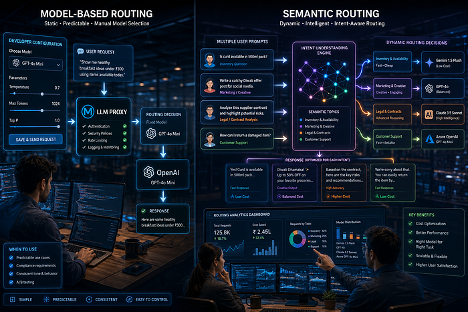
Here, the Proxy provides two powerful options.
Option A: Model-Based Routing — Static
The application explicitly says:
“model”: “gpt-4o-mini”
The Proxy validates policies and forwards the request.
Best for: Predictable tasks, compliance requirements, or A/B testing.
Option B: Semantic Routing — Dynamic & Intelligent
The application sends only the prompt.
The Proxy understands its meaning and matches it against predefined topics:
- “Simple product/inventory query” → Fast & cheap model
- “Marketing content creation” → Creative, balanced model
- “Legal or financial analysis” → High-accuracy, powerful model
In this case, “healthy breakfast ideas” is recognized as a simple customer support/marketing request and routed to a fast, cost-effective model.
Step 6: The Chosen LLM Processes the Request
Step 7: Response Handling
The Proxy can:
- Filter unsafe content
- Standardize the format
- Add disclaimers
- Log the full interaction
Step 8: Monitoring & Analytics
Everything is recorded in Anypoint Platform dashboards—including cost, tokens used, latency, success rate, and other operational information.
The customer receives a helpful, on-brand suggestion within seconds.
Why Businesses Love MuleSoft LLM Proxy
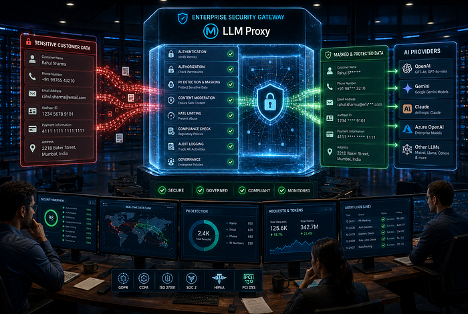
The value extends beyond simplifying model connectivity.
Lower Costs
Simple requests can use lower-cost models, while only complex workloads need premium models.
Stronger Security
Sensitive data can be protected centrally before leaving the enterprise environment.
Centralized Governance
Organizations gain one place to enforce policies, quotas, and compliance requirements.
Greater Flexibility
Teams can switch or add LLMs without changing every consuming application.
Improved Productivity
Developers can focus on business functionality instead of repeatedly implementing AI connectivity, authentication, routing, and error handling.
Full Observability
Organizations gain clearer visibility into AI interactions, token consumption, performance, and spending.
Where LLM Proxy Fits in the MuleSoft AI Ecosystem
LLM Proxy does not operate in isolation. It works together with other MuleSoft AI capabilities:
MCP Server: Turns existing APIs into discoverable tools for AI agents.
AI Chain Connector: Supports complex, multi-step AI workflows.
Agent Registry: Helps manage AI agents across the enterprise.
Together, these capabilities enable more secure, governed, and scalable enterprise AI solutions.
Getting Started with MuleSoft LLM Proxy
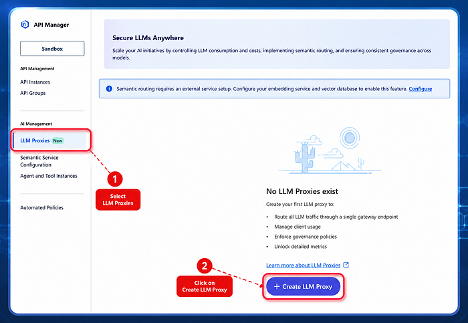
Step 1: Open the LLM Proxy Wizard
- Log in to Anypoint Platform.
- Go to API Manager → LLM Proxies.
- Click + Create LLM Proxy.
This launches a three-step wizard:
Inbound → Gateway → Outbound
You can’t move forward until each step is properly filled, making configuration errors easier to avoid.
Step 2: Configure the Inbound Endpoint — The Front Door
This is where you define how applications will communicate with the Proxy.
- Proxy Name: Give it a clear name, such as VSmart-AI-Gateway.
- Base Path: Set the URL path, such as /llm-proxy.
- Provider Format: Choose the main format, usually OpenAI-compatible.
This becomes your single unified endpoint for AI requests.
Result: Every application in the company can now call one address instead of connecting independently to multiple AI providers.
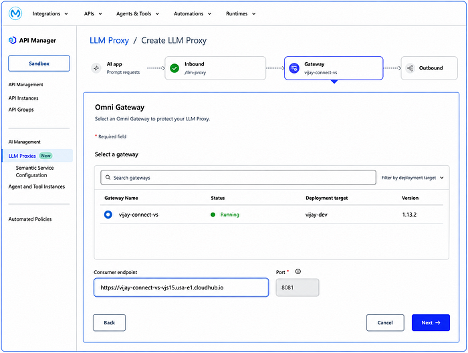
Step 3: Choose Your Gateway — The Engine Room
Select the Omni Gateway where the Proxy will run.
The gateway is the runtime that will:
- Receive requests
- Apply security
- Make routing decisions
- Monitor interactions
After selecting the gateway, copy the Consumer Endpoint URL. This is the live address applications will use.
Step 4: Set Up Outbound Routes
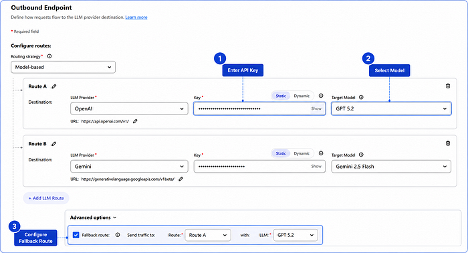
Here you connect the actual LLM providers.
For each route, define:
- LLM Provider
- API Key
- Default Target Model
Multiple routes can be configured.
For example:
Route 1: OpenAI + GPT-4o
Route 2: Gemini + Gemini Flash
Step 5: Choose Your Routing Strategy
This is the heart of the Proxy’s intelligence.
Model-Based Routing
You—or the application—tell the Proxy exactly which model to use.
It is simple, predictable, and easy to control.
Semantic Routing
You send only the prompt.
The Proxy reads the meaning and automatically selects the appropriate model.
This can be useful for chatbots and dynamic AI use cases.
Step 6: Add a Fallback Route
Always configure a backup.
If the primary model fails because of a rate limit, outage, or timeout, the Proxy can automatically send the request to the fallback model.
This helps keep AI applications operational when a provider experiences problems.
Step 7: Deploy
Click Deploy.
The LLM Proxy goes live on the selected gateway. AI traffic can now flow through MuleSoft with centralized governance applied.
Step 8: Test It
Use Postman or your application to send a test prompt to the Consumer Endpoint.
Check that:
- The request reaches the correct model
- Security policies work
- You receive the expected response
- Monitoring data appears in the dashboard
Step 9: Monitor & Improve
Use Anypoint Platform dashboards to review:
- Total requests
- Token usage and costs
- Most-used models
- Response times
- Policy violations
This turns AI gateway management into an ongoing optimization process rather than a one-time configuration exercise.
Best Practices
- Start small with 1–2 high-impact use cases.
- Carefully design semantic topics using real example prompts.
- Set clear token budgets for individual teams.
- Review analytics regularly and refine routing.
- Add custom policies appropriate to your industry, whether banking, retail, healthcare, or another regulated environment.
Why ProwessSoft
Implementing an LLM gateway is not simply a matter of putting another layer between an application and an AI model.
The larger architectural question is how AI becomes part of the enterprise integration landscape without creating another generation of point-to-point complexity.
At ProwessSoft, our work across MuleSoft, API-led integration, enterprise data, automation, and AI positions us to help organizations approach that transition from the integration architecture outward.
That means looking beyond individual AI experiments and addressing practical enterprise questions:
How should applications access multiple LLM providers?
Where should security and sensitive-data policies be enforced?
How can model selection and routing be managed centrally?
How should token usage and AI costs be monitored across business units?
How can existing APIs and MuleSoft investments become part of a broader AI and agentic architecture?
The objective is not simply to connect another LLM.
It is to establish an AI integration layer that can evolve as models, providers, costs, and enterprise requirements change.
Conclusion: From Scattered AI to Governed Enterprise AI
Enterprise AI is no longer just about choosing the latest or most powerful model.
As adoption spreads across departments and applications, the more difficult challenge becomes operating AI responsibly, securely, efficiently, and at scale.
Direct application-to-model connections may work during early experimentation. But as the number of AI use cases grows, that architecture can introduce duplicated integration logic, fragmented security controls, limited cost visibility, and increasing dependence on individual providers.
MuleSoft LLM Proxy introduces a different model.
Applications communicate through a consistent AI gateway. Security and governance can be centralized. Requests can be routed according to business requirements. Providers can be changed or expanded with less impact on consuming applications. And AI activity becomes easier to observe and manage.
The architecture shifts from:
Many Applications → Many Direct LLM Connections
to:
Many Applications → MuleSoft LLM Proxy → Governed LLM Ecosystem
That is an important evolution for enterprises moving from isolated AI experiments toward a scalable AI operating model.
The question changes from:
“Which LLM should my application call?”
to:
“How can we deliver the right AI experience while maintaining control?”
That is the real power of the AI Gatekeeper.
Ready to Bring Your Enterprise AI Under Control?
If your teams are already experimenting with multiple LLMs—or planning to scale AI across applications—the right starting point is understanding how those interactions should be secured, governed, routed, and monitored.
Talk to ProwessSoft about building a governed AI integration architecture with MuleSoft LLM Proxy.

Editor: Vijay Kumar Kothapalli
10 FAQs
MuleSoft’s Model Proxy provides a unified access layer between enterprise applications and multiple LLM providers. It can centralize access, apply governance controls, and route requests to appropriate AI models through Omni Gateway.
An LLM proxy reduces the need for individual applications to maintain separate connections to different AI providers. It provides a centralized layer for routing, authentication, policies, monitoring, and AI usage management.
Applications send requests to a Model Proxy endpoint deployed on Omni Gateway. The proxy applies configured policies and routing rules before forwarding the request to the appropriate LLM provider and model.
Semantic routing dynamically selects a model route based on the meaning of the prompt. A semantic service compares an incoming request with configured prompt topics and routes it to the best-matching destination.
Model-based routing uses the model specified in the request to determine the destination. Semantic routing evaluates the content of the prompt and dynamically selects an appropriate route based on configured topics.
Current MuleSoft documentation lists support for providers including OpenAI, Azure OpenAI, Google Gemini, Anthropic, Amazon Bedrock Anthropic, and NVIDIA Nemotron, with availability depending on the configured endpoint format and model.
Organizations can apply policies to Model Proxies for controls such as client authentication, PII detection, prompt guarding, content safety, and token-based rate limiting. This creates a centralized enforcement point rather than implementing controls separately in every AI application.
Yes. MuleSoft provides capabilities including token-based rate limiting, request compression, semantic caching, and model wallets for controlling or reducing AI consumption and spend.
A Model Proxy creates a consistent service endpoint and can route to multiple configured providers. This reduces application-level coupling to individual LLM providers and makes adding or changing backend models easier.
Model Proxy can provide governed LLM access for agentic applications. MuleSoft also supports using an Omni Gateway Model Proxy as the LLM connection for an Agent Network broker, connecting centralized LLM governance with broader agent orchestration.